
tarowyaki realm modpack
Modpack that should be used for this specific realm. I don't recommend using this modpack for any other server, especially one with anti-cheat.
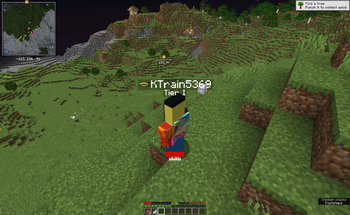
Screenshots
About this Modpack
This modpack is designed specifically for the realm and may need tweaking and removal of some mods if you wish to play on other servers using it.
The following are things about mods. If you know this stuff already, you can skip this, but if you don't, I highly recommend reading it:
This modpack is designed specifically for the realm and may need tweaking and removal of some mods if you wish to play on other servers using it.
The mod with ${name} as its name is YetAnotherConfigLibrary (YACL) and they've been having issues with including mod metadata during the Gradle build process.
Cosmetica manages the cosmetics that are shown when playing. Go to Cosmetica Settings to change your account settings.
YOSBR (Your Options Shall Be Respected) allows me to not override your mods folder when you update the modpack. This also provides default options which should maximise FPS out-of-the-box.
Press H in-game to open up a mini screen that views the wiki page of any entity, item or block you are facing (done by Hey Wiki). You can als set a keybind in settings to export recipes, this is from REI.
In order to equip shaders, go to Video Settings -> Shader Packs... and equip shaders there. Press I to turn on or off shaders without having to access this menu every time.
The two resource packs are Visual Enchantments and Chat Reporting Helper (enabled by default). If you choose to install other resource packs, they should be compatible but it also may not be compatible with all resource packs.
Custom resource pack textures usually require OptiFine or CIT Resewn, neither option works here, so I put an alternative in but it might not work.
If you need to take ultra-wide screenshots, press F9. Yeah I included a mod that does that for some reason.
Fullbright can be toggled off and on using G.
A sound controller mod is included to allow you to tone up or down various Minecraft sounds.
Nvidium improves performance on NVIDIA GPUs. It auto-disables itself when running on a non-NVIDIA device or is shaders are enabled.
The ChatNotify mod allows you to set up audio & visual cues when a specific word or phrase is mentioned in chat.
Resourcify allows you to update and install resource packs in-game through the Resource Packs menu.
Spark is a performance measurement mod designed to help debug performance issues. It should be included in this modpack, if you need to use it:
- Run /sparkc profiler start
- Engage in activities that can lag your game
- Stop logging using /sparkc profiler stop
- View the link sent in chat
When tabbed out (or if Minecraft is left idle), Dynamic FPS will reduce resource usage of Minecraft. This behaviour is intentional and can be reverted by simply focusing into Minecraft again.
Auth Me is a mod that re-authenticates your account so that you don't run into the invalid session ID error.
The crosshair has been modified in two ways:
- It now dynamically changes depending on what you are targeting
- The attack indicator is now used for more things.
There are many, MANY optimization mods included here, so enjoy the efficiency :)
However, ThreadTweaks is disabled by default as it's a mod for more advanced users.
ThreatenGL is also disabled by default because it could cause some issues, but depending on your machine it may just work out so just try it and see. (https://tryitands.ee)
You can add emojis & other symbols in your chat messages without having to copy from your web browser.
Available Versions
How to Set Up a tarowyaki realm modpack Server
Order Server
Choose at least 4 GB RAM (6 GB recommended for tarowyaki realm modpack). Based on player count: per 8 players.
Install Modpack in Dashboard
Open the modpack browser in the dashboard, search for "tarowyaki realm modpack" and click "Install". The fabric loader and Minecraft 1.20.6 are configured automatically.
Start Server & Play
Start the server – all mods are loaded automatically. Share the server IP with friends and play together!
Frequently Asked Questions
tarowyaki realm modpack server crashes or won't start – what to do?
Most common causes: insufficient RAM or wrong fabric loader. Check latest.log for "OutOfMemoryError" → increase RAM to at least 6 GB. For "Mixin" or "ClassNotFoundException" errors: modpack version and loader don't match. With Mado Hosting, loader and Minecraft version are auto-configured on modpack install – preventing most startup issues.
How much RAM does a tarowyaki realm modpack server really need?
Minimum 4 GB, recommended 6 GB for stable performance. per 8 players. Important: Minecraft modpacks need more RAM than vanilla – plan extra per additional player. With Mado Hosting, you can scale RAM up live at any time without data loss (from €8/month).
Can I add custom mods to tarowyaki realm modpack without conflicts?
Yes, but check compatibility: only use mods for the same loader (fabric) and same Minecraft version (1.20.6). Common issues: ID conflicts with recipe mods and incompatible coremod versions. The Mado dashboard mod browser only shows compatible mods and warns about known conflicts.
tarowyaki realm modpack server lagging – performance tips
1) Increase RAM to 6 GB+. 2) Reduce server view-distance to 8 (server.properties). 3) Pre-generate chunks with the "Chunky" plugin. 4) Use /spark profiler to check which mods consume the most tick time. With Mado Hosting, all servers run on NVMe SSDs with dedicated CPU cores – eliminating hardware as a bottleneck.
Rent tarowyaki realm modpack Server
Start your own server with automatic modpack installation.
Supported Versions
Start your tarowyaki realm modpack Server now
From €8.00/month with 6 GB RAM for the best performance.
Configure Server →