TCSMP Season 1
This is the official public release of the TCSMP Season 1 modpack!
Screenshots
About this Modpack
TCSMP Season 1
The TCSMP is a SMP for The Church of [Server], which is a group of people (some of which are content creators) who are participating in a Minecraft SMP together.
This pack is for all people, and we thought we would share the pack on Modrinth as we have put a lot of effort into its development, optimization, and overall feel. Enjoy!
We will be using this pack for our SMP, and I will be recording and editing that for my upcoming YouTube series!
Running
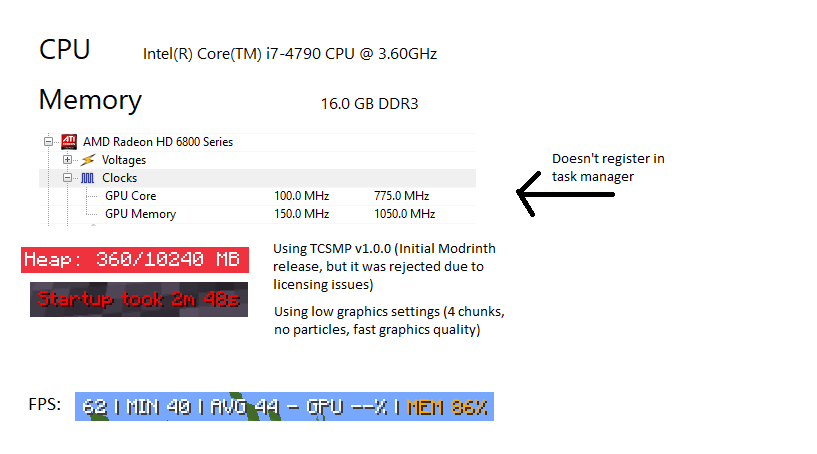
I recommend allocating 6 to 8 gigabytes (GB) of RAM to this pack. It's pretty hefty, but it should run well on low-end devices.
Known issues
Sometimes menus will freeze up or be laggy when the pack is under load. I don't currently know of a good way to mitigate this issue.
Duplicate ores are a thing, but I've tried to mitigate this as much as possible using the mod Almost Unified.
If you find any other bugs or issues, please don't hesitate to create a GitHub issue! I'll try to respond as quickly as I can.
Credits
Modpack Development Lead - @RedstoneWizard08
Menu Design - @NioBeMe
Playtesters:
- @EntropianVFX
- @FearlessFoster
- @Mattyplays72
- @EctoG20
- @user_25th9p7
- @MonkiiEngineer
- @Bogdanasaurus
Mod List
Expand
- Server Tab Info
- 3D Skin Layers
- AE2 QoL Recipes
- AEInfinityBooster
- AI Improvements
- Ad Astra
- Ad Astra: Extra Additions
- Ad Extendra
- Ad-Astra: Giselle Addon
- Additional Lanterns
- Adorn
- Advanced Netherite
- Alex's Caves
- Almost Unified
- Alternate Current
- Animated Ore
- Anvil Never Too Expensive
- AppleSkin
- Applied Botanics
- Applied Energistics 2
- Applied Energistics 2 Wireless Terminals
- Architectury API
- Armourer's Workshop
- Ars Additions
- Ars Creo
- Ars Nouveau
- Ars Énergistique
- Artifacts
- Assembly Line
- Athena
- Auudio
- AzureLib
- BSL Shaders
- Bad Wither No Cookie - Reloaded
- BadOptimizations
- Ballistix
- Balm
- Bedspreads
- Better Advancements
- Better Animations Collection
- Better Archeology
- Better Ping Display [Forge]
- Better Third Person
- Better Tridents
- BetterF3
- Blastcraft
- BlockUI
- BlueMap
- Bookshelf
- Botania
- Botany Pots
- Botany Trees
- Botarium
- Bottled Air
- Building Wands
- CTOV - Monobank compat
- CTOV - Create: Structures
- CTOV - Croptopia compat
- CTOV - Farmer Delight Compat
- CTOV - Friends and Foes Compat
- CTOV - Immersive Engineering Compat
- CTOV - Iron's Spells 'n Spellbooks compat
- CTOV - More villagers compat
- CTOV - Paragliders compat
- CTOV - PneumaticCraft: Repressurized compat
- CTOV - Wares compat
- Caelus API
- Cataclysm Weaponery
- Catalogue
- Chalk
- Chat Heads
- ChoiceTheorem's Overhauled Village
- Chunky
- Citadel
- Cloth Config API
- CoFH Core
- CobbleGen
- Collective
- Combat Roll
- Comforts
- Companion 🐕
- Complementary Shaders - Reimagined
- Complementary Shaders - Unbound
- Configured
- Configured Defaults
- Controlling
- Cooking for Blockheads
- CoroUtil
- Crafting on a Stick
- Create
- Create : The Salt
- Create Big Cannons
- Create Central Kitchen
- Create Crafts & Additions
- Create Deco
- Create Enchantment Industry
- Create Slice & Dice
- Create Stuff & Additions
- Create Utilities
- Create: Applied Kinetics
- Create: Aquatic Ambitions
- Create: Armory
- Create: Basic Additions
- Create: Connected
- Create: Copycats+
- Create: Garnished
- Create: Interiors
- Create: Liquid Fuel
- Create: New Age
- Create: Power Loader
- Create: Steam 'n' Rails
- Create: Structures
- Create: Sweets & Treats
- Create: Trimmed
- Cucumber Library
- Cull Leaves
- Curios API
- Curtain
- Deeper Dark
- DeepslateCutting
- Default Server Properties
- Destroy
- Diagonal Fences
- Dimensional Sync Fixes
- Distorted Discs
- Domum Ornamentum
- Drawers Tooltip
- Drip Sounds (Forge)
- Drippy Loading Screen
- Dyeable Redstone Signal
- Dynamic Electricity
- Dynamic FPS
- Dynamic Lights
- EMI
- EMI Loot
- EMI Trades
- EMIffect
- Easy Anvils
- Easy Magic
- Easy Piglins
- Easy Villagers
- Eccentric Tome
- Echo Chest
- Effortless Building
- Electrodynamics
- ElevatorMod
- Elytra Slot
- Embeddium
- Embeddium (Rubidium) Extra
- Embeddium++
- Enchanting Infuser
- Enchantment Descriptions
- End Remastered
- End's Delight
- Ender Dragon Drops
- Ender IO
- Enlightend
- Entity Culling
- Euphoria Patches
- Experimental Settings Disabler
- Explorer's Compass
- Exposure
- Extended Tools
- ExtraSounds Forge
- Extreme Reactors
- Extreme sound muffler
- FLIB
- FPS Reducer
- FancyMenu
- Farmer's Delight
- Farmer's Delight: Cookbook Reforged
- Farming for Blockheads
- FerriteCore
- Flux Networks
- Forge CIT
- Forge Config Screens
- Forgery
- Forgeshot
- Framed Compacting Drawers
- FramedBlocks
- Freecam (Modrinth Edition)
- Fresh Animations
- Friends&Foes (Forge/NeoForge)
- Friends&Foes - Beekeeper Hut (Forge/NeoForge)
- Friends&Foes - Flowery Mooblooms (Forge/NeoForge)
- Full Brightness Toggle
- FullStack Watchdog
- Fumo
- Fusion (Connected Textures)
- Geckolib
- Gobber [FORGE]
- GraphUtil
- Grappling Hook Mod
- GraveStone Mod
- Handcrafted
- Icterine
- ImmediatelyFast
- Immersive Aircraft
- Immersive Caves
- Immersive Engineering
- Immersive Weathering
- Iris & Oculus Flywheel Compat
- Iron Chests: Restocked
- Iron Jetpacks
- Iron's Spells 'n Spellbooks
- Jade Addons (Forge)
- Jade 🔍
- Just Enough Items
- Just Enough Mekanism Multiblocks
- Just Zoom
- KleeSlabs
- Konkrete
- Kotlin for Forge
- KubeJS
- KubeJS Additions
- KubeJS Create
- KubeJS Offline
- KubeJS Thermal
- L_Ender's Cataclysm(Cataclysm)
- Leaves Be Gone
- Let Sleeping Dogs Lie
- LibJF
- LibX
- Lithostitched
- LootJS: KubeJS Addon
- Lootr
- MaFgLib
- Macaw's Bridges
- Macaw's Doors
- Macaw's Fences and Walls
- Macaw's Furniture
- Macaw's Holidays
- Macaw's Lights and Lamps
- Macaw's Paintings
- Macaw's Paths and Pavings
- Macaw's Roofs
- Macaw's Trapdoors
- Macaw's Windows
- Magnum Torch
- Make Bubbles Pop
- Man of Many Planes
- McJtyLib
- Medieval Origins Revival
- Mekanism
- Mekanism Additions
- Mekanism Cardboard Tooltip
- Mekanism Generators
- Mekanism Tools
- Mekanism: Ad Astra Ores
- Melody
- Memory Leak Fix
- MidnightLib
- MineColonies
- Minecards [Forge]
- Miniboss Bars
- Mixin In Heaven
- Mobtimizations - Entity Performance Fixes
- Modern Startup QOL
- ModernFix
- Modonomicon
- Modular Force Field Systems
- Modular Routers
- MomentariyModder' Applications
- Monobank
- Moonlight Lib
- More Mekanism Processing
- More Mob Variants
- MoreJS: KubeJS Addon
- Mouse Tweaks
- Multi-Piston
- Nature's Compass
- Necronomicon API
- Nether Chested
- Nether's Delight
- No Chat Reports
- Not Enough Animations
- Not Enough Recipe Book [NERB]
- Nuclear Science
- Oculus
- Open Loader
- Origins (Forge)
- Origins: Classes (Forge)
- Overflowing Bars
- Paragliders
- PatPatPat
- Patchouli
- Pehkui
- Pipez
- Plenty Plates
- PneumaticCraft: Repressurized
- Polymorph
- Polymorphic Energistics
- Ponder for KubeJS
- Productive Bees
- Prometheus
- Puzzles Lib
- Quark
- Quark Oddities
- RFTools Base
- RFTools Builder
- RFTools Control
- RFTools Power
- RFTools Utility
- Radium
- RecipeDumper
- Redstone Pen
- Resource Pack Overrides
- Resourceful Config
- Resourceful Lib
- Rethinking Voxels
- Rhino
- Salt
- Searchables
- SebastrnLib
- SecurityCraft
- ServerCore
- Shipping
- Simple Dive Gear
- Simple Storage Network
- Simple Voice Chat
- Sit
- Smooth Boot (Reloaded)
- Solas Shader
- Some Assembly Required
- Sooty Chimneys
- Sophisticated Backpacks
- Sophisticated Core
- Sound Physics Remastered
- Spawn Animations
- Squat Grow
- Starter Kit
- Storage Drawers
- Structure Gel API
- Structurize
- SuperMartijn642's Config Lib
- SuperMartijn642's Core Lib
- Supplementaries
- Sushi Go Crafting
- Tectonic
- Tectonic-Tweak
- Tempad
- TerraBlender
- Tetra Extras
- Tetra tables looking neat
- Tetra's Delight
- TexTrue's Embeddium Options
- Thermal And Space
- Thermal Cultivation
- Thermal Dynamics
- Thermal Endergy
- Thermal Expansion
- Thermal Foundation
- Thermal Innovation
- Thermal Integration
- Thermal Locomotion
- Thermal: Extra
- Tips
- Titanium
- Tool Belt
- TrashSlot
- Visual Workbench
- Visuality: Reforged
- Wares
- Waystones
- XL Packets
- Xaero's Minimap
- Xaero's Minimap & World Map - Waystones Compatibility
- Xaero's World Map
- YUNG's API
- YUNG's Better Dungeons
- YUNG's Better Mineshafts
- YUNG's Better Nether Fortresses
- YUNG's Better Ocean Monuments
- YUNG's Better Strongholds
- ZeroCore
- Zeta
- [EMF] Entity Model Features
- [ETF] Entity Texture Features
- amendments
- bad packets
- e4mc
- mutil
- playerAnimator
- spark
- tetra
- tetracelium
Available Versions
How to Set Up a TCSMP Season 1 Server
Order Server
Choose at least 6 GB RAM (8 GB recommended for TCSMP Season 1). Based on player count: per 5 players.
Install Modpack in Dashboard
Open the modpack browser in the dashboard, search for "TCSMP Season 1" and click "Install". The neoforge loader and Minecraft 1.20.1 are configured automatically.
Start Server & Play
Start the server – all mods are loaded automatically. Share the server IP with friends and play together!
Frequently Asked Questions
TCSMP Season 1 server crashes or won't start – what to do?
Most common causes: insufficient RAM or wrong neoforge loader. Check latest.log for "OutOfMemoryError" → increase RAM to at least 8 GB. For "Mixin" or "ClassNotFoundException" errors: modpack version and loader don't match. With Mado Hosting, loader and Minecraft version are auto-configured on modpack install – preventing most startup issues.
How much RAM does a TCSMP Season 1 server really need?
Minimum 6 GB, recommended 8 GB for stable performance. per 5 players. Important: Minecraft modpacks need more RAM than vanilla – plan extra per additional player. With Mado Hosting, you can scale RAM up live at any time without data loss (from €12/month).
Can I add custom mods to TCSMP Season 1 without conflicts?
Yes, but check compatibility: only use mods for the same loader (neoforge) and same Minecraft version (1.20.1). Common issues: ID conflicts with recipe mods and incompatible coremod versions. The Mado dashboard mod browser only shows compatible mods and warns about known conflicts.
TCSMP Season 1 server lagging – performance tips
1) Increase RAM to 8 GB+. 2) Reduce server view-distance to 8 (server.properties). 3) Pre-generate chunks with the "Chunky" plugin. 4) Use /spark profiler to check which mods consume the most tick time. With Mado Hosting, all servers run on NVMe SSDs with dedicated CPU cores – eliminating hardware as a bottleneck.
Similar Modpacks
![Better MC [FABRIC] - BMC2](https://cdn.modrinth.com/data/shFhR8Vx/a19c2bcb51d38f32f138d3607e91cb2b7b8e387f_96.webp)
![Better MC [FORGE] - BMC4](https://cdn.modrinth.com/data/4BV47HRn/7f5ef7cc61b2593609aabef3ed07a866a4f11b73_96.webp)


![Better MC [FABRIC] - BMC3](https://cdn.modrinth.com/data/NHUidpfR/327e0749bb6d160c41799fd77bf6d3d631569dc8_96.webp)

Rent TCSMP Season 1 Server
Start your own server with automatic modpack installation.
Supported Versions
Start your TCSMP Season 1 Server now
From €12.00/month with 8 GB RAM for the best performance.
Configure Server →