
Tech Euphoria
Modpack of technical mods for 1.19.2 Forge.
Screenshots


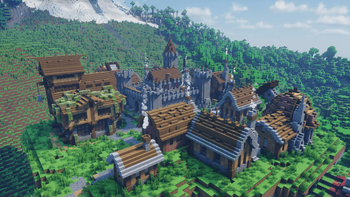
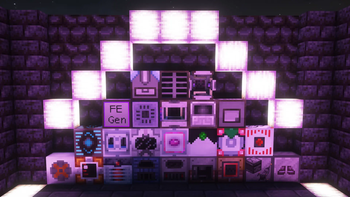
About this Modpack
This is a lightweight technical modpack based on Forge 1.19.2 that includes 90+ mods, but whithout Create. There are many industrial, adventure and optimisisation mods. The modpack will be updated regularly with new mods and features.
Optimisation
The optimization of this modpack is based on the Embeddium and its additions like Embeddium (Rubidium) Extra, Embeddium++ and more.
Functional
This mod pack has a lot of technical functionality, as well as support for most Optifine functions, such as improved zoom, connected glass (NOT all textures), detailed animation and particle settings, and the use of shaders.
Mods
Optimisation
- BadOptimisations
- Cull Leaves
- Dynamic FPS
- Embeddium
- Embeddium (Rubidium) Extra
- Embeddium++
- Entity Culling
- Fastload
- fast-ip-ping
- FerriteCore
- ImmediatelyFast
- Memory Leak Fix
- Model Gap Fix
- Saturn
- Starlight
- spark
- TexTrue's Embeddium Options
Functional (Client)
- AppleSkin
- Better Advancements
- Better Statistic Screen
- Better Taskbar
- BetterF3
- Catalogue
- Chat Heads
- Configured
- Connected Glass
- Controlling
- Dynamic Lights
- e4mc
- Enchantment Description
- FancyMenu
- Fusion (Connected Textures)
- InventoryHUD+
- InvMove
- ItemPhysic
- Jade Addons (Forge)
- Jade🔍
- Just Enough Items
- Just Zoom
- Mouse Tweaks
- Not Enough Animations
- Oculus
- Shulkes Box Tooltip
- Simple Voice Chat
- Sound Physics Remastered
- Xaero's Minimap
- Xaero's World Map
Functional (Server)
- Ad Astra
- Ad Astra: Giselle Addon
- Applied Energistics 2
- Better End Ore
- Carry On
- Chunk Loaders
- Detail Armor Bar
- Dungeons and Taverns
- Extreme Reactors
- FallingTree
- GraveStone Mod
- GregTechCEu Modern
- Industrial Agriculture
- Industrial Foregoing
- LAN World Plug-n-Play (mcwifipnp)
- Mekanism
- Mekanism Generators
- Mystical Agriculture
- Nature's Compass
- Polymorph
- Polymorphic Energistics
- Powah!
- Quark
- Refined Storage
- RightClickHarvest
- Screenshot to Clipboard
- Silent Gear
- Smooth Swapping
- Tectonic
- TerraBlender
- Terratith
- Thermal Cultivation
- Thermal Expansion
- Thermal Foundation
- Thermal Innovation
- Thermal Locomotion
- YUNG's Better End Islands
- YUNG's Better Nether Fortresses
Available Versions
How to Set Up a Tech Euphoria Server
Order Server
Choose at least 6 GB RAM (8 GB recommended for Tech Euphoria). Based on player count: per 5 players.
Install Modpack in Dashboard
Open the modpack browser in the dashboard, search for "Tech Euphoria" and click "Install". The forge loader and Minecraft 1.19.2 are configured automatically.
Start Server & Play
Start the server – all mods are loaded automatically. Share the server IP with friends and play together!
Frequently Asked Questions
Tech Euphoria server crashes or won't start – what to do?
Most common causes: insufficient RAM or wrong forge loader. Check latest.log for "OutOfMemoryError" → increase RAM to at least 8 GB. For "Mixin" or "ClassNotFoundException" errors: modpack version and loader don't match. With Mado Hosting, loader and Minecraft version are auto-configured on modpack install – preventing most startup issues.
How much RAM does a Tech Euphoria server really need?
Minimum 6 GB, recommended 8 GB for stable performance. per 5 players. Important: Minecraft modpacks need more RAM than vanilla – plan extra per additional player. With Mado Hosting, you can scale RAM up live at any time without data loss (from €12/month).
Can I add custom mods to Tech Euphoria without conflicts?
Yes, but check compatibility: only use mods for the same loader (forge) and same Minecraft version (1.19.2). Common issues: ID conflicts with recipe mods and incompatible coremod versions. The Mado dashboard mod browser only shows compatible mods and warns about known conflicts.
Tech Euphoria server lagging – performance tips
1) Increase RAM to 8 GB+. 2) Reduce server view-distance to 8 (server.properties). 3) Pre-generate chunks with the "Chunky" plugin. 4) Use /spark profiler to check which mods consume the most tick time. With Mado Hosting, all servers run on NVMe SSDs with dedicated CPU cores – eliminating hardware as a bottleneck.
Similar Modpacks
![Cobblemon Official Modpack [Fabric]](https://cdn.modrinth.com/data/5FFgwNNP/e7f9ee2e9d361623847853fe2ddce42f519ee64f.png)
![COBBLEVERSE - Pokemon Adventure [Cobblemon]](https://cdn.modrinth.com/data/Jkb29YJU/581ecf54530972afb18a04660afd820f2f24f6c7.png)
![Better MC [FABRIC] - BMC2](https://cdn.modrinth.com/data/shFhR8Vx/a19c2bcb51d38f32f138d3607e91cb2b7b8e387f_96.webp)


![Better MC [FORGE] - BMC4](https://cdn.modrinth.com/data/4BV47HRn/7f5ef7cc61b2593609aabef3ed07a866a4f11b73_96.webp)
Rent Tech Euphoria Server
Start your own server with automatic modpack installation.
Supported Versions
Start your Tech Euphoria Server now
From €12.00/month with 8 GB RAM for the best performance.
Configure Server →