
Technical Survival
This modpack aims to optimize performance and ensure a more technical survival experience. Client-Side and Server-Side.
Screenshots
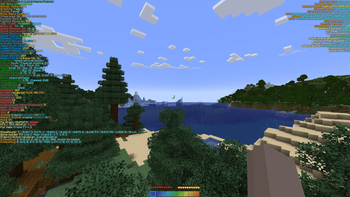
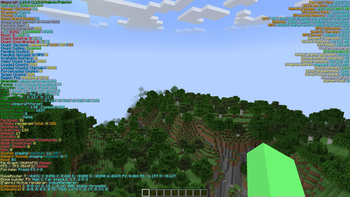
About this Modpack


📖About 📖
These are all the mods that I use every day to play minecraft, I believe that for a player who wants to approach minecraft in a technical way this modpack is perfect, as it offers very useful features that are used by thousands of people.
The following mods are found which aim to give you full control of your world:
Carpet: https://modrinth.com/mod/carpet
Carpet Extra (Extra Features for Carpet Mod): https://modrinth.com/mod/carpet-extra
Carpet TIS Addition (collection of carpet mod style useful tools and interesting features): https://modrinth.com/mod/carpet-tis-addition
Carpet autoCraftingTable: https://github.com/gnembon/carpet-autoCraftingTable
BetterF3 (mod that replaces Minecraft's original debug HUD with a highly customizable, more human-readable HUD.): https://modrinth.com/mod/betterf3
BSS (mod that improves the statistics screen and makes it more useful.): https://modrinth.com/mod/better-stats
Cloth Config (Configuration Library for Minecraft Mods): https://modrinth.com/mod/cloth-config
Inventory HUD+ (Inventory HUD, it shows your inventory while you are playing.)
Itemscroller (mod that adds several ways of moving items in inventory GUIs.)
Litematica (schematic mod.)
ShulkerBoxTooltip (View the contents of shulker boxes from your inventory): https://modrinth.com/mod/shulkerboxtooltip
Worldedit (In-game Minecraft map editor - build bigger things more quickly!)
Xaero's Minimap (Displays the nearby world terrain, players, mobs, entities in the corner of your screen.): https://modrinth.com/mod/xaeros-minimap
Xaero's World Map (Adds a full screen world map which shows you what you have explored in the world.): https://modrinth.com/mod/xaeros-world-map
The following mods instead aim to improve minecraft performance and add nice features:
Camera Utils (mod that adds convenient features related to the players camera.): https://modrinth.com/mod/camera-utils
Clumps (Clumps XP orbs together to reduce lag.): https://modrinth.com/mod/clumps
Continuity (mod that allows for efficient connected textures.): https://modrinth.com/mod/continuity
DashLoader (Launch at the speed of light.): https://modrinth.com/mod/dashloader
DCCH (mod that doesn't clear the messages you've sent from up arrow on disconnect/relog.): https://modrinth.com/mod/dcch
Dynamic FPS (Improve performance when Minecraft is in the background.): https://modrinth.com/mod/dynamic-fps
Fastload (Modifies how worlds are loaded to speed up loading times.)
FerriteCore (Memory usage optimizations.): https://modrinth.com/mod/ferrite-core
ImmediatelyFast (Speed up immediate mode rendering in Minecraft): https://modrinth.com/mod/immediatelyfast
Indium (Sodium addon providing support for the Fabric Rendering API, based on Indigo.): https://modrinth.com/mod/indium
Iris Shaders (A modern shaders mod for Minecraft.): https://modrinth.com/mod/iris
Krypton (A mod to optimize the Minecraft networking stack.): https://modrinth.com/mod/krypton
LazyDFU (Makes the game boot faster by deferring non-essential initialization.): https://modrinth.com/mod/lazydfu
Lithium (No-compromises game logic/server optimization mod.): https://modrinth.com/mod/lithium
Memory Leak Fix (A mod that fixes random memory leaks for both the client and server.): https://modrinth.com/mod/memoryleakfix
Mod Menu (Adds a mod menu to view the list of mods you have installed.): https://modrinth.com/mod/modmenu
Simple Discord RPC (A simple to use Discord RPC.): https://modrinth.com/mod/simple-discord-rpc
Smooth Boot (Improve Minecraft CPU scheduling.): https://modrinth.com/mod/smoothboot-fabric
Sodium (Modern rendering engine and client-side optimization.): https://modrinth.com/mod/sodium
Sodium Extra (Features that shouldn't be in Sodium.): https://modrinth.com/mod/sodium-extra
Spark (spark is a performance profiler.): https://modrinth.com/mod/spark
Starlight (Rewrites the light engine to fix lighting performance and lighting errors.): https://modrinth.com/mod/starlight
TweakerMore (A collection of client-side tweak kits to enhance your Minecraft game experience. Tweak Minecraft and beyond!): https://modrinth.com/mod/tweakermore
Tweakeroo (Tweakeroo is a client-side mod, which adds a whole bunch of various different "tweaks" to the game.)

NOTE: This project is in no way affiliated with the mods within it.
If you like this project, I invite you to join my discord server by simply going to discord.codelore.me and clicking on "Join US"
Waiting for you and have fun!
Available Versions
How to Set Up a Technical Survival Server
Order Server
Choose at least 4 GB RAM (6 GB recommended for Technical Survival). Based on player count: per 8 players.
Install Modpack in Dashboard
Open the modpack browser in the dashboard, search for "Technical Survival" and click "Install". The fabric loader and Minecraft 1.19.4 are configured automatically.
Start Server & Play
Start the server – all mods are loaded automatically. Share the server IP with friends and play together!
Frequently Asked Questions
Technical Survival server crashes or won't start – what to do?
Most common causes: insufficient RAM or wrong fabric loader. Check latest.log for "OutOfMemoryError" → increase RAM to at least 6 GB. For "Mixin" or "ClassNotFoundException" errors: modpack version and loader don't match. With Mado Hosting, loader and Minecraft version are auto-configured on modpack install – preventing most startup issues.
How much RAM does a Technical Survival server really need?
Minimum 4 GB, recommended 6 GB for stable performance. per 8 players. Important: Minecraft modpacks need more RAM than vanilla – plan extra per additional player. With Mado Hosting, you can scale RAM up live at any time without data loss (from €8/month).
Can I add custom mods to Technical Survival without conflicts?
Yes, but check compatibility: only use mods for the same loader (fabric) and same Minecraft version (1.19.4). Common issues: ID conflicts with recipe mods and incompatible coremod versions. The Mado dashboard mod browser only shows compatible mods and warns about known conflicts.
Technical Survival server lagging – performance tips
1) Increase RAM to 6 GB+. 2) Reduce server view-distance to 8 (server.properties). 3) Pre-generate chunks with the "Chunky" plugin. 4) Use /spark profiler to check which mods consume the most tick time. With Mado Hosting, all servers run on NVMe SSDs with dedicated CPU cores – eliminating hardware as a bottleneck.
Similar Modpacks

![Cobblemon Official Modpack [Fabric]](https://cdn.modrinth.com/data/5FFgwNNP/e7f9ee2e9d361623847853fe2ddce42f519ee64f.png)
![COBBLEVERSE - Pokemon Adventure [Cobblemon]](https://cdn.modrinth.com/data/Jkb29YJU/581ecf54530972afb18a04660afd820f2f24f6c7.png)
![Better MC [FABRIC] - BMC2](https://cdn.modrinth.com/data/shFhR8Vx/a19c2bcb51d38f32f138d3607e91cb2b7b8e387f_96.webp)


Rent Technical Survival Server
Start your own server with automatic modpack installation.
Supported Versions
Start your Technical Survival Server now
From €8.00/month with 6 GB RAM for the best performance.
Configure Server →