
Tectonic Atlas: The Wayfarer’s Journey
Experience breathtaking terrain and immersive physical navigation in this highly optimized Vanilla plus adventure.
Screenshots
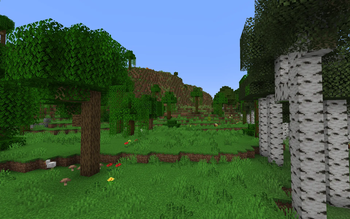
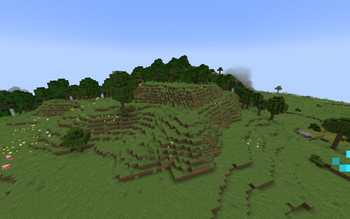
About this Modpack
Tectonic Atlas is a carefully balanced Vanilla+ modpack for Minecraft 1.20.1, designed for those who appreciate the scale of nature and the depth of immersion. We’ve stripped away the clutter so you can be one-on-one with the world.
🏔 A World That Takes Your Breath Away
Powered by the synergy of Tectonic and Geophilic, the game's landscape is completely transformed. Expect colossal mountain ranges, deep canyons, and overhauled biomes that feel wild and alive. This is a world meant to be studied, not just sprinted through.
🗺 Navigation as an Art Form
Forget about "magic" GPS navigators. In this pack, your primary ally is a physical Atlas.
Craft maps and combine them into a true traveler’s book.
Place custom markers using banners, just like a real pioneer.
Feel the value of every mile traveled as you check your paper map in real-time.
⚡ Optimization for Everyone
This pack was built with low-end PCs in mind. It features a powerful suite of optimization mods (Sodium, Lithium, Indium, FerriteCore, ModernFix), ensuring high stability and smooth FPS even on integrated graphics. We’ve optimized everything from memory usage to hidden entity culling.
💡 Advanced Features
The pack is delivered in a lightweight and fast state, but you can push the boundaries even further:
🚀 For High-End PC Owners:
If your hardware allows it, we highly recommend installing the Distant Horizons mod. This pack is fully compatible with it, and combined with Tectonic’s massive mountains, it creates breathtaking vistas with hundreds of chunks of render distance.
🛠 Key Features:
Clean UI: No screen clutter—just you and the horizon.
Vanilla+ Experience: New structures from YUNG’s series and Towns and Towers are seamlessly integrated.
Smart Optimization: Fast loading times and minimal RAM consumption.
Atmospheric Immersion: Exploration is driven by actual in-game items rather than UI overlays.
Are you ready to close the minimap and trust your instincts? Your journey begins here.
Made with the support of the Gemini 3 Flash AI.
Available Versions
How to Set Up a Tectonic Atlas: The Wayfarer’s Journey Server
Order Server
Choose at least 6 GB RAM (8 GB recommended for Tectonic Atlas: The Wayfarer’s Journey). Based on player count: per 5 players.
Install Modpack in Dashboard
Open the modpack browser in the dashboard, search for "Tectonic Atlas: The Wayfarer’s Journey" and click "Install". The fabric loader and Minecraft 1.20.1 are configured automatically.
Start Server & Play
Start the server – all mods are loaded automatically. Share the server IP with friends and play together!
Frequently Asked Questions
Tectonic Atlas: The Wayfarer’s Journey server crashes or won't start – what to do?
Most common causes: insufficient RAM or wrong fabric loader. Check latest.log for "OutOfMemoryError" → increase RAM to at least 8 GB. For "Mixin" or "ClassNotFoundException" errors: modpack version and loader don't match. With Mado Hosting, loader and Minecraft version are auto-configured on modpack install – preventing most startup issues.
How much RAM does a Tectonic Atlas: The Wayfarer’s Journey server really need?
Minimum 6 GB, recommended 8 GB for stable performance. per 5 players. Important: Minecraft modpacks need more RAM than vanilla – plan extra per additional player. With Mado Hosting, you can scale RAM up live at any time without data loss (from €12/month).
Can I add custom mods to Tectonic Atlas: The Wayfarer’s Journey without conflicts?
Yes, but check compatibility: only use mods for the same loader (fabric) and same Minecraft version (1.20.1). Common issues: ID conflicts with recipe mods and incompatible coremod versions. The Mado dashboard mod browser only shows compatible mods and warns about known conflicts.
Tectonic Atlas: The Wayfarer’s Journey server lagging – performance tips
1) Increase RAM to 8 GB+. 2) Reduce server view-distance to 8 (server.properties). 3) Pre-generate chunks with the "Chunky" plugin. 4) Use /spark profiler to check which mods consume the most tick time. With Mado Hosting, all servers run on NVMe SSDs with dedicated CPU cores – eliminating hardware as a bottleneck.
Similar Modpacks
![Cobblemon Official Modpack [Fabric]](https://cdn.modrinth.com/data/5FFgwNNP/e7f9ee2e9d361623847853fe2ddce42f519ee64f.png)
![COBBLEVERSE - Pokemon Adventure [Cobblemon]](https://cdn.modrinth.com/data/Jkb29YJU/581ecf54530972afb18a04660afd820f2f24f6c7.png)
![Better MC [FABRIC] - BMC2](https://cdn.modrinth.com/data/shFhR8Vx/a19c2bcb51d38f32f138d3607e91cb2b7b8e387f_96.webp)


![Better MC [FORGE] - BMC4](https://cdn.modrinth.com/data/4BV47HRn/7f5ef7cc61b2593609aabef3ed07a866a4f11b73_96.webp)
Rent Tectonic Atlas: The Wayfarer’s Journey Server
Start your own server with automatic modpack installation.
Supported Versions
Start your Tectonic Atlas: The Wayfarer’s Journey Server now
From €12.00/month with 8 GB RAM for the best performance.
Configure Server →