
Terracraft
Minecraft how you have never experienced before. A minimalistic modpack focused on visual enhancements, performance and Create support.
Screenshots
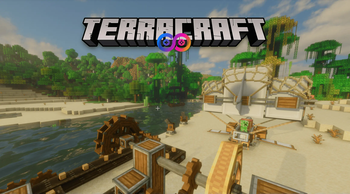
About this Modpack
Experience a New Era of Minecraft
Discover a groundbreaking Fabric-based modpack that blends stunning visuals, advanced mechanics, and smooth performance to redefine your Minecraft adventure. This modpack focuses on bringing together the most stunning mods for visual enhancements and Create.

Elevate your Minecraft experience with a modpack that fuses stunning graphics, innovative automation, and uncompromising performance. Dive into a world where every block, mechanic, and landscape detail is designed to create an adventure unlike any other.
Graphics & Visuals
Enhanced Render Distance:
Enjoy vastly increased render distances with Distant Horizons that transform your exploration experience.Shader Variety:
Choose from multiple pre-configured shader packs:- Bliss: For ultra-photorealistic visuals.
- Complementary Reimagined: Offers a beautifully refined vanilla aesthetic.
- Rethinking Voxels: Focuses on path tracing and realistic shadows.
PBR Texture Packs:
Experience blocks rendered with lifelike detail that perfectly complement the shader options.
Full Create Mod Support
Dynamic Mechanics:
Immerse yourself in new automation and mechanics courtesy of the Create mod, making complex constructions and processes intuitive.Enhanced Transportation:
Navigate your world with:- Airships (Immersive Aircrafts): Seamlessly integrated with Create mechanics for a unique crafting experience.
- Ships (Small Ships): Maintain a classic feel while expanding your transportation options.
Realism & Quality-of-Life Improvements
Immersive Realism:
Enjoy a more authentic survival experience with added systems like Thirst and Temperature, bringing an extra layer of challenge and immersion.User-Friendly Tools:
Quality-of-life mods such as NEI, Journey Map, and Inventory Tweaks streamline gameplay without overwhelming the classic Minecraft charm.Reworked Terrain:
With Lithosphere, explore landscapes featuring higher mountain ranges, deeper valleys, and more realistic terrain generation.
Optimized Performance
Every mod is meticulously selected and tweaked to ensure:
- Seamless Integration: A vanilla-like look and feel that respects Minecraft’s original design.
- Smooth Gameplay: Robust optimization mods that keep your game running effortlessly even as you push the visual boundaries.
Multiplayer Support
This modpack was build with multiplayer in mind. Each release includes a pre-configured server release file that includes all required server side mods and additional optimizations and tools (e.g. chunky). To run the server, extract the server file to your Minecraft Server directory. The release file also includes a bash script that automatically downloads and runs the latest fabric server executable.
Known Issues
- Using the Bliss shader can sometimes lead to smearing / dublication in the skybox. To fix this disable and enable Distant Horizon in the settings or restart the game.
Important Notes
- It is highly recommended to run the server on a seperat device due to performance reason. A high frequency CPU with at least 8 cores and at least 24GB of memory is recommended.
- When running the server, use chunky to pregenerate chunks and Distant Horizon LoDs, so players can take full advantage of Distant Horizon even in mutiplayer sessions.
- When using other shaders make sure to increate the cloud height to at least 300, since mountains ranges will have a height of up to y=500.
- If running on lower end hardware, it is recommended to use the pre-configured version of Complementary shaders or disable shaders all togehter. In addition try and avoid playing at higher resolutions as this will drastically affect your FPS.
Credits
The following mods have been included from external sources:
- Create Immersive Aircrafts: nicky__21
- Create Immersive Aircraft - Warship: crazyfl_
- Bliss Shader Development Version: X0nk
Available Versions
How to Set Up a Terracraft Server
Order Server
Choose at least 6 GB RAM (8 GB recommended for Terracraft). Based on player count: per 5 players.
Install Modpack in Dashboard
Open the modpack browser in the dashboard, search for "Terracraft" and click "Install". The fabric loader and Minecraft 1.20.1 are configured automatically.
Start Server & Play
Start the server – all mods are loaded automatically. Share the server IP with friends and play together!
Frequently Asked Questions
Terracraft server crashes or won't start – what to do?
Most common causes: insufficient RAM or wrong fabric loader. Check latest.log for "OutOfMemoryError" → increase RAM to at least 8 GB. For "Mixin" or "ClassNotFoundException" errors: modpack version and loader don't match. With Mado Hosting, loader and Minecraft version are auto-configured on modpack install – preventing most startup issues.
How much RAM does a Terracraft server really need?
Minimum 6 GB, recommended 8 GB for stable performance. per 5 players. Important: Minecraft modpacks need more RAM than vanilla – plan extra per additional player. With Mado Hosting, you can scale RAM up live at any time without data loss (from €12/month).
Can I add custom mods to Terracraft without conflicts?
Yes, but check compatibility: only use mods for the same loader (fabric) and same Minecraft version (1.20.1). Common issues: ID conflicts with recipe mods and incompatible coremod versions. The Mado dashboard mod browser only shows compatible mods and warns about known conflicts.
Terracraft server lagging – performance tips
1) Increase RAM to 8 GB+. 2) Reduce server view-distance to 8 (server.properties). 3) Pre-generate chunks with the "Chunky" plugin. 4) Use /spark profiler to check which mods consume the most tick time. With Mado Hosting, all servers run on NVMe SSDs with dedicated CPU cores – eliminating hardware as a bottleneck.
Similar Modpacks


![Cobblemon Official Modpack [Fabric]](https://cdn.modrinth.com/data/5FFgwNNP/e7f9ee2e9d361623847853fe2ddce42f519ee64f.png)
![COBBLEVERSE - Pokemon Adventure [Cobblemon]](https://cdn.modrinth.com/data/Jkb29YJU/581ecf54530972afb18a04660afd820f2f24f6c7.png)
![Better MC [FABRIC] - BMC2](https://cdn.modrinth.com/data/shFhR8Vx/a19c2bcb51d38f32f138d3607e91cb2b7b8e387f_96.webp)

Rent Terracraft Server
Start your own server with automatic modpack installation.
Supported Versions
Start your Terracraft Server now
From €12.00/month with 8 GB RAM for the best performance.
Configure Server →