
tepid's origins
a datapack with multiplayer-focused custom origins
Screenshots
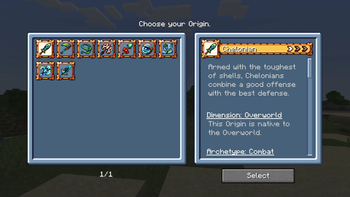
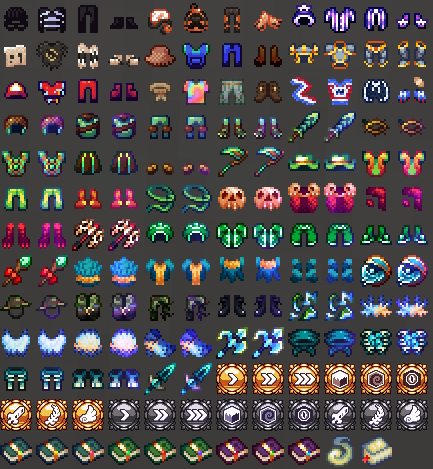
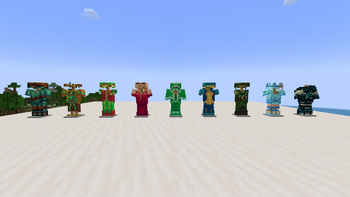
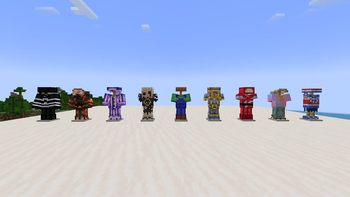
About this Modpack
Welcome!
tepid's origins is a datapack that will (eventually/hopefully) offer 27 unique and customizable Origins. This modpack includes all its dependencies!
Some of its features are:
- Different Origin archetypes
- Multiplayer-oriented gameplay
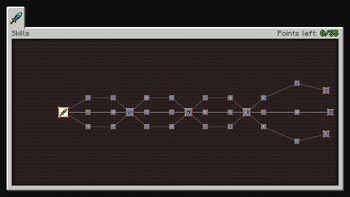
- Skill trees
- Items
- Item sets
- A progression system that is consistent across all Origins
This pack is in constant development, so expect somewhat frequent updates until all 27 Origins and all related features are complete.
QnA
How do I update this?
If you'd like to update the Origin content pack but stay in the same version, I'd recommend going to my GitHub and following the instructions there, as it'll likely be faster.
However, this pack can be updated just the same as any other, via your preferred launcher's "Change Version" or "Update Modpack" feature.
I found a bug/I have a suggestion!
DM me @tepschmep on Discord, or go to the #feedback channel in my Discord server.
Will you add this mod?
This pack is intentionally barebones, only containing the essential to make my Origins work. This aspect will rarely ever change, sorry. You are encouraged to add your own mods to it.
When are you porting it to 1.X/Forge?
Likely a while later. I want to complete all Origins before thinking about porting to other versions.
As for Forge, my current stance is I won't support it. If you want to make a port yourself, you're on your own there.
I want to include your Origins in another modpack!
Awesome! Thank you for considering them.
It is worth noting that you will have to go into the Origin Layer file (
data/origins/origin_layers/origin.json) and remove the line that has"replace": true. Otherwise, Origins in the same layer - including the default ones - will not be listed in the menu.That said, however, please DM me on Discord to let me know, and please keep the license and credit files in the pack. I do not allow other people to repost the contents of the origins pack without my permission.
Can I contribute?
Sure! I'd like to keep the gameplay design part of it to myself, as this is a personal project of mine at the end of the day, but asset help would be greatly appreciated!
If you're interested, DM me on Discord with some of your works.
This didn't answer my question!
Again, reach out to me @tepschmep on Discord, and I'll get back to ya!
Credits
Fancybread, MarioMak967, OctCube_, Pseuu, Zorestrough: Item Sprites
C_rry, Pseuu, Someone404, WaterDroplet02: Armor Sprites
CV35W: Audio Design
37, Kin, okamii, Pseuu, Silver, starry skies, Symphony, thefinals, yoshikirby26, Zorestrough, and the Rhythm Doctor Lounge server: Playtesting & Feedback
Mods included
- Alternate Origin GUI by UltrusBot
- Apugli by Pug
- Architectury API by shedaniel
- AttributeFix by Darkhax
- AutoTag by Apace
- Cloth Config API by shedaniel
- eggolib by eggohito
- EMI by Emi
- Fabric API by modmuss50
- Fabric Language Kotlin by modmuss50
- Iris by coderbot
- KubeJS by Lat
- LootJS by Lytho
- Lithium by jellysquid3
- Mod Menu by Prospector
- Moonlight Lib by MehVahdJukaar
- Origins by Apace
- Pehkui by Virtuoel
- Pufferfish's Skills by Pufferfish
- Rhino by Lat
- Sodium by jellysquid3
- ToolTipFix by kyrptonaught
Bolded bullet points are required dependencies.
Available Versions
How to Set Up a tepid's origins Server
Order Server
Choose at least 6 GB RAM (8 GB recommended for tepid's origins). Based on player count: per 5 players.
Install Modpack in Dashboard
Open the modpack browser in the dashboard, search for "tepid's origins" and click "Install". The fabric loader and Minecraft 1.20.1 are configured automatically.
Start Server & Play
Start the server – all mods are loaded automatically. Share the server IP with friends and play together!
Frequently Asked Questions
tepid's origins server crashes or won't start – what to do?
Most common causes: insufficient RAM or wrong fabric loader. Check latest.log for "OutOfMemoryError" → increase RAM to at least 8 GB. For "Mixin" or "ClassNotFoundException" errors: modpack version and loader don't match. With Mado Hosting, loader and Minecraft version are auto-configured on modpack install – preventing most startup issues.
How much RAM does a tepid's origins server really need?
Minimum 6 GB, recommended 8 GB for stable performance. per 5 players. Important: Minecraft modpacks need more RAM than vanilla – plan extra per additional player. With Mado Hosting, you can scale RAM up live at any time without data loss (from €12/month).
Can I add custom mods to tepid's origins without conflicts?
Yes, but check compatibility: only use mods for the same loader (fabric) and same Minecraft version (1.20.1). Common issues: ID conflicts with recipe mods and incompatible coremod versions. The Mado dashboard mod browser only shows compatible mods and warns about known conflicts.
tepid's origins server lagging – performance tips
1) Increase RAM to 8 GB+. 2) Reduce server view-distance to 8 (server.properties). 3) Pre-generate chunks with the "Chunky" plugin. 4) Use /spark profiler to check which mods consume the most tick time. With Mado Hosting, all servers run on NVMe SSDs with dedicated CPU cores – eliminating hardware as a bottleneck.
Similar Modpacks
![Cobblemon Official Modpack [Fabric]](https://cdn.modrinth.com/data/5FFgwNNP/e7f9ee2e9d361623847853fe2ddce42f519ee64f.png)
![COBBLEVERSE - Pokemon Adventure [Cobblemon]](https://cdn.modrinth.com/data/Jkb29YJU/581ecf54530972afb18a04660afd820f2f24f6c7.png)
![Better MC [FABRIC] - BMC2](https://cdn.modrinth.com/data/shFhR8Vx/a19c2bcb51d38f32f138d3607e91cb2b7b8e387f_96.webp)


![Better MC [FORGE] - BMC4](https://cdn.modrinth.com/data/4BV47HRn/7f5ef7cc61b2593609aabef3ed07a866a4f11b73_96.webp)
Rent tepid's origins Server
Start your own server with automatic modpack installation.
Details
- License
- BSD 3-Clause "New" or "Revised" License
- Server-side
- Required
- Client-side
- Required
Supported Versions
Start your tepid's origins Server now
From €12.00/month with 8 GB RAM for the best performance.
Configure Server →