
The Beautiful Potato Modpack
wanna make your mc look better? got a potato laptop or pc? i gotchu!
Screenshots
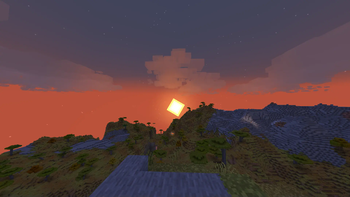

About this Modpack
Please make sure to edit the settings to your liking before playing.
TBPM: The Beautiful Potato Modpack - Reclaim Your Minecraft Experience
Is your computer struggling to run the latest Minecraft with the visual fidelity you crave? Do you dream of lush shaders and smooth gameplay, even on a less-than-powerful machine? Then TBPM (The Beautiful Potato Modpack) is the solution you've been waiting for.
TBPM is a meticulously crafted modpack designed to deliver stunning visuals and optimized performance, breathing new life into your Minecraft 1.21.5 experience, regardless of your computer's specifications.
What TBPM Offers:
TBPM combines performance-enhancing mods with carefully selected visual enhancements, offering a balanced and immersive experience.
1. Unparalleled Performance Optimization:
- Fabric API & Loader: Provides the foundational framework for seamless mod integration and functionality.
- Sodium: A revolutionary rendering engine overhaul that dramatically increases FPS, eliminating lag and stuttering.
- Lithium: Optimizes game calculations, further enhancing performance and responsiveness.
- FerriteCore: Reduces memory consumption, freeing up resources and improving stability, especially on older systems.
- Entity Culling & Cull Particles MultiLoader: Intelligently filters rendered elements, preventing unnecessary strain on your system by only displaying visible entities and particles.
- Cull Leaves: Streamlines the rendering of foliage, ensuring smoother performance in densely forested areas.
2. Breathtaking Visual Enhancements:
- Iris Shaders & Miniature Shader: Experience the magic of shaders, even on "potato" PCs! Iris enables shader support, and the included Miniature Shader provides beautiful dynamic lighting, shadows, and water effects without sacrificing performance.
- Distant Horizons & Bobby: Explore the vastness of your world with stunning long-range views. Distant Horizons renders distant terrain with impressive detail, while Bobby ensures those faraway chunks are efficiently cached.
- RAY's 3D Ladders & RAY's 3D Rails: Adds depth and realism to your structures with enhanced 3D models.
- Better Clouds: Elevates the atmosphere with more realistic and visually appealing clouds.
- Falling Leaves: Adds a touch of realism as leaves gently fall from trees, bringing your world to life.
- Particle Rain: Enhances the rain effect with more realistic and appealing particles.
- Visuality: Introduces subtle visual effects that contribute to a more immersive and dynamic environment.
- Continuity: Improves the appearance of connected textures and block models for a seamless visual experience.
- [EMF] Entity Model Features & [ETF] Entity Texture Features: Enhances the details of creatures and players, making them more engaging and visually appealing.
- Customizable Player Models: Allows you to personalize your character's appearance.
- Reimagined: A visual overhaul mod that enhances many aspects of Minecraft's rendering.
- Polytone: Adds support for custom colors and textures, enhancing visual variety.
3. Essential Quality-of-Life Improvements:
- AppleSkin: Provides clear and accurate information about food values, eliminating guesswork when managing hunger.
- BetterF3: Improves the readability and organization of the F3 debug screen, making it easier to monitor performance and game information.
- Mod Menu: Offers a centralized interface for managing and configuring your mods directly within the game.
- Shulker Box Tooltip: Simplifies inventory management by displaying the contents of Shulker Boxes on hover.
- Presence Footsteps & AmbientSounds: Enhances immersion with realistic footstep sounds and dynamic ambient audio.
- Vertical Bobbing & View Bobbing Options: Provides greater control over camera movements for a more comfortable and personalized experience.
- Dynamic Crosshair: Offers a responsive crosshair that adapts to different in-game actions and situations.
- Better Statistics Screen: Improves the presentation and accessibility of in-game statistics.
- Better Mount HUD: Enhances the clarity and usability of the Heads-Up Display when riding mounts.
Why Choose TBPM?
- Shaders for Everyone: Experience the beauty of shaders, even if your computer struggles with demanding visual effects.
- Up-to-Date: Fully compatible with Minecraft 1.21.5, ensuring access to the latest features and content.
- Limitless Exploration: Explore vast landscapes with unparalleled detail thanks to Distant Horizons.
- Fluid Gameplay: Enjoy consistently smooth performance, even with enhanced graphics, thanks to Sodium and Lithium.
- Visually Stunning: Immerse yourself in a richer, more detailed Minecraft world with a host of visual enhancements.
- Uncompromising Experience: TBPM eliminates the need to choose between performance and aesthetics, delivering the best of both worlds.
Who is TBPM For?
- Players with older computers, laptops, or integrated graphics.
- Those who crave beautiful graphics without sacrificing performance.
- Players seeking to revitalize their Minecraft Java experience.
- Explorers who want to appreciate the grandeur of their world.
Download TBPM today and unlock the full potential of your Minecraft experience!
Available Versions
How to Set Up a The Beautiful Potato Modpack Server
Order Server
Choose at least 6 GB RAM (8 GB recommended for The Beautiful Potato Modpack). Based on player count: per 5 players.
Install Modpack in Dashboard
Open the modpack browser in the dashboard, search for "The Beautiful Potato Modpack" and click "Install". The fabric loader and Minecraft 26.1.2 are configured automatically.
Start Server & Play
Start the server – all mods are loaded automatically. Share the server IP with friends and play together!
Frequently Asked Questions
The Beautiful Potato Modpack server crashes or won't start – what to do?
Most common causes: insufficient RAM or wrong fabric loader. Check latest.log for "OutOfMemoryError" → increase RAM to at least 8 GB. For "Mixin" or "ClassNotFoundException" errors: modpack version and loader don't match. With Mado Hosting, loader and Minecraft version are auto-configured on modpack install – preventing most startup issues.
How much RAM does a The Beautiful Potato Modpack server really need?
Minimum 6 GB, recommended 8 GB for stable performance. per 5 players. Important: Minecraft modpacks need more RAM than vanilla – plan extra per additional player. With Mado Hosting, you can scale RAM up live at any time without data loss (from €12/month).
Can I add custom mods to The Beautiful Potato Modpack without conflicts?
Yes, but check compatibility: only use mods for the same loader (fabric) and same Minecraft version (26.1.2). Common issues: ID conflicts with recipe mods and incompatible coremod versions. The Mado dashboard mod browser only shows compatible mods and warns about known conflicts.
The Beautiful Potato Modpack server lagging – performance tips
1) Increase RAM to 8 GB+. 2) Reduce server view-distance to 8 (server.properties). 3) Pre-generate chunks with the "Chunky" plugin. 4) Use /spark profiler to check which mods consume the most tick time. With Mado Hosting, all servers run on NVMe SSDs with dedicated CPU cores – eliminating hardware as a bottleneck.
Similar Modpacks
![Cobblemon Official Modpack [Fabric]](https://cdn.modrinth.com/data/5FFgwNNP/e7f9ee2e9d361623847853fe2ddce42f519ee64f.png)
![COBBLEVERSE - Pokemon Adventure [Cobblemon]](https://cdn.modrinth.com/data/Jkb29YJU/581ecf54530972afb18a04660afd820f2f24f6c7.png)
![Better MC [FABRIC] - BMC2](https://cdn.modrinth.com/data/shFhR8Vx/a19c2bcb51d38f32f138d3607e91cb2b7b8e387f_96.webp)


![Better MC [FORGE] - BMC4](https://cdn.modrinth.com/data/4BV47HRn/7f5ef7cc61b2593609aabef3ed07a866a4f11b73_96.webp)
Rent The Beautiful Potato Modpack Server
Start your own server with automatic modpack installation.
Details
- License
- Creative Commons Attribution Non Commercial Share Alike 4.0 International
- Server-side
- Optional
- Client-side
- Required
Supported Versions
Start your The Beautiful Potato Modpack Server now
From €12.00/month with 8 GB RAM for the best performance.
Configure Server →