
The Best View
By combining a custom modpack with Distant Horizons and modern Shaders, you have essentially transformed Minecraft from a game with a short render distance into a breathtaking, next-generation open-world experience.
Screenshots
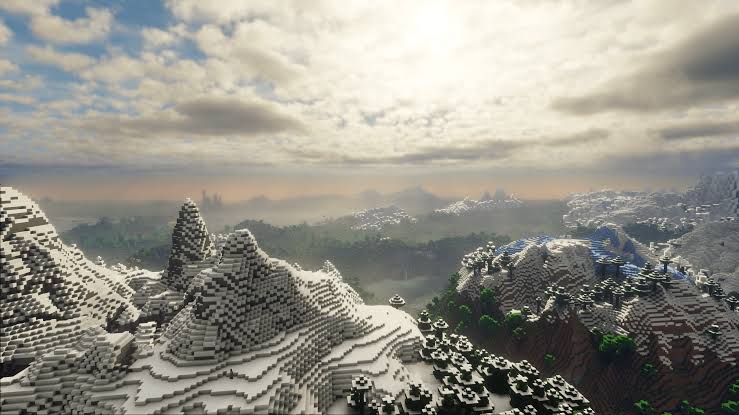
About this Modpack
A New Era of ExplorationWhen you boot up this world, the first thing that hits you is the staggering sense of scale. By shattering Minecraft’s traditional render distance limits, your world no longer feels like a localized bubble—it feels like a massive, interconnected continent.
💨 The Horizon Just Keeps Going
With Distant Horizons doing the heavy lifting, the abrupt wall of fog that usually cuts off your view is gone. Instead, you can stand on the peak of a jagged mountain and trace the landscape for miles. You’ll watch jagged, snow-capped ranges gradually slope down into distant, sweeping valleys, dense forest canopies, and vast oceans that actually stretch all the way to a curved horizon.
☀️ Atmosphere, Light, and Shadow
The Shaders breathe organic life into this endless canvas.
Dynamic Lighting: Sunlight filters through the clouds, casting deep, realistic shadows across the valleys below. As the sun moves, the shadows stretch and shift dynamically across the terrain.
Volumetric Fog & Skybox: A gentle, realistic atmospheric haze settles into low-lying areas, naturally softening the details of landmasses hundreds of chunks away. Morning sunbeams pierce through the mist, and sunsets paint the entire visible world in blazing hues of amber and violet.
A Living Environment: Foliage waves gently in the breeze, and water surfaces boast crystal-clear reflections, mirroring the grand mountain ranges and moving clouds far above.
Available Versions
How to Set Up a The Best View Server
Order Server
Choose at least 6 GB RAM (8 GB recommended for The Best View). Based on player count: per 5 players.
Install Modpack in Dashboard
Open the modpack browser in the dashboard, search for "The Best View" and click "Install". The fabric loader and Minecraft 1.21.11 are configured automatically.
Start Server & Play
Start the server – all mods are loaded automatically. Share the server IP with friends and play together!
Frequently Asked Questions
The Best View server crashes or won't start – what to do?
Most common causes: insufficient RAM or wrong fabric loader. Check latest.log for "OutOfMemoryError" → increase RAM to at least 8 GB. For "Mixin" or "ClassNotFoundException" errors: modpack version and loader don't match. With Mado Hosting, loader and Minecraft version are auto-configured on modpack install – preventing most startup issues.
How much RAM does a The Best View server really need?
Minimum 6 GB, recommended 8 GB for stable performance. per 5 players. Important: Minecraft modpacks need more RAM than vanilla – plan extra per additional player. With Mado Hosting, you can scale RAM up live at any time without data loss (from €12/month).
Can I add custom mods to The Best View without conflicts?
Yes, but check compatibility: only use mods for the same loader (fabric) and same Minecraft version (1.21.11). Common issues: ID conflicts with recipe mods and incompatible coremod versions. The Mado dashboard mod browser only shows compatible mods and warns about known conflicts.
The Best View server lagging – performance tips
1) Increase RAM to 8 GB+. 2) Reduce server view-distance to 8 (server.properties). 3) Pre-generate chunks with the "Chunky" plugin. 4) Use /spark profiler to check which mods consume the most tick time. With Mado Hosting, all servers run on NVMe SSDs with dedicated CPU cores – eliminating hardware as a bottleneck.
Similar Modpacks
![Cobblemon Official Modpack [Fabric]](https://cdn.modrinth.com/data/5FFgwNNP/e7f9ee2e9d361623847853fe2ddce42f519ee64f.png)
![COBBLEVERSE - Pokemon Adventure [Cobblemon]](https://cdn.modrinth.com/data/Jkb29YJU/581ecf54530972afb18a04660afd820f2f24f6c7.png)
![Better MC [FABRIC] - BMC2](https://cdn.modrinth.com/data/shFhR8Vx/a19c2bcb51d38f32f138d3607e91cb2b7b8e387f_96.webp)


![Better MC [FORGE] - BMC4](https://cdn.modrinth.com/data/4BV47HRn/7f5ef7cc61b2593609aabef3ed07a866a4f11b73_96.webp)
Rent The Best View Server
Start your own server with automatic modpack installation.
Supported Versions
Start your The Best View Server now
From €12.00/month with 8 GB RAM for the best performance.
Configure Server →