
The Essentials of Modpacks
A modpack that aims to boost performance and increase usability.
Screenshots
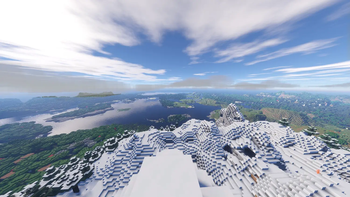
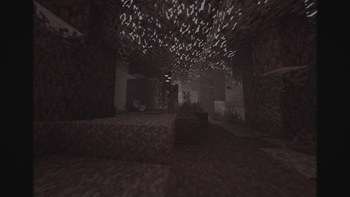
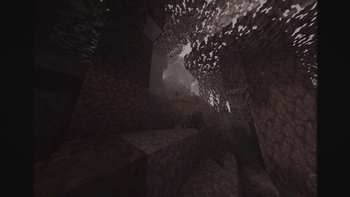
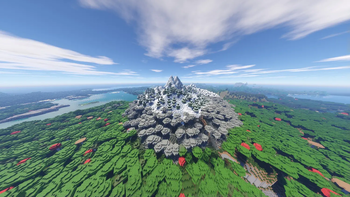


About this Modpack
🚀 Enhanced Performance and Visuals
An elegantly optimized Minecraft modpack designed to deliver beautiful graphics, improved performance, and a smoother gameplay experience.
🎯 Designed for Smooth Gameplay
Experience faster load times, higher FPS, and seamless chunk loading with carefully selected performance mods like C2ME, Dynamic FPS, Entity Culling, and Distant Horizons.
🌟 Stunning Visual Improvements
Enjoy Minecraft with visually appealing enhancements such as improved clouds, grass textures, and immersive rendering features. Mods like Better Grassify, Better Clouds, and Entity Texture Features make your world look fantastic without compromising speed.
🎮 Familiar Yet Enhanced
Keep the classic Minecraft experience while adding subtle quality-of-life improvements. Cleaner UI with CleanF3, intuitive chunk loading with Chunks Fade-In, and debug improvements with Debugify ensure your gameplay remains intuitive and enjoyable.
🌎 Server Friendly
This modpack is compatible with both single-player worlds and multiplayer servers. Essential compatibility mods such as Fabric API, Architectury, and Cull Leaves make this pack versatile for all your Minecraft adventures.
🛠️ Built on Fabric
Leverage the lightweight and highly customizable Fabric loader, ideal for optimal performance and flexibility. Easily expand this pack by adding your own favorite mods.
🔄 Regularly Updated
Stay ahead with fast updates to the latest Minecraft versions, ensuring your worlds and servers remain cutting-edge and bug-free.
📖 Open and Community Driven
Join our friendly and growing community. Your feedback and contributions help shape the pack's future, ensuring continuous improvement and satisfaction for all players.
FAQs:
Do I need this modpack on the server?
Yes, server-side installation is recommended for full functionality, though many visual mods remain optional.Where can I get help or report issues?
Join our community Discord or visit our GitHub for support and to provide feedback.
Available Versions
How to Set Up a The Essentials of Modpacks Server
Order Server
Choose at least 4 GB RAM (6 GB recommended for The Essentials of Modpacks). Based on player count: per 8 players.
Install Modpack in Dashboard
Open the modpack browser in the dashboard, search for "The Essentials of Modpacks" and click "Install". The fabric loader and Minecraft 1.21.5 are configured automatically.
Start Server & Play
Start the server – all mods are loaded automatically. Share the server IP with friends and play together!
Frequently Asked Questions
The Essentials of Modpacks server crashes or won't start – what to do?
Most common causes: insufficient RAM or wrong fabric loader. Check latest.log for "OutOfMemoryError" → increase RAM to at least 6 GB. For "Mixin" or "ClassNotFoundException" errors: modpack version and loader don't match. With Mado Hosting, loader and Minecraft version are auto-configured on modpack install – preventing most startup issues.
How much RAM does a The Essentials of Modpacks server really need?
Minimum 4 GB, recommended 6 GB for stable performance. per 8 players. Important: Minecraft modpacks need more RAM than vanilla – plan extra per additional player. With Mado Hosting, you can scale RAM up live at any time without data loss (from €8/month).
Can I add custom mods to The Essentials of Modpacks without conflicts?
Yes, but check compatibility: only use mods for the same loader (fabric) and same Minecraft version (1.21.5). Common issues: ID conflicts with recipe mods and incompatible coremod versions. The Mado dashboard mod browser only shows compatible mods and warns about known conflicts.
The Essentials of Modpacks server lagging – performance tips
1) Increase RAM to 6 GB+. 2) Reduce server view-distance to 8 (server.properties). 3) Pre-generate chunks with the "Chunky" plugin. 4) Use /spark profiler to check which mods consume the most tick time. With Mado Hosting, all servers run on NVMe SSDs with dedicated CPU cores – eliminating hardware as a bottleneck.
Similar Modpacks

![Cobblemon Official Modpack [Fabric]](https://cdn.modrinth.com/data/5FFgwNNP/e7f9ee2e9d361623847853fe2ddce42f519ee64f.png)
![COBBLEVERSE - Pokemon Adventure [Cobblemon]](https://cdn.modrinth.com/data/Jkb29YJU/581ecf54530972afb18a04660afd820f2f24f6c7.png)
![Better MC [FABRIC] - BMC2](https://cdn.modrinth.com/data/shFhR8Vx/a19c2bcb51d38f32f138d3607e91cb2b7b8e387f_96.webp)


Rent The Essentials of Modpacks Server
Start your own server with automatic modpack installation.
Details
- License
- Creative Commons Attribution 4.0 International
- Server-side
- Unsupported
- Client-side
- Required
Supported Versions
Start your The Essentials of Modpacks Server now
From €8.00/month with 6 GB RAM for the best performance.
Configure Server →