
The Lost Tape (Phycological Horror)
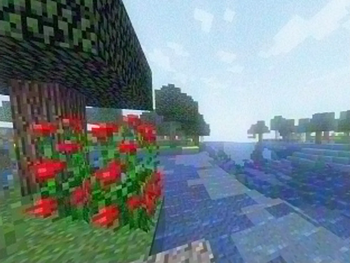
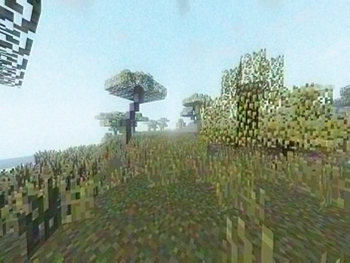
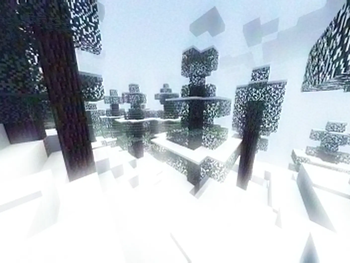
Will you be able to survive the lost Minecraft tape? This mod pack focuses on psychological horror and is ready to make you paranoid with its old VHS tape effect and nostalgic textures.
Screenshots
About this Modpack
The Lost Tape [v0.80.1] (Open beta)
Minecraft's most unsettling modpack. A psychological horror modpack focused on making you paranoid. This mod pack is much more than what you see in the photos: its vintage VHS tape looks, its sinister and unexpected events, its mechanics, and most importantly, the night and what lurks within it.
Can you endure this mod pack? It also has a lot of vanilla enhancement mods, as well as some hardcore mods, I recommend reading the small guide I wrote below to get started!
Changelog:
v0.8 (Open beta)
v0.80.1-b.2
Patch update. Changed some default settings and removed some temporary mods.v0.80.0-b.2:
Major update. Open beta. I added a lot of modifications to the base game, as well as defining the three main entities of the modpack: one that can bother you anywhere, at any time, another that can only do so in caves, and another that only does so at night. Among the changes to the base game, I've added improvements to the mobs, which are "fairly" experimental. This version isn't even close to being stable; it's very unbalanced and needs some tweaking, but for now, I think it's good enough to open the project to the public.
v0.7 (Base version. Not available)
v0.72.0-b.1:
Minor update. Added a resourcepack on top of programmer art for a better experience, plus some version changes in a few mods, and other additions. No longer availablev0.71.1-b.1:
Patch update. Mods affected by copyright were removed, and similar replacements were introduced, without affecting the homogeneity of these. No longer available.v0.71.0-b.1:
Minor update. Not available to the public due to copyright issues.v0.70.0-b.1:
Base version. No longer available.
Hey! Please read the texts below!
Quick guide:
This modpack contains many changes to the original game regarding the first hours of play here I wrote a guide, recommendations and tips: In this modpack, at the beginning, you will not be able to hit the trees with your hands, you must get flint shards, for that, get flint and sharpen it on any rock, then get sticks from the leaves of the trees. Once you have a stick and a flint shard (I recommend getting a dozen flint shards and at least 2 sticks) make a flint knife, you will use this to cut the surrounding grass and get fiber, when you have enough you can turn it into a plant string, gathering a flint shard, a plant string, and a stick you can craft a flint axe, to finally cut down wood. Always check the recipes you don't know in the recipe finder on the right when you enter the inventory. Once you can get wood, I would recommend quickly making a base with the materials you get, make a bed if possible, and if you're fast enough you can craft the flint pickaxe. But first, I wanted to clarify a new mechanic: to sleep, you'll need to have some fatigue (you can check your fatigue percentage in the inventory tab). You can sleep when you have 100% or more of this fatigue which increases ove time. Now for the last step to get rid of flint tools: make a flint pickaxe, and look for iron, because as you may have noticed, wooden and stone tools no longer exist. Finally, I'd like to give you a tip: in this mod, torches and most light sources now go off after a while. If you don't have any other sources nearby to relight them, and you don't have a lighter, you could craft a fire starter with some sticks and plant strings. You can also use it to light a campfire.
Installation through Modrinth's Desktop App:
- Get latest Modrinth App version for your computer here: https://modrinth.com/app
- Download latest (or any of your liking) version of this modpack.
- Now, open Modrinth App and log in with your Microsoft account.
- Click the "plus" symbol on the left sidebar of the app to create a new instance.
- In the "Create Instance" window, select "From File" it should open your file manager, and you'll need to select the previous downloaded version of this modpack which should appear as "modpack.mrpack" where "modpack" is the name of this modpack. It should start installing it.
- After it's installed, click on the "Play" button, Modrinth will start a game for this modpack!
Important: To run this modpack you'll need fabric and minecraft 1.20.1. I'd recommend running the modpack only with the desktop Modrinth app, as it downloads all the modpack needs to run properly. Also I wouldn't recommend setting modpack's default 2GB memory to an even lower value, the modpack itself is pretty light-weight so...
When you install this modpack make sure you don't update any mod/resourcepack/shader because there are a few I selected specifically.
For a best experience use headphones and do not change graphic and/or music/sound settings except for render distance or performance settings.
I'd like you to keep resource packs ands shaders as they come for the best looks.
- This mod CANNOT damage your device.
- This mod WILL force hard difficulty on every world.
- This mod CAN generate unexpected structures/blocks in your world.
- This mod CAN break your buildings (not in a very exaggerated way btw).
- But most importantly, this mod WILL scare you...
Available Versions
How to Set Up a The Lost Tape (Phycological Horror) Server
Order Server
Choose at least 6 GB RAM (8 GB recommended for The Lost Tape (Phycological Horror)). Based on player count: per 5 players.
Install Modpack in Dashboard
Open the modpack browser in the dashboard, search for "The Lost Tape (Phycological Horror)" and click "Install". The fabric loader and Minecraft 1.20.1 are configured automatically.
Start Server & Play
Start the server – all mods are loaded automatically. Share the server IP with friends and play together!
Frequently Asked Questions
The Lost Tape (Phycological Horror) server crashes or won't start – what to do?
Most common causes: insufficient RAM or wrong fabric loader. Check latest.log for "OutOfMemoryError" → increase RAM to at least 8 GB. For "Mixin" or "ClassNotFoundException" errors: modpack version and loader don't match. With Mado Hosting, loader and Minecraft version are auto-configured on modpack install – preventing most startup issues.
How much RAM does a The Lost Tape (Phycological Horror) server really need?
Minimum 6 GB, recommended 8 GB for stable performance. per 5 players. Important: Minecraft modpacks need more RAM than vanilla – plan extra per additional player. With Mado Hosting, you can scale RAM up live at any time without data loss (from €12/month).
Can I add custom mods to The Lost Tape (Phycological Horror) without conflicts?
Yes, but check compatibility: only use mods for the same loader (fabric) and same Minecraft version (1.20.1). Common issues: ID conflicts with recipe mods and incompatible coremod versions. The Mado dashboard mod browser only shows compatible mods and warns about known conflicts.
The Lost Tape (Phycological Horror) server lagging – performance tips
1) Increase RAM to 8 GB+. 2) Reduce server view-distance to 8 (server.properties). 3) Pre-generate chunks with the "Chunky" plugin. 4) Use /spark profiler to check which mods consume the most tick time. With Mado Hosting, all servers run on NVMe SSDs with dedicated CPU cores – eliminating hardware as a bottleneck.
Similar Modpacks
![Cobblemon Official Modpack [Fabric]](https://cdn.modrinth.com/data/5FFgwNNP/e7f9ee2e9d361623847853fe2ddce42f519ee64f.png)
![COBBLEVERSE - Pokemon Adventure [Cobblemon]](https://cdn.modrinth.com/data/Jkb29YJU/581ecf54530972afb18a04660afd820f2f24f6c7.png)
![Better MC [FABRIC] - BMC2](https://cdn.modrinth.com/data/shFhR8Vx/a19c2bcb51d38f32f138d3607e91cb2b7b8e387f_96.webp)


![Better MC [FORGE] - BMC4](https://cdn.modrinth.com/data/4BV47HRn/7f5ef7cc61b2593609aabef3ed07a866a4f11b73_96.webp)
Rent The Lost Tape (Phycological Horror) Server
Start your own server with automatic modpack installation.
Details
- License
- Creative Commons Attribution 4.0 International
- Server-side
- Required
- Client-side
- Required
Supported Versions
Start your The Lost Tape (Phycological Horror) Server now
From €12.00/month with 8 GB RAM for the best performance.
Configure Server →