
Trailer Experience
Trailer Experience is a carefully designed Minecraft modpack that recreates the stunning visuals and immersive feel of the official trailers. It captures the trailer’s charm while ensuring great performance, making it ideal for low-end devices.
Screenshots
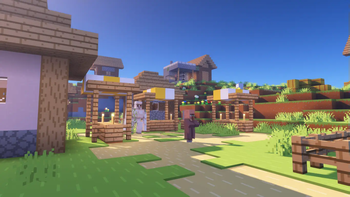
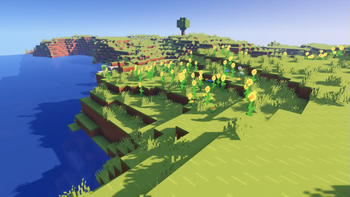
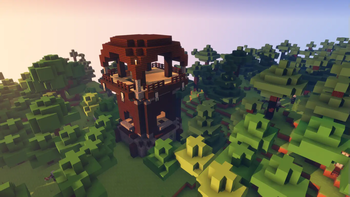
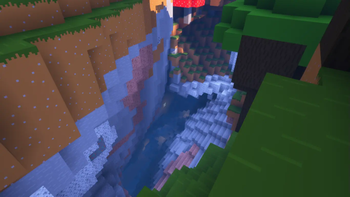
About this Modpack
Trailer Experience is a meticulously crafted Minecraft modpack designed to recreate the stunning visuals and immersive experience of the official Minecraft trailers. This modpack not only captures the aesthetic charm of the trailers but also ensures exceptional performance, making it perfect for low-end devices.
Features:
Trailer-Style Graphics:
Enjoy the iconic look of Minecraft trailers with simplified textures, vibrant colors, and dynamic animations.
Optimized Performance:
Built with performance in mind, Trailer Experience uses lightweight mods and efficient resource packs to ensure smooth gameplay on low-end PCs.
Enhanced Animations:
Experience lively and expressive mobs with mods like Fresh Animations and BareBonesxFreshAnimations.
Immersive Sound:
Dive into a rich audio environment with mods like Presence Footsteps.
Shader Support:
Optional shader support with BSL shaders for those who want to push their visuals further while maintaining performance.
Thanks to Remarkabley Optimized for the config files
This modpack was based on remarkabley optimized - https://modrinth.com/modpack/remarkably
Mods:
AmbientSounds - https://modrinth.com/mod/ambientsounds
Animatica - https://modrinth.com/mod/animatica
BadOptimizations - https://modrinth.com/mod/badoptimizations
CIT Resewn - https://modrinth.com/mod/cit-resewn
Cloth Config - https://modrinth.com/mod/cloth-config
C^2ME - https://modrinth.com/mod/c2me-fabric
Continuity - https://modrinth.com/mod/continuity
CreativeCore - https://modrinth.com/mod/creativecore
Dynamic FPS - https://modrinth.com/mod/dynamic-fps
Eating Animation - https://modrinth.com/mod/eating-animation
Enhanced Block Entities - https://modrinth.com/mod/ebe
EntityCulling - https://modrinth.com/mod/entityculling
Fabric API - https://modrinth.com/mod/fabric-api
Fabric Language Kotlin - https://modrinth.com/mod/fabric-language-kotlin
FabricSkyBoxes - https://modrinth.com/mod/fabricskyboxes
FerriteCore - https://modrinth.com/mod/ferrite-core
ImmediatelyFast - https://modrinth.com/mod/immediatelyfast
Indium - https://modrinth.com/mod/indium
Iris - https://modrinth.com/mod/iris
LambDynamicLights - https://modrinth.com/mod/lambdynamiclights
Lithium - https://modrinth.com/mod/lithium
Mod Menu - https://modrinth.com/mod/modmenu
Modern Fix - https://modrinth.com/mod/modernfix
More Culling - https://modrinth.com/mod/moreculling
No Chat Reports - https://modrinth.com/mod/no-chat-reports
Noisium - https://modrinth.com/mod/noisium
Not Enough Animations - https://modrinth.com/mod/not-enough-animations
Nvidium - https://modrinth.com/mod/nvidium
Nyf's Spiders - https://modrinth.com/mod/nyfs-spiders
Presence Footsteps - https://modrinth.com/mod/presence-footsteps
Reese's Sodium Options - https://modrinth.com/mod/reeses-sodium-options
Sodium - https://modrinth.com/mod/sodium
Sodium Extra - https://modrinth.com/mod/sodium-extra
Text Placeholder API - https://modrinth.com/mod/placeholder-api
Thread Tweak - https://modrinth.com/mod/threadtweak
Very Many Players - https://modrinth.com/mod/vmp-fabric
Visuality - https://modrinth.com/mod/visuality
Wakes - https://modrinth.com/mod/wakes
Yet Another Config lib - https://modrinth.com/mod/yacl
Zoomify - https://modrinth.com/mod/zoomify
[EMF] Entity Model Features - https://modrinth.com/mod/entity-model-features
[ETF] Entity Texture Features - https://modrinth.com/mod/entitytexturefeatures
Resource Packs:
Bare Bones - https://modrinth.com/resourcepack/bare-bones
Bare Bones x Eating Animation - https://modrinth.com/resourcepack/bare-bones-x-eating-animation
Bare Bones x Fresh Animations - https://modrinth.com/resourcepack/bare-bones-x-fresh-animations
Fresh Animations - https://modrinth.com/resourcepack/fresh-animations
Fresh Moves - https://modrinth.com/resourcepack/tras-fresh-player
Shader Packs:
Available Versions
How to Set Up a Trailer Experience Server
Order Server
Choose at least 6 GB RAM (8 GB recommended for Trailer Experience). Based on player count: per 5 players.
Install Modpack in Dashboard
Open the modpack browser in the dashboard, search for "Trailer Experience" and click "Install". The fabric loader and Minecraft 1.21 are configured automatically.
Start Server & Play
Start the server – all mods are loaded automatically. Share the server IP with friends and play together!
Frequently Asked Questions
Trailer Experience server crashes or won't start – what to do?
Most common causes: insufficient RAM or wrong fabric loader. Check latest.log for "OutOfMemoryError" → increase RAM to at least 8 GB. For "Mixin" or "ClassNotFoundException" errors: modpack version and loader don't match. With Mado Hosting, loader and Minecraft version are auto-configured on modpack install – preventing most startup issues.
How much RAM does a Trailer Experience server really need?
Minimum 6 GB, recommended 8 GB for stable performance. per 5 players. Important: Minecraft modpacks need more RAM than vanilla – plan extra per additional player. With Mado Hosting, you can scale RAM up live at any time without data loss (from €12/month).
Can I add custom mods to Trailer Experience without conflicts?
Yes, but check compatibility: only use mods for the same loader (fabric) and same Minecraft version (1.21). Common issues: ID conflicts with recipe mods and incompatible coremod versions. The Mado dashboard mod browser only shows compatible mods and warns about known conflicts.
Trailer Experience server lagging – performance tips
1) Increase RAM to 8 GB+. 2) Reduce server view-distance to 8 (server.properties). 3) Pre-generate chunks with the "Chunky" plugin. 4) Use /spark profiler to check which mods consume the most tick time. With Mado Hosting, all servers run on NVMe SSDs with dedicated CPU cores – eliminating hardware as a bottleneck.
Similar Modpacks
![Cobblemon Official Modpack [Fabric]](https://cdn.modrinth.com/data/5FFgwNNP/e7f9ee2e9d361623847853fe2ddce42f519ee64f.png)
![COBBLEVERSE - Pokemon Adventure [Cobblemon]](https://cdn.modrinth.com/data/Jkb29YJU/581ecf54530972afb18a04660afd820f2f24f6c7.png)
![Better MC [FABRIC] - BMC2](https://cdn.modrinth.com/data/shFhR8Vx/a19c2bcb51d38f32f138d3607e91cb2b7b8e387f_96.webp)


![Better MC [FORGE] - BMC4](https://cdn.modrinth.com/data/4BV47HRn/7f5ef7cc61b2593609aabef3ed07a866a4f11b73_96.webp)
Rent Trailer Experience Server
Start your own server with automatic modpack installation.
Supported Versions
Start your Trailer Experience Server now
From €12.00/month with 8 GB RAM for the best performance.
Configure Server →