
The Ultimate Creator
🎥 The BEST modpack for content creators with the best performance optimizations and useful camera tools. Useful for beautiful cinematic videos and screenshots. Super handy for YouTube, TikTok, Instagram, Twitch, Facebook...
Screenshots

About this Modpack

This modpack is made for creating the best videos in minecraft which makes it super useful for content creators. The modpack contains mods to make your Minecraft more beautiful, useful tools to record videos, mods for better communication with others and mods to improve your performance and give you further distance, so you can be the director in your own movie! The mods are all client-side so you could use them on multiplayer and singleplayer. All this on the latest Minecraft version, 1.20.2! Replay Mod and EBE will be included when updated to 1.20.2.
More info here comming soon...
Optimization
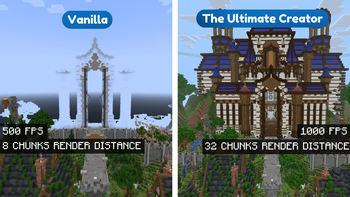
Of course, good performance is important in Minecraft, especially when creating content, you shouldn't miss a frame! There are many mods in the modpack that improve your performance. Some mods such as sodium will provide more fps. And other mods like lithium for example will provide chunks that load faster and an overall smooth experience. Nvidium is also included in the mod pack, which ensures incredibly high fps with a high render distance for people with an NVIDIA 16 graphics card or newer. If you do not have this, the mod will disable itself. There is much more that I will not explain separately here, but it will help you get the best performance in Minecraft. All performance mods are below.
200+ fps with 64 chunks render distance on a RTX 2060!

Optimization mods:
- Concurrent Chunk Management - Debugify - Enttity Culling - FerriteCore - Indium - Language Reload - LazyDFU - Lithium - Methane - ModernFix - Nvidium - Sodium - Sodium Shadowy Path Block - Server Pinger Fixer - ThreadTweak - Lazy Language Loader - Client Side Noteblocks - Async Pack ScanQuality Of Life
...
Quality Of Life mods:
- AppleSkin - Better Mount HUD - Better Selection - Better Suggestions - BetterHandBobbing - Boat - Chat Notify - Controlling - Draggable Lists - Essential Mod - Edgeless Chat Screen - KeybindsGalore - MixinTrace - Mod Menu - More Chat History - No Weather Effects - Raised - Recursive Resources - Reese's Sodium Options - Restore Chat Links - Server Pack Unlocker - Show Yourself - Sodium Extra - Splasher - Status Effect Bars - Suggestion Tweaker - Title Fix Mod - Toggle Scoreboard - Tooltip Scroll - WI Zoom - Wider TabContent creation mods
...
Content creation mods:
- 3D Skin Layers - BactroMod - Better Clouds - Biome Fog - Blur - Bobby - Bounced - Camera Utils - Capes - Continuity - Creator Overlays - Do a Barrel Roll - Eating Animation - Euphoria Patches - Explosive Enhancement - Falling Leaves - Freecam (Modrinth Edition) - Gamma Utils - Iris Shaders - Isometric Renders - LambDynamicLights - Make Bubbles Pop - Not Enough Animations - PanoramicShot - Particle Rain - Partcle Tweaks - Player Visibility - Resourcify - ScreenFX - Show Me Your Skin - Symbol Chat - Telepistons - Tiny Item Animations - VTDownloader - Vectorientations - Visuality - Wakes - Wavey CapesSound mods
...
Content creation mods:
- AmbientSounds - ImmersiveThunder - Presence Footsteps - Quality Sounds - SonanceResourcepack Mods
There are some mods needed for adding resourcepack functions like optifine.
Resource Packs mods:
- Chime - FabricSkyboxes - Entity Model Features - Entity Texture FeaturesLibraries
...
library mods:
- Architectury - Cloth Config API - CreativeCore - Fabric API - Fabric Language Kotlin - LibJF - Searchables - YetAnotherConfigLib - owo-libResource Packs and Shaders
...
Resource Packs and Shaders:
- Complementary Shaders - Reimagined - Embrace Pixels - Fresh Animations - No World Border - Ore Variants - Torchcraft Lobby PanoramaSupport
If you have any problems, ideas, or other feedback about this project, please contact me via discord or email. You can contact me on Discord by sending a friend request, so you can send me a message.
Discord: tibodp
Mail: [email protected]
🌟 My other projects:
Available Versions
How to Set Up a The Ultimate Creator Server
Order Server
Choose at least 4 GB RAM (6 GB recommended for The Ultimate Creator). Based on player count: per 8 players.
Install Modpack in Dashboard
Open the modpack browser in the dashboard, search for "The Ultimate Creator" and click "Install". The fabric loader and Minecraft 1.20.2 are configured automatically.
Start Server & Play
Start the server – all mods are loaded automatically. Share the server IP with friends and play together!
Frequently Asked Questions
The Ultimate Creator server crashes or won't start – what to do?
Most common causes: insufficient RAM or wrong fabric loader. Check latest.log for "OutOfMemoryError" → increase RAM to at least 6 GB. For "Mixin" or "ClassNotFoundException" errors: modpack version and loader don't match. With Mado Hosting, loader and Minecraft version are auto-configured on modpack install – preventing most startup issues.
How much RAM does a The Ultimate Creator server really need?
Minimum 4 GB, recommended 6 GB for stable performance. per 8 players. Important: Minecraft modpacks need more RAM than vanilla – plan extra per additional player. With Mado Hosting, you can scale RAM up live at any time without data loss (from €8/month).
Can I add custom mods to The Ultimate Creator without conflicts?
Yes, but check compatibility: only use mods for the same loader (fabric) and same Minecraft version (1.20.2). Common issues: ID conflicts with recipe mods and incompatible coremod versions. The Mado dashboard mod browser only shows compatible mods and warns about known conflicts.
The Ultimate Creator server lagging – performance tips
1) Increase RAM to 6 GB+. 2) Reduce server view-distance to 8 (server.properties). 3) Pre-generate chunks with the "Chunky" plugin. 4) Use /spark profiler to check which mods consume the most tick time. With Mado Hosting, all servers run on NVMe SSDs with dedicated CPU cores – eliminating hardware as a bottleneck.
Similar Modpacks


![Cobblemon Official Modpack [Fabric]](https://cdn.modrinth.com/data/5FFgwNNP/e7f9ee2e9d361623847853fe2ddce42f519ee64f.png)
![COBBLEVERSE - Pokemon Adventure [Cobblemon]](https://cdn.modrinth.com/data/Jkb29YJU/581ecf54530972afb18a04660afd820f2f24f6c7.png)
![Better MC [FABRIC] - BMC2](https://cdn.modrinth.com/data/shFhR8Vx/a19c2bcb51d38f32f138d3607e91cb2b7b8e387f_96.webp)

Rent The Ultimate Creator Server
Start your own server with automatic modpack installation.
Supported Versions
Start your The Ultimate Creator Server now
From €8.00/month with 6 GB RAM for the best performance.
Configure Server →