
the Art
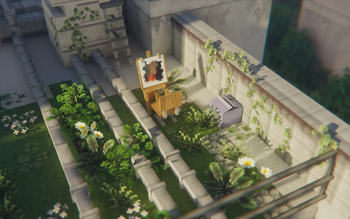
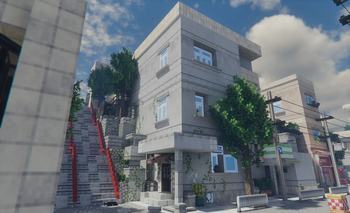
Build a Japanese structures in a visually pleasing world with over 2000 blocks, custom menu and ambiance.
Screenshots
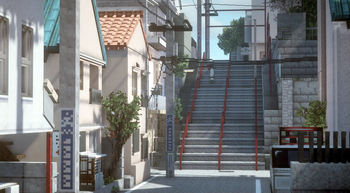
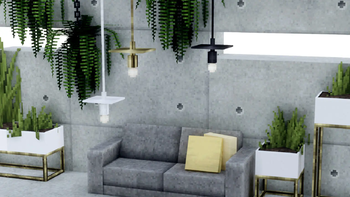
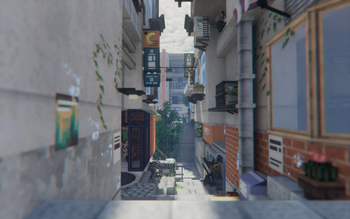
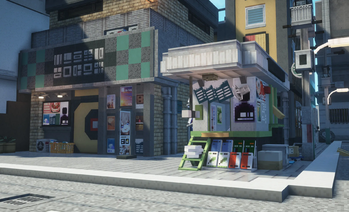
About this Modpack
the Art Modpack for Minecraft 1.20.4

What is this modpack about?

A Modpack for Architectures, Building, and Imagination.
the Art is a creative-focused modpack built for designers & creative visionaries inspired by the elegance of Japanese design—from timeless traditions to cutting-edge minimalism.
Whether you’re crafting serene temples, cozy countryside homes, or sleek urban spaces, The Art gives you the tools to build with precision and flair. With a carefully curated collection of building-focused mods and a peaceful atmosphere, this is your blank canvas for visual storytelling.
Designed primarily for creative mode, this modpack is ideal for dedicated builders—but it also supports survival mode for casual exploration and chill gameplay.
Express your vision. Build your masterpiece. Welcome to The Art.
Socials



Key Features
🧊 2,000+ Custom Blocks & Furniture
A massive selection of detailed building blocks and furnishings—from shoji doors and tatami mats to sleek panels and designer lighting.
🦌 Wildlife & Aquatic Life
Populate your builds with adorable land animals and ambient sea creatures to create dynamic, living environments.
🛠️ Advanced Building Tools
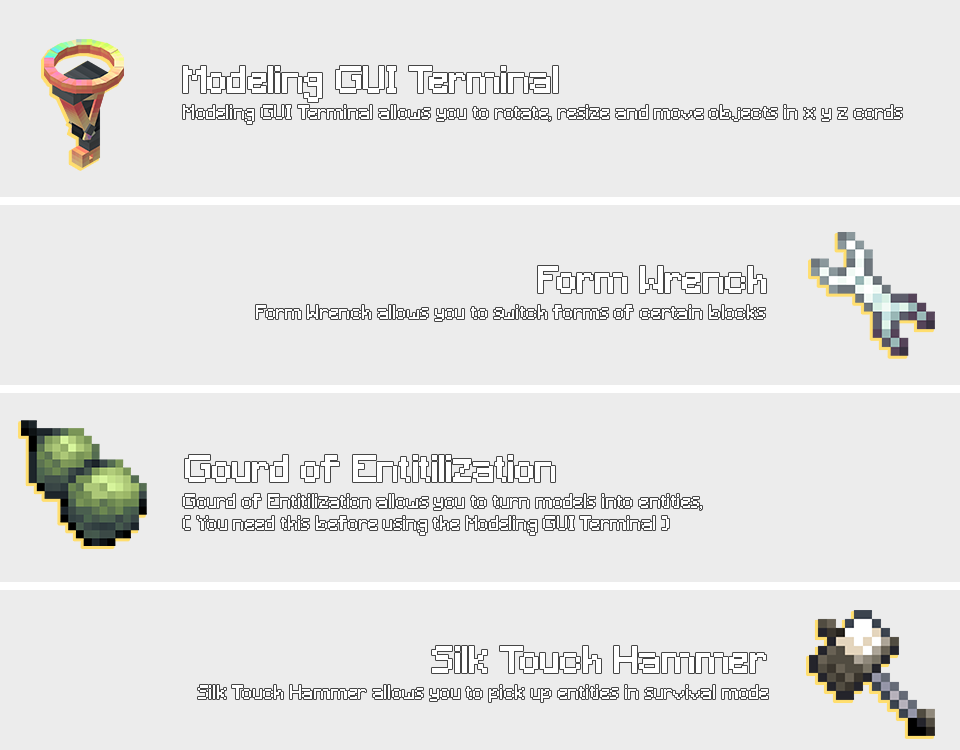
World-editing & block-editing tools built for creators: rotate, move, resize, copy-paste, and perfect your world with ease.
🖼️ Custom Image Placement
Insert your own images and artwork into the game using signs and display blocks. Great for city posters, art galleries, or personal touches.
💡 Custom Lighting Controls
Fine-tune the atmosphere with adjustable lighting settings, from cozy interiors to cinematic nightscapes.
🌅 Distant Horizons & Built-In Shaders
Explore vast draw distances and enjoy stunning visual effects with pre-configured shaders for a photo-realistic touch.
🧩 Great Optimization
Smooth performance even in large, detailed builds thanks to performance-focused mod selections and tweaks.
📚 Custom Main Menu
A fully redesigned main menu with high-quality visuals, animated elements, and an eye-pleasing UI that matches the tone and beauty of the pack.
✳️ Creative Mode First, Survival Compatible
While made for builders and designers, the pack still supports survival play for those who enjoy relaxed exploration and storytelling.
🌐 Multiplayer Friendly
Build together, host architecture showcases, or collaborate on themed villages in peaceful online sessions.
🖥️ RAM Allocation:
- Recommended Allocated Memory: 8192
- Minimum Allocated Memory: 4096
- Possibly Lowest Allocated Memory: 2048 (not recommended)
How to use Yuushya Modelling Mod


Quick Disclaimer
I do not own any of the mods in this pack
all credit goes to the original creators.
This modpack is non-commercial,
and I’m not making any money from this.
If any mod author wants their mod removed,
I’ll do so immediately.
Big thanks to all the amazing mod developers
this project wouldn’t exist without you!

Mod & Resource Packs highly recommended in this modpack:
- cocricot for 1.20.4 v1.1
- cocricot for MOD 1.20.4 snapshot1.1.1
- cocricotMOD for 1.20.4 Fabric snapshot1.1.0
- Yuushya Foliage Addon 0.11.0

Download links for copyrighted content from their original sources:
- Yuushya Foliage Addon 0.11.0
- Cocricot Resource Pack for 1.20.4 v1.1
- Cocricot for MOD Resource Pack 1.20.4 snapshot1.1.1
- Cocricot MOD for 1.20.4 Fabric snapshot1.1.0

Credits for the Mods & Resource Pack Creators!
- Credits to Cocricot Mod & Resource Packs: https://cocricot.pics/
- Credits to Yuushya Mod & Resource Packs: https://yuushya.com/t
Available Versions
How to Set Up a the Art Server
Order Server
Choose at least 4 GB RAM (6 GB recommended for the Art). Based on player count: per 8 players.
Install Modpack in Dashboard
Open the modpack browser in the dashboard, search for "the Art" and click "Install". The fabric loader and Minecraft 1.20.4 are configured automatically.
Start Server & Play
Start the server – all mods are loaded automatically. Share the server IP with friends and play together!
Frequently Asked Questions
the Art server crashes or won't start – what to do?
Most common causes: insufficient RAM or wrong fabric loader. Check latest.log for "OutOfMemoryError" → increase RAM to at least 6 GB. For "Mixin" or "ClassNotFoundException" errors: modpack version and loader don't match. With Mado Hosting, loader and Minecraft version are auto-configured on modpack install – preventing most startup issues.
How much RAM does a the Art server really need?
Minimum 4 GB, recommended 6 GB for stable performance. per 8 players. Important: Minecraft modpacks need more RAM than vanilla – plan extra per additional player. With Mado Hosting, you can scale RAM up live at any time without data loss (from €8/month).
Can I add custom mods to the Art without conflicts?
Yes, but check compatibility: only use mods for the same loader (fabric) and same Minecraft version (1.20.4). Common issues: ID conflicts with recipe mods and incompatible coremod versions. The Mado dashboard mod browser only shows compatible mods and warns about known conflicts.
the Art server lagging – performance tips
1) Increase RAM to 6 GB+. 2) Reduce server view-distance to 8 (server.properties). 3) Pre-generate chunks with the "Chunky" plugin. 4) Use /spark profiler to check which mods consume the most tick time. With Mado Hosting, all servers run on NVMe SSDs with dedicated CPU cores – eliminating hardware as a bottleneck.
Similar Modpacks

![Cobblemon Official Modpack [Fabric]](https://cdn.modrinth.com/data/5FFgwNNP/e7f9ee2e9d361623847853fe2ddce42f519ee64f.png)
![COBBLEVERSE - Pokemon Adventure [Cobblemon]](https://cdn.modrinth.com/data/Jkb29YJU/581ecf54530972afb18a04660afd820f2f24f6c7.png)
![Better MC [FABRIC] - BMC2](https://cdn.modrinth.com/data/shFhR8Vx/a19c2bcb51d38f32f138d3607e91cb2b7b8e387f_96.webp)


Rent the Art Server
Start your own server with automatic modpack installation.
Supported Versions
Start your the Art Server now
From €8.00/month with 6 GB RAM for the best performance.
Configure Server →