
ClientRefine
A client-side optimization modpack to refine and enhance Minecraft's graphics, quality, and FPS!
Screenshots
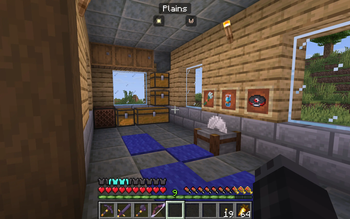
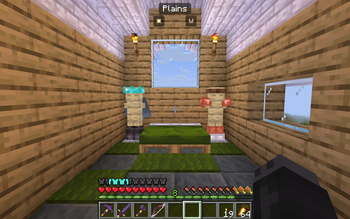
About this Modpack

Summary
ClientRefine is a client-side modpack to enhance the Minecraft feel. It increases FPS with trusted mods and enriches graphics with Iris and Mellow. It also has Fabric API which is necessary to run most mods. And with simple quality of life mods it's never been easier to play your game. To tie it all together, Mod Menu makes it easy to see all your mods and edit them from one spot.
Personally, I believe this is a great modpack to use as a base for a server or to just hop into Minecraft. While everyone has a different preference, I hope that this modpack would be a great base from which to create your own personalized Minecraft experience.
Features
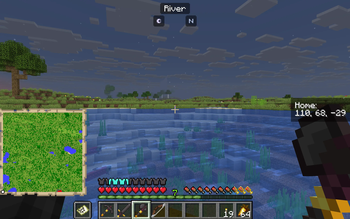
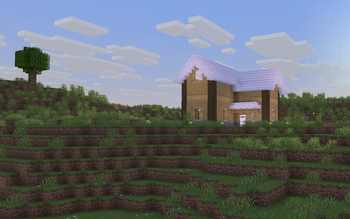
The latest version of ClientRefine is packed with features to improve your Minecraft experience. These include things that are simple, such as more human-friendly statistics and F3 screens. Accompanied by many UI upgrades that feel intentional including clean, colorful, block themed GUIs. New particles introduce a sense of atmosphere, while connected textures smooth the rough look of glass and sandstone. Weather sees a beautiful improvement in sandstorms and water ripples. Brand new first person animations and 3D items that just feel right. And new sounds that feel more immersive.
But even beyond the graphical, there are QoL features that make your experience better. A resource pack menu with drag-and-drop and presets for tinkerers. A light level checker activated with F8 that helps you place your torches in just the right spot. Small conveniences that help out include better 3rd person, a notepad, the ability to favorite worlds, and small mouse adjustments. These runs in tandem with new buttons to manage the inventory, not keybinds. And to tie it all together, FPS gains that help starchy spuds run.
Credits
Creators deserve credit, it’s that simple.
--DISCLAIMER: I have not personally created a single thing inside this pack, everything in this pack was designed by wonderful members of the Minecraft community who are much more talented than I.
--Braytonks, your enchanted book and zombie pack are out-of-this world, keep up the good work. You also helped create Fresh Food which adds a little something to the world. Even if it is disgust when eating rotten flesh.
--2DWisp, Simple Grass flowers was one of the first resource packs I ever added, and I am glad for that. It just adds a little extra something to the world.
--Vanilla Tweaks While not directly included, this is one of the greatest concepts in the modding world. A resource pack created completely by you. While I have had to go through about 100 variations of it, I like my final result.
--fishstiz, I originally downloaded Packed Packs not actually knowing what it did, I used it as a replacement for another mod that had not been updated to the newest version. What it turned out to be surpassed my wildest expectations. It gave a level of control I didn’t think possible.
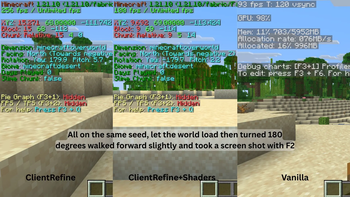
--CaffineMC, without Sodium and Lithium, Minecraft would literally be unplayable for me. Thank you for your work in the optimization word, helping my potato of a laptop run Minecraft at 100+ FPS
--NemoNotFound, without you, my chests and inventory would be a mess. The simple interface and dark mode option is just the icing on the cake. Unlike my old sorting mod, yours doesn't go by alphabetical order. Instead it uses, well, I don't know what but it's more helpful.
--And everyone else, my truly perfect and uniquely me modpack would not exist without you. Thank you for your services to the Minecraft and Modrinth community.
Notice
I have not tested this mod on servers and thus you could get banned, although I highly doubt that this will happen. The only mod that has a real risk of getting you banned, is Mouse Tweaks or Nemo's Inventory Sorting. Also, some keybinds might be a little different than what you are used to, here is a list of what has been changed:-Iris Toggle - K (But the rest of the keybinds have been removed)
-Gamma Toggle (Fullbright) - Left Alt
Available Versions
How to Set Up a ClientRefine Server
Order Server
Choose at least 4 GB RAM (6 GB recommended for ClientRefine). Based on player count: per 8 players.
Install Modpack in Dashboard
Open the modpack browser in the dashboard, search for "ClientRefine" and click "Install". The fabric loader and Minecraft 1.21.11 are configured automatically.
Start Server & Play
Start the server – all mods are loaded automatically. Share the server IP with friends and play together!
Frequently Asked Questions
ClientRefine server crashes or won't start – what to do?
Most common causes: insufficient RAM or wrong fabric loader. Check latest.log for "OutOfMemoryError" → increase RAM to at least 6 GB. For "Mixin" or "ClassNotFoundException" errors: modpack version and loader don't match. With Mado Hosting, loader and Minecraft version are auto-configured on modpack install – preventing most startup issues.
How much RAM does a ClientRefine server really need?
Minimum 4 GB, recommended 6 GB for stable performance. per 8 players. Important: Minecraft modpacks need more RAM than vanilla – plan extra per additional player. With Mado Hosting, you can scale RAM up live at any time without data loss (from €8/month).
Can I add custom mods to ClientRefine without conflicts?
Yes, but check compatibility: only use mods for the same loader (fabric) and same Minecraft version (1.21.11). Common issues: ID conflicts with recipe mods and incompatible coremod versions. The Mado dashboard mod browser only shows compatible mods and warns about known conflicts.
ClientRefine server lagging – performance tips
1) Increase RAM to 6 GB+. 2) Reduce server view-distance to 8 (server.properties). 3) Pre-generate chunks with the "Chunky" plugin. 4) Use /spark profiler to check which mods consume the most tick time. With Mado Hosting, all servers run on NVMe SSDs with dedicated CPU cores – eliminating hardware as a bottleneck.
Similar Modpacks

![Cobblemon Official Modpack [Fabric]](https://cdn.modrinth.com/data/5FFgwNNP/e7f9ee2e9d361623847853fe2ddce42f519ee64f.png)
![COBBLEVERSE - Pokemon Adventure [Cobblemon]](https://cdn.modrinth.com/data/Jkb29YJU/581ecf54530972afb18a04660afd820f2f24f6c7.png)
![Better MC [FABRIC] - BMC2](https://cdn.modrinth.com/data/shFhR8Vx/a19c2bcb51d38f32f138d3607e91cb2b7b8e387f_96.webp)


Rent ClientRefine Server
Start your own server with automatic modpack installation.
Supported Versions
Start your ClientRefine Server now
From €8.00/month with 6 GB RAM for the best performance.
Configure Server →