
THF Industrial
Welcome to THF Industrial, a cutting-edge Minecraft modpack tailored for version 1.20.1, inspired in classic Tekkit where industrial innovation meets the limitless creativity of Minecraft, from steam engines to computers!
Screenshots
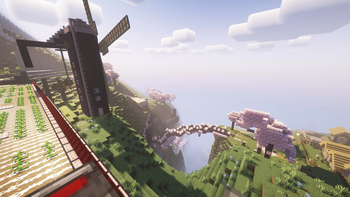
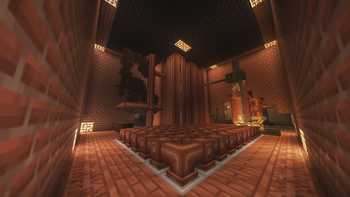
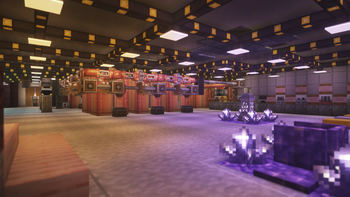
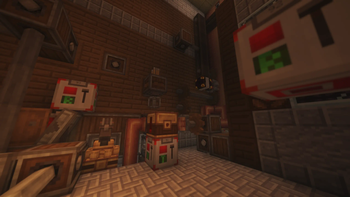
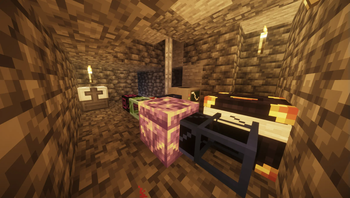
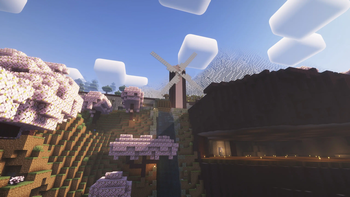
About this Modpack
Welcome to THF Industrial, a Minecraft modpack tailored for version 1.20.1, where industrial innovation meets the limitless creativity of Minecraft. Explore a world enriched with technological wonders, from advanced machinery to intricate automation systems, all set within a thematic blend of steampunk and modern industrial aesthetics.
Key Features:
Tech Reborn:
Delve into the next generation of industrialization with Tech Reborn, offering a comprehensive suite of advanced machinery and tools. From ore processing to energy generation, Tech Reborn empowers players to master the art of industrial crafting.
ComputerCraft (CC) / CC: Tweaked:
Unleash your programming skills with ComputerCraft, allowing you to automate tasks and control devices using Lua programming. With CC: Tweaked, enhance your scripting capabilities and expand the scope of automation across your industrial empire.
Create Fabric:
Transform your world with Create Fabric, a revolutionary mod introducing mechanical engineering at its finest. Build intricate contraptions, automate processes, and construct awe-inspiring structures using gears, belts, and mechanical blocks.
Applied Energistics 2 (AE2):
Experience unparalleled storage and automation capabilities with Applied Energistics 2. Manage vast inventories seamlessly, craft with precision, and optimize resource processing to fuel your industrial ambitions.
Lamps (Additional Lanterns, Distant Horizons):
Illuminate your creations with style using Additional Lanterns and Distant Horizons. These mods offer a wide array of lighting solutions, from decorative lanterns to futuristic light sources, enhancing both functionality and ambiance.
Tectonic:
Embark on geological adventures with Tectonic, where the earth itself becomes your playground. Explore dynamic landscapes, harness natural resources, and uncover geological marvels in your quest for industrial dominance.
Embrace the Industrial Revolution:
THF Industrial invites you to redefine the boundaries of industrialization within Minecraft. Whether you're constructing massive factories powered by Tech Reborn, programming intricate systems with ComputerCraft, or engineering complex machinery using Create Fabric, every aspect of this modpack is crafted to ignite your creativity and challenge your engineering prowess.
Forge alliances with fellow engineers, embark on ambitious projects, and carve your legacy in the annals of industrial history. From towering steam-powered structures to sleek, automated facilities, THF Industrial is your gateway to a world where innovation and imagination converge. Are you ready to build the future?
Available Versions
How to Set Up a THF Industrial Server
Order Server
Choose at least 6 GB RAM (8 GB recommended for THF Industrial). Based on player count: per 5 players.
Install Modpack in Dashboard
Open the modpack browser in the dashboard, search for "THF Industrial" and click "Install". The fabric loader and Minecraft 1.20.1 are configured automatically.
Start Server & Play
Start the server – all mods are loaded automatically. Share the server IP with friends and play together!
Frequently Asked Questions
THF Industrial server crashes or won't start – what to do?
Most common causes: insufficient RAM or wrong fabric loader. Check latest.log for "OutOfMemoryError" → increase RAM to at least 8 GB. For "Mixin" or "ClassNotFoundException" errors: modpack version and loader don't match. With Mado Hosting, loader and Minecraft version are auto-configured on modpack install – preventing most startup issues.
How much RAM does a THF Industrial server really need?
Minimum 6 GB, recommended 8 GB for stable performance. per 5 players. Important: Minecraft modpacks need more RAM than vanilla – plan extra per additional player. With Mado Hosting, you can scale RAM up live at any time without data loss (from €12/month).
Can I add custom mods to THF Industrial without conflicts?
Yes, but check compatibility: only use mods for the same loader (fabric) and same Minecraft version (1.20.1). Common issues: ID conflicts with recipe mods and incompatible coremod versions. The Mado dashboard mod browser only shows compatible mods and warns about known conflicts.
THF Industrial server lagging – performance tips
1) Increase RAM to 8 GB+. 2) Reduce server view-distance to 8 (server.properties). 3) Pre-generate chunks with the "Chunky" plugin. 4) Use /spark profiler to check which mods consume the most tick time. With Mado Hosting, all servers run on NVMe SSDs with dedicated CPU cores – eliminating hardware as a bottleneck.
Similar Modpacks
![Cobblemon Official Modpack [Fabric]](https://cdn.modrinth.com/data/5FFgwNNP/e7f9ee2e9d361623847853fe2ddce42f519ee64f.png)
![COBBLEVERSE - Pokemon Adventure [Cobblemon]](https://cdn.modrinth.com/data/Jkb29YJU/581ecf54530972afb18a04660afd820f2f24f6c7.png)
![Better MC [FABRIC] - BMC2](https://cdn.modrinth.com/data/shFhR8Vx/a19c2bcb51d38f32f138d3607e91cb2b7b8e387f_96.webp)


![Better MC [FORGE] - BMC4](https://cdn.modrinth.com/data/4BV47HRn/7f5ef7cc61b2593609aabef3ed07a866a4f11b73_96.webp)
Rent THF Industrial Server
Start your own server with automatic modpack installation.
Supported Versions
Start your THF Industrial Server now
From €12.00/month with 8 GB RAM for the best performance.
Configure Server →