
Thumbily
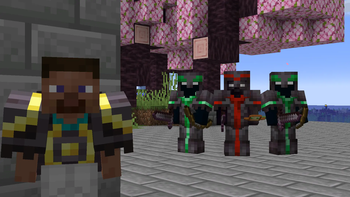
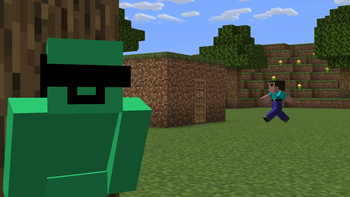
A modpack that helps Minecraft creators make better thumbnails in a variety of styles.
Screenshots
About this Modpack
🎬 Thumbily - The Content Creator's Thumbnail Modpack
Thumbily is a modpack designed to help content creators produce high-quality thumbnails in Minecraft. It combines performance mods, multiple shader packs, and creative tools to let you work efficiently without worrying about frame drops.
✨ What's Included
⚡ Performance & Rendering
- Sodium - Fast rendering engine
- Iris Shaders - High-quality shader support
- Concurrent Chunk Management Engine (C2ME) - Optimized chunk loading
- StutterFix - Removes frame stuttering
- Entity View Distance - Fine-tune entity rendering distance
🎨 Visual Enhancements
- Fresh Animations - Smooth player animations
- Bobby - Extended render distance for wider shots
- Sodium Extra - Additional visual tweaks
- Screenshot to Clipboard - Quick screenshot saving
🌅 Shader Packs
- BSL Shaders - Balanced visuals and performance
- Complementary Shaders (Reimagined & Unbound) - Popular community shaders
- Solas Shader - High-quality visuals
- DMS - Depth Map Shaders - Unique depth effects
- Fullbright UB - Clean, bright visuals
🎥 Content Tools
- ReplayMod - Capture cinematic angles and replays
- NewNPCs - Add NPCs to thumbnails
- Mod Menu - Easy mod configuration
- Fzzy Config - Advanced configuration options
🎛️ Optional Enhancements
3D Skin Layers can be installed separately if you want to add depth to player skins. It works with all included shaders.
🎯 Why Use Thumbily?
- ⚡ Performance - Smooth framerates even with shaders enabled
- 🎨 Flexibility - Multiple shader options for different looks
- 🎬 Creator Tools - ReplayMod and other tools built in
- ⚙️ Customization - Easy to adjust settings to your needs
📋 Credits & Licenses
This modpack includes mods created and maintained by their respective authors:
| Mod | Author |
|---|---|
| Bobby | Johni0702 |
| BSL Shaders | CaptTatsu |
| Complementary Shaders - Reimagined | EminGT |
| Complementary Shaders - Unbound | EminGT |
| Concurrent Chunk Management Engine (C2ME) | ishland |
| DMS - Depth Map Shaders | Seltop |
| Entity View Distance | Patbox |
| Fabric API | modmuss50 |
| Fabric Language Kotlin | modmuss50 |
| Fresh Animations | FreshLX |
| Fullbright UB | worldresourcepack |
| Fzzy Config | fzzyhmstrs |
| Iris Shaders | coderbot |
| Mod Menu | Terraformers |
| NewNPCs | gfx.heaven.supplies |
| Particle Core | fzzyhmstrs |
| ReplayMod | Johni0702 |
| Screenshot to Clipboard | comp500 |
| Sodium | CaffeineMC |
| Sodium Extra | FlashyReese |
| Solas Shader | Septonious |
| StutterFix | wisecase2 |
License Information
Each mod is licensed by its creator under their chosen license. By downloading this modpack, you agree to abide by the individual licenses of each mod included.
Thumbily itself is released under the MIT License, which means you're free to use and share it as long as you credit the original creators.
ℹ️ Notes
- Minecraft Version: 1.20.1
- Loader: Fabric
- All shaders are optional—disable if needed for better performance
- If your launcher doesn't support Modrinth, you can get a zip file including mods and other items by searching for
.mrpack to zip converteron Google, opening any website, and uploading the.mrpackthere. I will recommend using the fabulously-optimized website.
Available Versions
How to Set Up a Thumbily Server
Order Server
Choose at least 6 GB RAM (8 GB recommended for Thumbily). Based on player count: per 5 players.
Install Modpack in Dashboard
Open the modpack browser in the dashboard, search for "Thumbily" and click "Install". The fabric loader and Minecraft 1.20.1 are configured automatically.
Start Server & Play
Start the server – all mods are loaded automatically. Share the server IP with friends and play together!
Frequently Asked Questions
Thumbily server crashes or won't start – what to do?
Most common causes: insufficient RAM or wrong fabric loader. Check latest.log for "OutOfMemoryError" → increase RAM to at least 8 GB. For "Mixin" or "ClassNotFoundException" errors: modpack version and loader don't match. With Mado Hosting, loader and Minecraft version are auto-configured on modpack install – preventing most startup issues.
How much RAM does a Thumbily server really need?
Minimum 6 GB, recommended 8 GB for stable performance. per 5 players. Important: Minecraft modpacks need more RAM than vanilla – plan extra per additional player. With Mado Hosting, you can scale RAM up live at any time without data loss (from €12/month).
Can I add custom mods to Thumbily without conflicts?
Yes, but check compatibility: only use mods for the same loader (fabric) and same Minecraft version (1.20.1). Common issues: ID conflicts with recipe mods and incompatible coremod versions. The Mado dashboard mod browser only shows compatible mods and warns about known conflicts.
Thumbily server lagging – performance tips
1) Increase RAM to 8 GB+. 2) Reduce server view-distance to 8 (server.properties). 3) Pre-generate chunks with the "Chunky" plugin. 4) Use /spark profiler to check which mods consume the most tick time. With Mado Hosting, all servers run on NVMe SSDs with dedicated CPU cores – eliminating hardware as a bottleneck.
Similar Modpacks

![Cobblemon Official Modpack [Fabric]](https://cdn.modrinth.com/data/5FFgwNNP/e7f9ee2e9d361623847853fe2ddce42f519ee64f.png)
![COBBLEVERSE - Pokemon Adventure [Cobblemon]](https://cdn.modrinth.com/data/Jkb29YJU/581ecf54530972afb18a04660afd820f2f24f6c7.png)
![Better MC [FABRIC] - BMC2](https://cdn.modrinth.com/data/shFhR8Vx/a19c2bcb51d38f32f138d3607e91cb2b7b8e387f_96.webp)


Rent Thumbily Server
Start your own server with automatic modpack installation.
Supported Versions
Start your Thumbily Server now
From €12.00/month with 8 GB RAM for the best performance.
Configure Server →