
Thumbnailing
A collection of mods designed to enhance your Minecraft thumbnail design workflow.
Screenshots


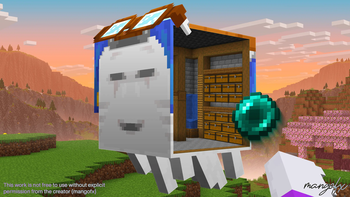
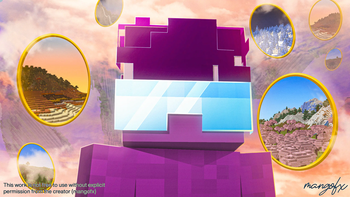
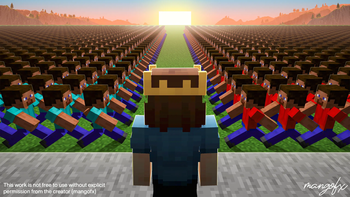

About this Modpack
The definitive Minecraft thumbnail design modpack.
Crafted by a thumbnail designer, for thumbnail designers.
This pack includes the essential tools needed to pose characters, build scenes, capture clean renders, and produce professional thumbnails with speed and consistency.
Features
| Tool | Purpose |
|---|---|
| NPC Studio | Spawn, pose, and animate NPCs for character setups. |
| Bobby | Load and render distant chunks for cinematic backgrounds. |
| Optimization Suite | Tweaked for high FPS and shader-friendly performance. |
| DMS | Generate depth maps for realistic atmospheric fog, lens blur, and depth-based effects. |
| NMS | Render normal maps to easily shade and relight characters for dramatic lighting. |
| WEM | Render white-masked entities to quickly cut out characters in thumbnails. |
| BDS | Render shadows and ambient occlusion while keeping vanilla style intact. |
| WorldGen Enhancements | Four terrain presets for building dramatic scenes and environment compositions. |
NPC Studio Guide
FAQ
Can I use this modpack to make commercial thumbnails?
Yes — commercial use is allowed. You can create and monetize thumbnails, videos, streams, and artwork made using this modpack. However, you may not reupload or redistribute the modpack by another name.How does this compare to software like Blender or Blockbench?
Blender is more powerful, but it comes with a steep learning curve and slow workflow for quick scene iteration. This modpack is optimized for speed and thumbnail-ready composition directly in Minecraft, then finished in Photoshop. Furthermore, nearly every prominent thumbnail artist uses some variation of this workflow. If that isn't enough proof, take a look at the gallery for thumbnails I've made using only this modpack and Photoshop.Do I need shaders for this pack?
No, shaders are entirely optional and completely depend on the style you're going for. I actually recommend NOT using shaders unless you have a clear idea of what you want. Hysteria is great for spooky-looking scenes, bliss is a decent middleground, and complementary is great for general usage. If you do use shaders, please configure them to suit your needs, as the shaders included with the pack are completely unedited.I'm having issues with NPC Studio. Where do I get help?
NPC Mod's Discord Server can be found at: https://discord.gg/uE7gFcZ7QBI'm having issues with the modpack in general. Where do I get help?
For troubleshooting or setup questions, please join the Thumbnailers Discord: https://discord.gg/TTC7Uvm2N8Where can I get feedback on my designs?
Feel free to join Thumbnailers, the biggest Minecraft thumbnail design community: https://discord.gg/TTC7Uvm2N8Disclaimer: I don't own any mods provided in this pack. All credit goes to the original mod developers. I simply compiled these mods into one unified modpack for ease of use.
Want to go one step further?
Visit https://mangofx.art to explore asset packs that will instantly take your thumbnails to the next level.
Available Versions
How to Set Up a Thumbnailing Server
Order Server
Choose at least 4 GB RAM (6 GB recommended for Thumbnailing). Based on player count: per 8 players.
Install Modpack in Dashboard
Open the modpack browser in the dashboard, search for "Thumbnailing" and click "Install". The fabric loader and Minecraft 1.21.11 are configured automatically.
Start Server & Play
Start the server – all mods are loaded automatically. Share the server IP with friends and play together!
Frequently Asked Questions
Thumbnailing server crashes or won't start – what to do?
Most common causes: insufficient RAM or wrong fabric loader. Check latest.log for "OutOfMemoryError" → increase RAM to at least 6 GB. For "Mixin" or "ClassNotFoundException" errors: modpack version and loader don't match. With Mado Hosting, loader and Minecraft version are auto-configured on modpack install – preventing most startup issues.
How much RAM does a Thumbnailing server really need?
Minimum 4 GB, recommended 6 GB for stable performance. per 8 players. Important: Minecraft modpacks need more RAM than vanilla – plan extra per additional player. With Mado Hosting, you can scale RAM up live at any time without data loss (from €8/month).
Can I add custom mods to Thumbnailing without conflicts?
Yes, but check compatibility: only use mods for the same loader (fabric) and same Minecraft version (1.21.11). Common issues: ID conflicts with recipe mods and incompatible coremod versions. The Mado dashboard mod browser only shows compatible mods and warns about known conflicts.
Thumbnailing server lagging – performance tips
1) Increase RAM to 6 GB+. 2) Reduce server view-distance to 8 (server.properties). 3) Pre-generate chunks with the "Chunky" plugin. 4) Use /spark profiler to check which mods consume the most tick time. With Mado Hosting, all servers run on NVMe SSDs with dedicated CPU cores – eliminating hardware as a bottleneck.
Similar Modpacks

![Cobblemon Official Modpack [Fabric]](https://cdn.modrinth.com/data/5FFgwNNP/e7f9ee2e9d361623847853fe2ddce42f519ee64f.png)
![COBBLEVERSE - Pokemon Adventure [Cobblemon]](https://cdn.modrinth.com/data/Jkb29YJU/581ecf54530972afb18a04660afd820f2f24f6c7.png)
![Better MC [FABRIC] - BMC2](https://cdn.modrinth.com/data/shFhR8Vx/a19c2bcb51d38f32f138d3607e91cb2b7b8e387f_96.webp)


Rent Thumbnailing Server
Start your own server with automatic modpack installation.
Details
- License
- Creative Commons Attribution Non Commercial No Derivatives 4.0 International
- Server-side
- Unsupported
- Client-side
- Required
Supported Versions
Start your Thumbnailing Server now
From €8.00/month with 6 GB RAM for the best performance.
Configure Server →