
Time's Assembly
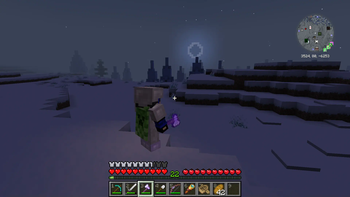
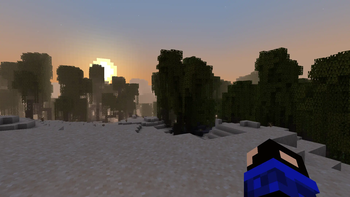
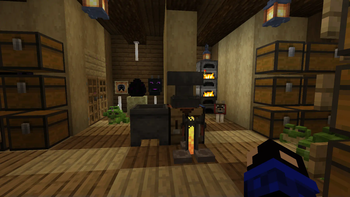
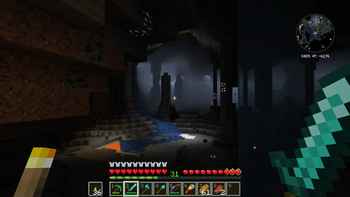
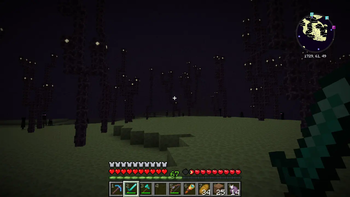
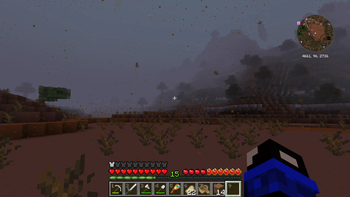
Beautiful Interface, Smooth Animations, New Sounds, Beautiful Textures, Improved Models and Beautiful Effects - all this in this assembly!
Screenshots
About this Modpack
English
(Translated by Google Translate)
Beautiful Interface, Smooth Animations, New Sounds, Beautiful Textures, Improved Models and Beautiful Effects - all this in this assembly!
This assembly will replace the usual Minecraft and complement Vanilla with a simple change in the visuals of the game.
Enjoy the game!
Русский
Красивый Интерфейс, Плавные Анимации, Новые Звуки, Красивые Текстуры, Улучшенные Модели и Прекрасные Эффекты - всё это в данной сборке!
Эта сборка заменит обычный Майнкрафт и дополнит Ваниллу простым изменением визуальности игры.
Приятной игры!
Links to Mods:
Advancement Plaques: https://modrinth.com/mod/advancement-plaques
AppleSkin: https://modrinth.com/mod/appleskin
Architectury API: https://modrinth.com/mod/architectury-api
Bounced: https://modrinth.com/mod/bounced
Camera Overhaul: https://modrinth.com/mod/cameraoverhaul
Cary On: https://modrinth.com/mod/carry-on
Cave Dust: https://modrinth.com/mod/cave-dust
Chat Heads: https://modrinth.com/mod/chat-heads
Cloth Config API: https://modrinth.com/mod/cloth-config
CoroUtil: https://modrinth.com/mod/coroutil
CreativeCore: https://modrinth.com/mod/creativecore
Dark Loading Screen: https://modrinth.com/mod/dark-loading-screen
Dynamic Lights: https://modrinth.com/datapack/dynamic-lights
Eating Animation: https://modrinth.com/mod/eating-animation
Emojiful: https://modrinth.com/mod/emojiful
Fabric API: https://modrinth.com/mod/fabric-api
Fabric Language Kotlin: https://modrinth.com/mod/fabric-language-kotlin
Falling Leaves: https://modrinth.com/mod/fallingleaves
FerriteCore: https://modrinth.com/mod/ferrite-core
Forge Config API Port: https://modrinth.com/mod/forge-config-api-port
Fzzy Config: https://modrinth.com/mod/fzzy-config
Iceberg: https://modrinth.com/mod/iceberg
ImmediatelyFast: https://modrinth.com/mod/immediatelyfast
Immersive UI: https://modrinth.com/mod/immersive-ui
Indium: https://modrinth.com/mod/indium
Lithium: https://modrinth.com/mod/lithium
M.R.U: https://modrinth.com/mod/mru
Make Bubbles Pop: [https://modrinth.com/mod/make_bubbles_pop (https://modrinth.com/mod/make_bubbles_pop)
Mod Menu: https://modrinth.com/mod/modmenu
ModernFix: https://modrinth.com/mod/modernfix
Not Enough Animations: https://modrinth.com/mod/not-enough-animations
Nyf's Spiders: https://modrinth.com/mod/nyfs-spiders
OctoLib: https://modrinth.com/mod/octo-lib
Ok Zoomer: https://modrinth.com/mod/ok-zoomer
Particle Core: https://modrinth.com/mod/particle-core
Reese's Sodium Options: https://modrinth.com/mod/reeses-sodium-options
Respawnable Pets: https://modrinth.com/mod/respawnable-pets
Shoulder Surfing Reloaded: https://modrinth.com/mod/shoulder-surfing-reloaded
Snow! Real Magic! ⛄: https://modrinth.com/mod/snow-real-magic
Sodium: https://modrinth.com/mod/sodium
Sodium Extra: https://modrinth.com/mod/sodium-extra
Sound Physics Remastered: https://modrinth.com/mod/sound-physics-remastered
Sounds: https://modrinth.com/mod/sound
Text Placeholder API: https://modrinth.com/mod/placeholder-api
TrashSlot: https://modrinth.com/mod/trashslot
What Are They Up To (Watut): https://modrinth.com/mod/what-are-they-up-to
Xaero's Minimap: https://modrinth.com/mod/xaeros-minimap
cat_jam: https://modrinth.com/mod/cat_jam
noclip: https://modrinth.com/mod/noclip
InventoryHUD: https://www.curseforge.com/minecraft/mc-mods/inventory-hud-forge
Smooths Wapping: https://github.com/YoungSoulluoS/Smooth-Swapping-1.20.4-Port/releases/tag/1.21-Fabric
Better F1 Reborn: https://modrinth.com/mod/better-f1-reborn
BetterF3: https://modrinth.com/mod/betterf3
Chat Animation [Smooth Chat]: https://modrinth.com/mod/chatanimation
Connected Doors: https://modrinth.com/mod/connected-doors
Continuity: https://modrinth.com/mod/continuity
Fusion (Connected Texstures): https://modrinth.com/mod/fusion-connected-textures
Inventory Blur: https://modrinth.com/mod/inventory-blur
Iris Shaders: https://modrinth.com/mod/iris
MidnightLib: https://modrinth.com/mod/midnightlib
Particle Rain: https://modrinth.com/mod/particle-rain
ResolutionControl 3: https://modrinth.com/mod/resolutioncontrol3
Smooth Gui: https://modrinth.com/mod/smooth-gui
SuperMartijn642's Core Lib: https://modrinth.com/mod/supermartijn642s-core-lib
Visuality: https://modrinth.com/mod/visuality
[EMF] Entity Model Features: https://modrinth.com/mod/entity-model-features
[ETF] Entity Texture Features: https://modrinth.com/mod/entitytexturefeatures
Elytra Slot: https://modrinth.com/mod/elytra-slot
Trinkets: https://modrinth.com/mod/trinkets
BadOptimizations: https://modrinth.com/mod/badoptimizations
Concurrent Chunk Management Engine: https://modrinth.com/mod/c2me-fabric
Entity Culling: https://modrinth.com/mod/entityculling
Let Me Despawn: https://modrinth.com/mod/lmd
Chunks fade in: https://modrinth.com/mod/chunks-fade-in
Jump Sounds: https://modrinth.com/mod/jump-sounds
OptiGUI: https://modrinth.com/mod/optigui
Traveler's Titles: https://modrinth.com/mod/travelers-titles
YUNG's API: https://modrinth.com/mod/yungs-api
Links to TexsturePacks:
VanillaTweaks: https://vanillatweaks.net/
Animated Ore: https://modrinth.com/resourcepack/animated-ore
Better Lanterns: https://modrinth.com/resourcepack/better-lanterns
Fast Better Grass: https://modrinth.com/resourcepack/fast-better-grass
Sky's 3D Barrel: https://modrinth.com/resourcepack/sky-3d-barrel
Better Flame Particles: https://modrinth.com/resourcepack/better-flame-particles
Distinguished GUI: https://modrinth.com/resourcepack/distinguished-gui
Fancy Crops: https://modrinth.com/resourcepack/fancy-crops
Simple Grass Flowers: https://modrinth.com/resourcepack/simple-grass-flowers
Spawned Eggs: https://modrinth.com/resourcepack/spawned-eggs
Spectator Xray: https://modrinth.com/resourcepack/x-ray
Available Versions
How to Set Up a Time's Assembly Server
Order Server
Choose at least 4 GB RAM (6 GB recommended for Time's Assembly). Based on player count: per 8 players.
Install Modpack in Dashboard
Open the modpack browser in the dashboard, search for "Time's Assembly" and click "Install". The fabric loader and Minecraft 1.21 are configured automatically.
Start Server & Play
Start the server – all mods are loaded automatically. Share the server IP with friends and play together!
Frequently Asked Questions
Time's Assembly server crashes or won't start – what to do?
Most common causes: insufficient RAM or wrong fabric loader. Check latest.log for "OutOfMemoryError" → increase RAM to at least 6 GB. For "Mixin" or "ClassNotFoundException" errors: modpack version and loader don't match. With Mado Hosting, loader and Minecraft version are auto-configured on modpack install – preventing most startup issues.
How much RAM does a Time's Assembly server really need?
Minimum 4 GB, recommended 6 GB for stable performance. per 8 players. Important: Minecraft modpacks need more RAM than vanilla – plan extra per additional player. With Mado Hosting, you can scale RAM up live at any time without data loss (from €8/month).
Can I add custom mods to Time's Assembly without conflicts?
Yes, but check compatibility: only use mods for the same loader (fabric) and same Minecraft version (1.21). Common issues: ID conflicts with recipe mods and incompatible coremod versions. The Mado dashboard mod browser only shows compatible mods and warns about known conflicts.
Time's Assembly server lagging – performance tips
1) Increase RAM to 6 GB+. 2) Reduce server view-distance to 8 (server.properties). 3) Pre-generate chunks with the "Chunky" plugin. 4) Use /spark profiler to check which mods consume the most tick time. With Mado Hosting, all servers run on NVMe SSDs with dedicated CPU cores – eliminating hardware as a bottleneck.
Rent Time's Assembly Server
Start your own server with automatic modpack installation.
Supported Versions
Start your Time's Assembly Server now
From €8.00/month with 6 GB RAM for the best performance.
Configure Server →