
T.O.M
From free cosmetics to replay recordings & OptiFine parity to controller support, this pack has all the QoL you might ever need!
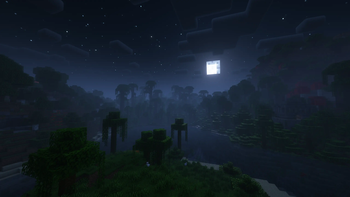
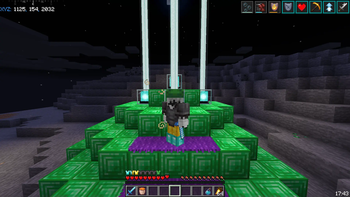
Screenshots
About this Modpack
T.O.M

This Modrinth exclusive, Quality of Life modpack includes a fair amount of cherry picked mods which have been fine-adjusted for your enjoyment and peace of mind. See screenshots on Gallery!
No server-side mods, neither cheats nor unfair advantages. Just a vanilla friendly and game enhancing experience!
Discontinued
I started taking a C++ course and I really have no will or time to continue maintaining this modpack, even though I like it.
So the statement is official: T.O.M is depricated
There is an extremely small chance I'll continue the project in future, but I doubt it. It's really a pain to update from version to version.
If you are willing, please fork the pack and carry the project, it's a shame.
Thanks for all the love I got! I love y'all <3
🌃 Featuring
The base modpack:
- Fabulously Optimized (with some mod and config adjustments)
The unique mods (A-Z • Library mods excluded):
Click me!
- 3D Skin Layers → by tr7zw
- Adaptive Tooltips → by isXander
- AppleSkin → by squeek502
- Armor Chroma → by A5b84
- Better Recipe Book → by marshmallow
- Blur → by Motschen
- Chat Heads → by dzdwdz
- Chat Patches → by OBro1961
- Chunks Fade In → by kerudion
- CleanF3 → by tyrannus00
- Controlify → by isXander
- Cosmetica → by eyezahhhh
- Draggable Resource Packs → by mrmelon54
- Enhanced Attack Indicator → by Minenash
- Emotecraft → by KosmX
- Falling Leaves → by randommcsomethin
- Held Item Info → by A5b84
- KronHUD → by DarkKronicle
- Loading Screen Tips → by UltrusBot
- NotEnoughAnimations → by tr7zw
- Online Emotes → by dima_dencep
- Presence Footsteps → by Sollace
- Replay Mod → by Johni0702
- ScreenFX → by LaryIsland
- ShulkerBoxTooltip → by MisterPeModder
- SimpleStatus → by Simply_Kel
- Smooth Swapping → by Schauweg
- StairAutoJump → by theRookieCoder
- Status Effect Bars → by A5b84
- Tiny Item Animations → by Trivaxy
- World Host → by Gaming32
- Xander's Sodium Options → by isXander
The amazing resource packs:
- Fresh Animations, by FreshLX (bundled from CF 🤮, until it comes to Modrinth)
- Dark Everywhere, by vindocel
☎️ Contact
For feature/mod requests and bug reports, use the Codeberg issues.
For support, discussion abour T.O.M etc. join T.O.M's Discord server.
Both are linked under External resources, probably on the left of your screen.
❓ FAQ
- Q: Where's the minimap?!?!?
A: I've been using a minimap & world map for at least half a year and I realized that it's an unfair and vanilla replacing addition. With a mini & world map you never get to use a nice mechanic of Minecraft, Cartography. You never get to make a map with banner points or a book with coordinates in your inventory to get around. It removes more difficulty and fun than it adds as a mod. Second, performance. Run your game with and without a minimap and compare. The performance cost is so high that it's just not worth it.
- Q: Why StairAutoJump then? Isn't that an unfair advantage?
A: Actually, no. If this was to be considered an unfair advantage, then zoom would too. Auto Jump is an accessibility feature, anyone can enable it in vanilla. So is FOV.
- Q: Why not Quilt?
A: Since T.O.M is built on Fabulously Optimized, it'll follow FO's judjement regarding technical changes such as the mod loader. Inform yourself on the situation on fabulously-optimized#257
- Q: Backports? Support for non-latest versions?
A: T.O.M aims for the latest Minecraft stable release. Therefore there'll be no backports nor support for non-latest versions of the game.
- Q: What does the name stand for?
A: The full story is located in the docs!
- Q: How does version numbering work?
A: The format is x.y.z. x changes with every new major Minecraft release, y with every new minor Minecraft release and z with every important modpack update within the minor MC release.
I recommend running the latest x.y.z release.
- Q: Why is chat reporting disabled in most places?
A: To protect your privacy and your account from inaccurate bans, chat reporting is disabled everywhere possible. For more information read the FO FAQ regarding chat reporting.
- Q: Is there anything else I should be aware of?
A: T.O.M is not endorsed by Fabulously Optimized or any of its contributors or moderators (except me of course). Other than that, make sure to read FO's disclaimers.
👥 Credits
Thanks to:
- robotkoer, for making the amazing Fabulously Optimized modpack
- Every single developer of all the mods and resource packs included in T.O.M
- comp500, for creating the amazing packwiz tool, which I use to maintain T.O.M
- Modrinth, for making this pack possible to be published to a greater Minecraft modding audience
- Codeberg, for hosting an open source, Forgejo based git service where I host T.O.M
- My friend Chistandr, for constantly asking me for my mod list
- Everybody who asked for my mod list, including Zxhir
📜 License
This modpack is open source and licensed under the GNU LGPLv3 License.
Please refer to the source code for more legal info.
Available Versions
How to Set Up a T.O.M Server
Order Server
Choose at least 6 GB RAM (8 GB recommended for T.O.M). Based on player count: per 5 players.
Install Modpack in Dashboard
Open the modpack browser in the dashboard, search for "T.O.M" and click "Install". The fabric loader and Minecraft 1.19.4 are configured automatically.
Start Server & Play
Start the server – all mods are loaded automatically. Share the server IP with friends and play together!
Frequently Asked Questions
T.O.M server crashes or won't start – what to do?
Most common causes: insufficient RAM or wrong fabric loader. Check latest.log for "OutOfMemoryError" → increase RAM to at least 8 GB. For "Mixin" or "ClassNotFoundException" errors: modpack version and loader don't match. With Mado Hosting, loader and Minecraft version are auto-configured on modpack install – preventing most startup issues.
How much RAM does a T.O.M server really need?
Minimum 6 GB, recommended 8 GB for stable performance. per 5 players. Important: Minecraft modpacks need more RAM than vanilla – plan extra per additional player. With Mado Hosting, you can scale RAM up live at any time without data loss (from €12/month).
Can I add custom mods to T.O.M without conflicts?
Yes, but check compatibility: only use mods for the same loader (fabric) and same Minecraft version (1.19.4). Common issues: ID conflicts with recipe mods and incompatible coremod versions. The Mado dashboard mod browser only shows compatible mods and warns about known conflicts.
T.O.M server lagging – performance tips
1) Increase RAM to 8 GB+. 2) Reduce server view-distance to 8 (server.properties). 3) Pre-generate chunks with the "Chunky" plugin. 4) Use /spark profiler to check which mods consume the most tick time. With Mado Hosting, all servers run on NVMe SSDs with dedicated CPU cores – eliminating hardware as a bottleneck.
Similar Modpacks
![Cobblemon Official Modpack [Fabric]](https://cdn.modrinth.com/data/5FFgwNNP/e7f9ee2e9d361623847853fe2ddce42f519ee64f.png)
![COBBLEVERSE - Pokemon Adventure [Cobblemon]](https://cdn.modrinth.com/data/Jkb29YJU/581ecf54530972afb18a04660afd820f2f24f6c7.png)
![Better MC [FABRIC] - BMC2](https://cdn.modrinth.com/data/shFhR8Vx/a19c2bcb51d38f32f138d3607e91cb2b7b8e387f_96.webp)


![Better MC [FORGE] - BMC4](https://cdn.modrinth.com/data/4BV47HRn/7f5ef7cc61b2593609aabef3ed07a866a4f11b73_96.webp)
Rent T.O.M Server
Start your own server with automatic modpack installation.
Details
- License
- GNU Lesser General Public License v3.0 only
- Server-side
- Unsupported
- Client-side
- Required
Supported Versions
Start your T.O.M Server now
From €12.00/month with 8 GB RAM for the best performance.
Configure Server →