
Toppermon
A Cobblemon Modpack that aims to provide a smooth experience for lovers of both the Pokémon Anime and games.
Screenshots

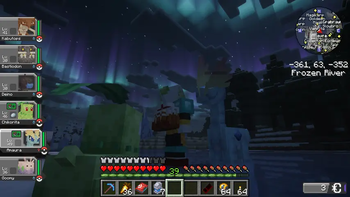


About this Modpack
A simple Cobblemon Modpack that aims to provide a smooth experience for lovers of both the Pokémon Anime and games. The Modpack can be played alone or with a group of friends.
For some Quests, multiple Players are needed. I whole-heartedly recommend to play in a group of 1-8 Players.
Features:
- Capture and train Pokémon
- Explore a beatiful world generated with Terralith
- Explore dozens of new buildings to find loot and legendary Pokémon
- Challenge NPC trainers and Gym Leaders to become the Pokémon Master
- Trade and battle with your friends (Server required)!
- Settle down and enjoy building with new decorative elements
- Quests that help Players adjust to the nature of the modpack
- Try out new foods, cook with and for your Pokémon
- Evolve your Pokémon into their Mega-Evolutions
- Search for new Pokémon by using the Minimap
- Take Pictures of your Pokémon
- Pokémon Music plays during exploration
- Pre-installed Shader
- "Endgame" activities such as shiny hunting, randomly generated gyms that scale with the players level, hunting for legendaries, breeding Pokémon and more!
This Modpack is intended as comfortable package that stays close to the Pokémon games and add enough content to satisfy any player for a long time.
There is also support for FTBQuests, but due to it not being on Modrinth it has to be installed manually.
Extra Mods
For full functionality you will need to manually install the following mods. If you don't you will lose out on all the Quests but the rest of the modpack will work fine.FTB Quest
FTB Library
FTB Teams
FTB XMod Compat
ExtraQuests
Cobblemon Quests
The Quests are still being expanded and are expected to be finshed around Dec. 20th 2025
Warning!
As Cobblemon sometimes needs to load a lot of different mobs at once when loading new chunks, I recommend giving the pack between 6 ~ 8 GB of RAM.
Available Versions
How to Set Up a Toppermon Server
Order Server
Choose at least 6 GB RAM (8 GB recommended for Toppermon). Based on player count: per 5 players.
Install Modpack in Dashboard
Open the modpack browser in the dashboard, search for "Toppermon" and click "Install". The fabric loader and Minecraft 1.21.1 are configured automatically.
Start Server & Play
Start the server – all mods are loaded automatically. Share the server IP with friends and play together!
Frequently Asked Questions
Toppermon server crashes or won't start – what to do?
Most common causes: insufficient RAM or wrong fabric loader. Check latest.log for "OutOfMemoryError" → increase RAM to at least 8 GB. For "Mixin" or "ClassNotFoundException" errors: modpack version and loader don't match. With Mado Hosting, loader and Minecraft version are auto-configured on modpack install – preventing most startup issues.
How much RAM does a Toppermon server really need?
Minimum 6 GB, recommended 8 GB for stable performance. per 5 players. Important: Minecraft modpacks need more RAM than vanilla – plan extra per additional player. With Mado Hosting, you can scale RAM up live at any time without data loss (from €12/month).
Can I add custom mods to Toppermon without conflicts?
Yes, but check compatibility: only use mods for the same loader (fabric) and same Minecraft version (1.21.1). Common issues: ID conflicts with recipe mods and incompatible coremod versions. The Mado dashboard mod browser only shows compatible mods and warns about known conflicts.
Toppermon server lagging – performance tips
1) Increase RAM to 8 GB+. 2) Reduce server view-distance to 8 (server.properties). 3) Pre-generate chunks with the "Chunky" plugin. 4) Use /spark profiler to check which mods consume the most tick time. With Mado Hosting, all servers run on NVMe SSDs with dedicated CPU cores – eliminating hardware as a bottleneck.
Similar Modpacks
![Cobblemon Official Modpack [Fabric]](https://cdn.modrinth.com/data/5FFgwNNP/e7f9ee2e9d361623847853fe2ddce42f519ee64f.png)
![COBBLEVERSE - Pokemon Adventure [Cobblemon]](https://cdn.modrinth.com/data/Jkb29YJU/581ecf54530972afb18a04660afd820f2f24f6c7.png)
![Better MC [FABRIC] - BMC2](https://cdn.modrinth.com/data/shFhR8Vx/a19c2bcb51d38f32f138d3607e91cb2b7b8e387f_96.webp)


![Better MC [FORGE] - BMC4](https://cdn.modrinth.com/data/4BV47HRn/7f5ef7cc61b2593609aabef3ed07a866a4f11b73_96.webp)
Rent Toppermon Server
Start your own server with automatic modpack installation.
Supported Versions
Start your Toppermon Server now
From €12.00/month with 8 GB RAM for the best performance.
Configure Server →