Trailercrafted
a Minecraft adventure modpack with the look of the trailers
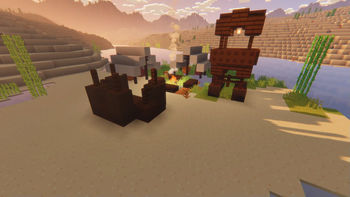
Screenshots




About this Modpack
Trailercrafted A Minecraft Vanilla+ adventure modpack with the the look of the Trailers that aims to improve performance, visuals, and exploration.
Key Mods:
Spoiler
Better Combat
Distant Horizons
Dungeons And Taverns
Key Resource packs:
Bare Bones
Fresh Animations
World Generation:
Spoiler
Amplified Nether
Dungeons And Taverns
Dungeons and Taverns Desert Temple Replacement
Dungeons and Taverns Jungle Temple Replacement
Dungeons and Taverns Ocean Monument Replacement
Dungeons and Taverns Stronghold Overhaul
Dungeons and Taverns Swamp Hut Overhaul
Geophilic
Nullscape
Sparse Structures
Tectonic
Resource Packs:
Spoiler
Bare Bones
Bare Bones - Low On Fire
Bare Bones Glass CTM fix
Bare Bones Mod Compat + Extra
Bare Bones Patches
Bare Bones Simple CTM
Bare Bones x Eating Animation
Bare Bones x Fresh Animations
Fresh Animations
Fresh Moves
Sounds:
Spoiler
Ambient Sounds
Auditory Continued
Presence Footsteps
Sound Physics Remasterd
Visuals:
Spoiler
BSL Shaders
Continuity
Eating Animation
Explosive Enhancement
Falling Leaves
First-person Model
Make Bubbles Pop
Not Enough Animations
Particle Rain
Particular
Shulker Box Tooltip
Snow! Real Magic!
Visuality
Wakes
Vanilla+:
Spoiler
Advancement Plaques
AppleSkin
Better Advancements
Better Mount HUD
Better Third Person
Better F3
Cherished Worlds
Clumps
Disable Custom Worlds Advice
Easy Anvils
Easy Elytra Takeoff
Easy Magic
Fast Minecart
HerdsPanic
Horse Buff
ImmersiveThunder
InvMove
Item Highlighter
Let Me Despawn
Mod Menu
Mouse Tweaks
RpgDifficulty
ScalableLux
Smooth Scrolling
Tiny Item Animations
Trade
Cycling
Vanilla Refresh
Villager Names
YDM's Weapon Master
Zoomify
Performance:
Spoiler
Concurrent Chunk Management Engine (Fabric)
Cull Leaves
Debugify
Entity Culling
ImmediatelyFast
Indium
Lithium
Memory Leak Fix
ModernFix
More Culling
Sodium
(There are also many suport mods)
Available Versions
How to Set Up a Trailercrafted Server
Order Server
Choose at least 6 GB RAM (8 GB recommended for Trailercrafted). Based on player count: per 5 players.
Install Modpack in Dashboard
Open the modpack browser in the dashboard, search for "Trailercrafted" and click "Install". The fabric loader and Minecraft 1.21.1 are configured automatically.
Start Server & Play
Start the server – all mods are loaded automatically. Share the server IP with friends and play together!
Frequently Asked Questions
Trailercrafted server crashes or won't start – what to do?
Most common causes: insufficient RAM or wrong fabric loader. Check latest.log for "OutOfMemoryError" → increase RAM to at least 8 GB. For "Mixin" or "ClassNotFoundException" errors: modpack version and loader don't match. With Mado Hosting, loader and Minecraft version are auto-configured on modpack install – preventing most startup issues.
How much RAM does a Trailercrafted server really need?
Minimum 6 GB, recommended 8 GB for stable performance. per 5 players. Important: Minecraft modpacks need more RAM than vanilla – plan extra per additional player. With Mado Hosting, you can scale RAM up live at any time without data loss (from €12/month).
Can I add custom mods to Trailercrafted without conflicts?
Yes, but check compatibility: only use mods for the same loader (fabric) and same Minecraft version (1.21.1). Common issues: ID conflicts with recipe mods and incompatible coremod versions. The Mado dashboard mod browser only shows compatible mods and warns about known conflicts.
Trailercrafted server lagging – performance tips
1) Increase RAM to 8 GB+. 2) Reduce server view-distance to 8 (server.properties). 3) Pre-generate chunks with the "Chunky" plugin. 4) Use /spark profiler to check which mods consume the most tick time. With Mado Hosting, all servers run on NVMe SSDs with dedicated CPU cores – eliminating hardware as a bottleneck.
Similar Modpacks
![Cobblemon Official Modpack [Fabric]](https://cdn.modrinth.com/data/5FFgwNNP/e7f9ee2e9d361623847853fe2ddce42f519ee64f.png)
![COBBLEVERSE - Pokemon Adventure [Cobblemon]](https://cdn.modrinth.com/data/Jkb29YJU/581ecf54530972afb18a04660afd820f2f24f6c7.png)
![Better MC [FABRIC] - BMC2](https://cdn.modrinth.com/data/shFhR8Vx/a19c2bcb51d38f32f138d3607e91cb2b7b8e387f_96.webp)


![Better MC [FORGE] - BMC4](https://cdn.modrinth.com/data/4BV47HRn/7f5ef7cc61b2593609aabef3ed07a866a4f11b73_96.webp)
Rent Trailercrafted Server
Start your own server with automatic modpack installation.
Supported Versions
Start your Trailercrafted Server now
From €12.00/month with 8 GB RAM for the best performance.
Configure Server →