
Transit Scape
Include MTR addons that are compatible with each other.
Screenshots
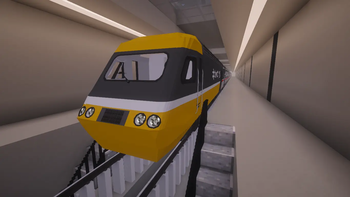
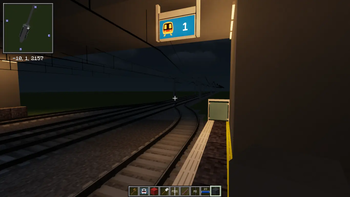
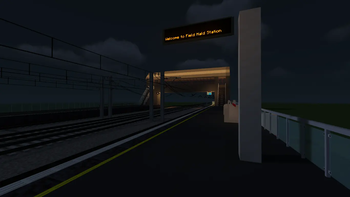
About this Modpack
TransitScape: The Ultimate Minecraft Transit Experience
TransitScape is the definitive, highly-optimized modpack designed for creators and engineers to build and manage realistic public rail networks.
Built around the powerful Minecraft Transit Railway (MTR), this pack integrates essential addons like TJMetro, MSD (Station Decoration), and the MTR France Addon to give you unparalleled control over routes, stations, and custom train models.
Whether you are designing a sprawling subterranean subway or a high-speed intercity corridor, TransitScape provides the performance (via Sodium & Lithium) and the precision (via Chisels & Bits) to bring your vision to life. Simply install, and start connecting your world!
TransitScape:终极 Minecraft 交通建设整合包
TransitScape 是一个权威性且高度优化的模组包,专为创建和管理逼真的公共铁路网络而设计。
本整合包以强大的 Minecraft Transit Railway (MTR) 为核心,深度集成了 TJMetroMSD (车站装饰) 以及 MTR France Addon 等关键插件,让您对线路布局、车站规划及自定义列车模型拥有无与伦比的控制力。
结合了顶级性能优化工具(Sodium/Lithium)与细节美化工具(Chisels & Bits),TransitScape 为您提供了一个完整、流畅且沉浸式的平台,助您打造从庞大地铁系统到高速城际铁路的一切蓝图。只需安装,即可开始连接您的世界!
🖥️ Server Hosting / 服务器托管
English:
We have officially released a separate ZIP folder for servers to make hosting easier! This pack contains only the necessary mods and resourcepack folders, removing all client-side bloat.
📥 To download the Server Pack, please join our Discord server: https://discord.gg/H7rFCQpv58
中文:
我们正式发布了一个独立的服务器 ZIP 压缩包,让开服变得更加简单!该压缩包仅包含必要的 mods 和 resourcepack 文件夹,去处了所有客户端冗余文件。
📥 如需下载服务器包,请加入我们的 Discord 服务器: https://discord.gg/H7rFCQpv58
🖥️ System Requirements / 系统配置要求
To ensure a smooth experience while building complex transit networks, please refer to the following specifications:
| Component | Minimum (Low Settings) | Recommended (Standard) |
|---|---|---|
| Allocated RAM | 8 GB | 10 GB |
| Total System RAM | 12 GB | 16 GB |
| CPU | Intel i5-4th Gen / Ryzen 3 | Intel i5-10th Gen / Ryzen 5 |
| GPU | Intel Integrated Graphics | NVIDIA GTX 1050 / RX 560 |
| Storage | 3 GB Free (SSD) | 8 GB Free (NVMe SSD) |
[!IMPORTANT]
Pro Tip: We recommend using the latest version of Java 17 (for 1.20.1/1.19.4) and ensuring your graphics drivers are up to date to prevent OpenGL errors during world rendering.
🛠️ Key Included Features / 包含的核心功能
- Core: Minecraft Transit Railway (MTR)
- Expansion: TJMetro, Transit Manager, MSD (Station Decoration), MTR France Addon
- Performance: Sodium, Lithium, Starlight, Iris Shaders
- Detailing: Chisels & Bits, Simply Light, Slideshow (Custom Displays)
- QoL: Xaero's Minimap, Sound Physics Remastered, Better Third Person
💬 Support & Community / 支持与社区
Encountering issues or have questions? Join our community for immediate help, tutorials, and project sharing!
🔗 Discord Support: Join the TransitScape Discord
Available Versions
How to Set Up a Transit Scape Server
Order Server
Choose at least 6 GB RAM (8 GB recommended for Transit Scape). Based on player count: per 5 players.
Install Modpack in Dashboard
Open the modpack browser in the dashboard, search for "Transit Scape" and click "Install". The fabric loader and Minecraft 1.20.1 are configured automatically.
Start Server & Play
Start the server – all mods are loaded automatically. Share the server IP with friends and play together!
Frequently Asked Questions
Transit Scape server crashes or won't start – what to do?
Most common causes: insufficient RAM or wrong fabric loader. Check latest.log for "OutOfMemoryError" → increase RAM to at least 8 GB. For "Mixin" or "ClassNotFoundException" errors: modpack version and loader don't match. With Mado Hosting, loader and Minecraft version are auto-configured on modpack install – preventing most startup issues.
How much RAM does a Transit Scape server really need?
Minimum 6 GB, recommended 8 GB for stable performance. per 5 players. Important: Minecraft modpacks need more RAM than vanilla – plan extra per additional player. With Mado Hosting, you can scale RAM up live at any time without data loss (from €12/month).
Can I add custom mods to Transit Scape without conflicts?
Yes, but check compatibility: only use mods for the same loader (fabric) and same Minecraft version (1.20.1). Common issues: ID conflicts with recipe mods and incompatible coremod versions. The Mado dashboard mod browser only shows compatible mods and warns about known conflicts.
Transit Scape server lagging – performance tips
1) Increase RAM to 8 GB+. 2) Reduce server view-distance to 8 (server.properties). 3) Pre-generate chunks with the "Chunky" plugin. 4) Use /spark profiler to check which mods consume the most tick time. With Mado Hosting, all servers run on NVMe SSDs with dedicated CPU cores – eliminating hardware as a bottleneck.
Similar Modpacks


![Cobblemon Official Modpack [Fabric]](https://cdn.modrinth.com/data/5FFgwNNP/e7f9ee2e9d361623847853fe2ddce42f519ee64f.png)
![COBBLEVERSE - Pokemon Adventure [Cobblemon]](https://cdn.modrinth.com/data/Jkb29YJU/581ecf54530972afb18a04660afd820f2f24f6c7.png)
![Better MC [FABRIC] - BMC2](https://cdn.modrinth.com/data/shFhR8Vx/a19c2bcb51d38f32f138d3607e91cb2b7b8e387f_96.webp)

Rent Transit Scape Server
Start your own server with automatic modpack installation.
Details
- License
- GNU General Public License v3.0 or later
- Server-side
- Required
- Client-side
- Required
Supported Versions
Start your Transit Scape Server now
From €12.00/month with 8 GB RAM for the best performance.
Configure Server →