
Triton
Opinionated optimization and QOL modpack for clients and servers
About this Modpack
Triton
Triton is a modern, opinionated QOL & optimization focused modpack, mainly meant for survival gameplay.
Why "opinionated"?
Triton is meant to be a plug&play experience, with as little further configuration as possible required after installation to get to a good Minecraft experience.
This is why lots of features are included out-of-the-box. If you're looking for a minimal modpack purely focused on performance, try Fabulously Optimized.
Features
⚡ General optimization
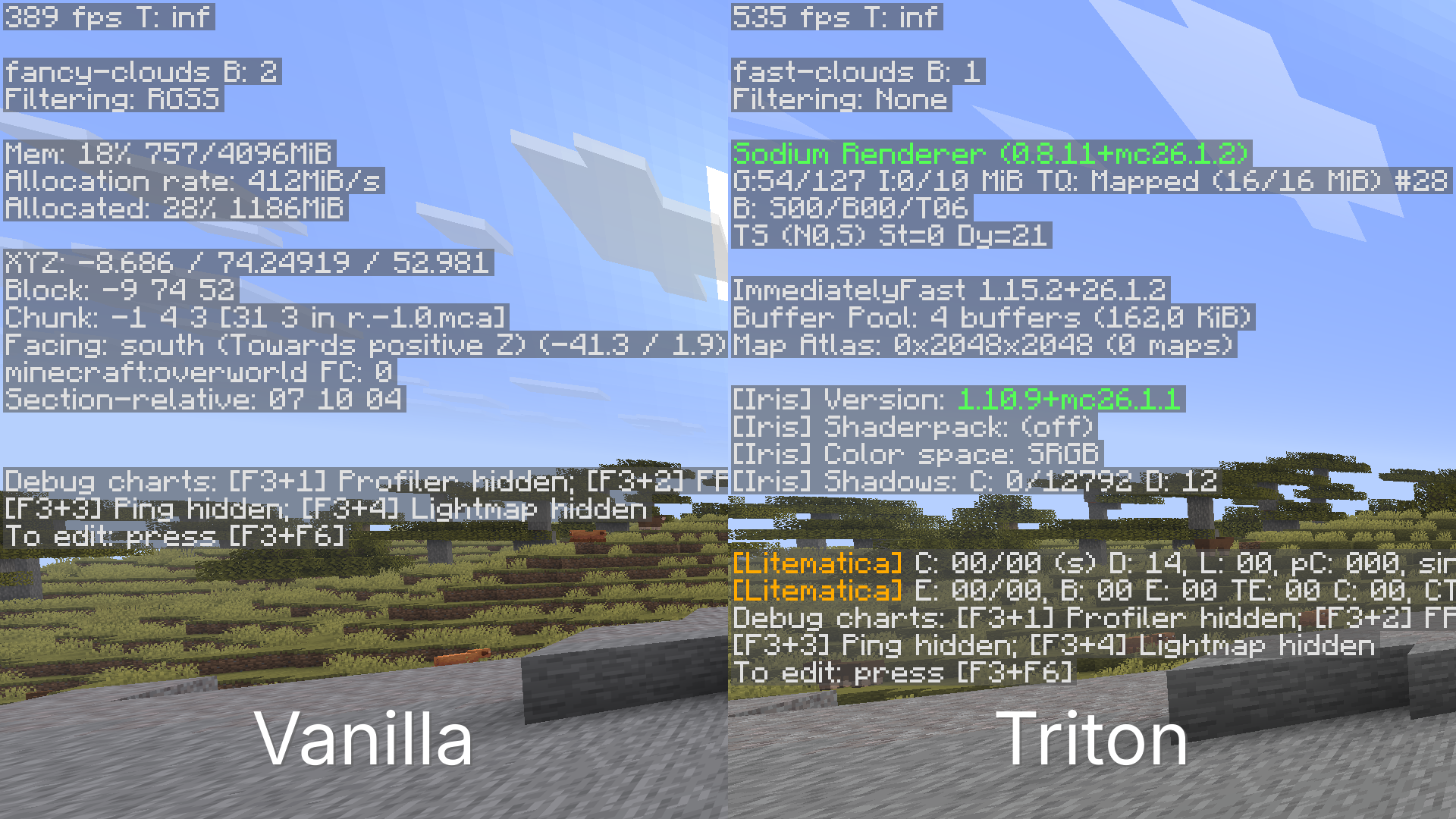
Thanks to performance mods like Sodium and Lithium, Triton may improve performance both in clients and servers.
In the same world and on the same system with default settings in both scenarios, Triton provides a ~150 fps increase compared to vanilla Minecraft.
🧭 OptiFine parity
Most OptiFine features, such as Better Grass, Dynamic Lighting, capes, custom resource pack features, shaders and more are available on Triton.
🎤 Voice Chat
Voice chat through Simple Voice Chat is included. When joining a world or server for the first time, you will get prompted through chat to configure your audio settings.
🗺️ World & mini maps
A minimap and a world map are included thanks to Xaero's mods. Please note that the Cave Mode and Entity Radar features are disabled by default for fairer play, but they can be re-enabled in singleplayer or if the server allows it.
✨ UI Improvements
This list is non-exhaustive.
- Smoother scrolling, item, and player animations.
- Dark mode by default
- The XP bar shows both the experience level and Locator Bar at the same time at all times, also replacing colored dots with the players' skins.
- The armor bar changes textures based on the armor you're wearing.
- The hunger bar shows saturation, and each food item shows how much hunger points it recovers in its tooltips.
- You can see your own name in third person and in the inventory.
- View bobbing and hand bobbing are separated, so you can keep your screen still while still seeing the hand bobbing animation.
🔨 Utility mods
This list is non-exhaustive. Keep server rules in mind when playing multiplayer to avoid getting banned.
- Included auto-clicker: You can set up the in-game autoclicker to AFK at farms. The advantage of having it in-game is that you can do other things on your computer while it is running, and you can set it up to respect the attack cooldown.
- Freecam: You can freely move your player camera to view builds from a higher angle.
- Tweakeroo and Fullbright: The fullbright tweak in Tweakeroo is bound by default to Ctrl + G.
- MiniHUD: By default, you can see your coordinates and IGT in the bottom-left corner, but MiniHUD can be configured to do much more. Check its page for more info.
- Litematica: Litematica is installed by default, and the tool item is disabled.
- In-game calculator: A calculator can be accessed through the
/calccommand in chat, and it also has some handy tools for Minecraft, like/calc itemtostack.
Keybinds
| Action | Key |
|---|---|
| VC settings | Ctrl + V |
| Mute VC | Ctrl + M |
| Autoclicker config | Ctrl + O |
| Toggle autoclicker | Ctrl + I |
| Toggle Freecam | F4 |
| Zoom | C |
| HD screenshot | F9 |
| Toggle Fullbright | Ctrl + G |
| New Waypoint | B |
Set up a Triton server
While Triton works perfectly fine client-side only, creating a server with it can unlock features such as Voice Chat for your players, and optimize it as well. Even after installing Triton on your server, Vanilla players will be able to join as well.
Option 1 (recommended)
If your hosting platform or panel has a way to install Modrinth modpacks directly, use that for the best experience.
Option 2
If you're self-hosting or your hosting platform doesn't support Modrinth modpack installs directly, the next best option is using packwiz-installer-bootstrap. Keep in mind that this option can only install the latest version of the modpack.
After you've set up your Fabric server, follow this guide to install Triton:
- Make sure you have a supported version of Java 25+ installed.
- Download the latest release of
packwiz-installer-bootstrapfrom here and place it in the root of your server folder. - Run this command in any terminal, not your MC server console:
java -jar packwiz-installer-bootstrap.jar -g -s server https://raw.githubusercontent.com/Alexciao/triton/refs/heads/master/pack.toml - Run your server as normal.
Available Versions
How to Set Up a Triton Server
Order Server
Choose at least 4 GB RAM (6 GB recommended for Triton). Based on player count: per 8 players.
Install Modpack in Dashboard
Open the modpack browser in the dashboard, search for "Triton" and click "Install". The fabric loader and Minecraft 26.1.2 are configured automatically.
Start Server & Play
Start the server – all mods are loaded automatically. Share the server IP with friends and play together!
Frequently Asked Questions
Triton server crashes or won't start – what to do?
Most common causes: insufficient RAM or wrong fabric loader. Check latest.log for "OutOfMemoryError" → increase RAM to at least 6 GB. For "Mixin" or "ClassNotFoundException" errors: modpack version and loader don't match. With Mado Hosting, loader and Minecraft version are auto-configured on modpack install – preventing most startup issues.
How much RAM does a Triton server really need?
Minimum 4 GB, recommended 6 GB for stable performance. per 8 players. Important: Minecraft modpacks need more RAM than vanilla – plan extra per additional player. With Mado Hosting, you can scale RAM up live at any time without data loss (from €8/month).
Can I add custom mods to Triton without conflicts?
Yes, but check compatibility: only use mods for the same loader (fabric) and same Minecraft version (26.1.2). Common issues: ID conflicts with recipe mods and incompatible coremod versions. The Mado dashboard mod browser only shows compatible mods and warns about known conflicts.
Triton server lagging – performance tips
1) Increase RAM to 6 GB+. 2) Reduce server view-distance to 8 (server.properties). 3) Pre-generate chunks with the "Chunky" plugin. 4) Use /spark profiler to check which mods consume the most tick time. With Mado Hosting, all servers run on NVMe SSDs with dedicated CPU cores – eliminating hardware as a bottleneck.
Similar Modpacks

![Cobblemon Official Modpack [Fabric]](https://cdn.modrinth.com/data/5FFgwNNP/e7f9ee2e9d361623847853fe2ddce42f519ee64f.png)
![COBBLEVERSE - Pokemon Adventure [Cobblemon]](https://cdn.modrinth.com/data/Jkb29YJU/581ecf54530972afb18a04660afd820f2f24f6c7.png)
![Better MC [FABRIC] - BMC2](https://cdn.modrinth.com/data/shFhR8Vx/a19c2bcb51d38f32f138d3607e91cb2b7b8e387f_96.webp)


Rent Triton Server
Start your own server with automatic modpack installation.
Details
- License
- GNU Lesser General Public License v3.0 or later
- Server-side
- Optional
- Client-side
- Optional
Supported Versions
Start your Triton Server now
From €8.00/month with 6 GB RAM for the best performance.
Configure Server →