
Turtle's Auxiliar Modpack
26.1.2 stable - A liteweight, optimize and auxiliar for Vanilla Minecraft's performance Modpack, For Fabric and Quilt!
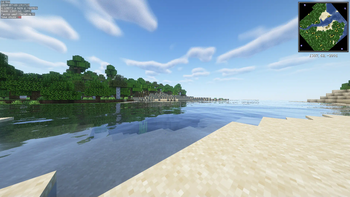
Screenshots
About this Modpack
You may need to disable Caxton on macOS
You need to disable PCA Protocol mobile devices
We advise players use Prism Launcher(Have better translations than ATLauncher) to play this modpack on Windows and macOS and use ATLauncher(Won't crash on Linux) for other OS,because it has so many features other Minecraft Launchers don't have and it can update modpacks easily
ColorMC and some other launchers will download mods in the modpack that should only be installed in server, so we won't support them
This Modpack is more made for Chinese,so there are some mods made for Chinese
We recommend all players using x86_64 Windows enable all the optional mods in this modpack, it has some improvements
你可能需要在macOS上禁用 Caxton
你需要在移动设备上禁用 PCA Protocol 和 caramelChat
我们建议各位玩家在Windows和macOS平台使用Prism Launcher(有比ATLauncher更优质的翻译)及在其他平台使用ATLauncher(不会在Linux上崩溃)来游玩该整合包,因为其拥有很多其它启动器没有的功能且它可以简单地更新整合包
ColorMC和其他部分启动器会安装整合包内应只在服务端安装的模组,所以我们不为其提供支持
该整合包更多为中国玩家制作,所以包内会有一些为中国玩家设计的模组
我们建议所有使用x86_64 Windows的玩家启用此整合包中的所有可选模组,内含一些改进
中文简介在英文简介的下方
English:
A modpack with optimized and auxiliary mods
Lightweight
Turtle's Modpack will stay lightweight forever, it means that it's not necessary to have a good enough hardware to run this Modpack
Optimization
Turtle's Modpack uses Sodium and other good,modern,open-source optimized mods to boost FPS,so I advise you to donate to mod authors and contributors like Jellysquid(One of authors of Sodium) if you can.
Auxiliar
Turtle's Modpack have Tweakeroo,Litematica and other good mods to boost your gaming experience
macOS & Linux Support
Why not play Minecraft in everywhere?Some mods in this modpack fixed some bugs only in macOS and Linux.Play Minecraft on this Modpack is much easier than on Vanilla
Radical feature updates
Compared to other modpacks of the same type, this modpack has a more radical feature update, which means you can use the latest features of the mod in a timely manner
Install Guide For Server Owners
We recommend server owners using mrpack-install for their modding server publish on Modrinth
- Download mrpack-install in this website
- move it in a empty folder or create a environment variable for it
- ↓
If you are creating a new server:
type this on your terminal(open terminal in the folder you move mrpack-install in it if you didn't create a environment variable for it)
mrpack-install turtles-modpack [optional version number]
(Universal)
or
./mrpack-install turtles-modpack [optional version number]
(Windows)
Then a Minecraft Server will be created in the mc folder
4.If you are modify/update an old server:
move the config folder and mods folder in the server you created in step 3 to your old server, don't forget to install fabric on your server
Q&A
Q:English description is a little strange?
A:I'm a Chinese middle school student so the English-ver description may be a little strange,it's normal
Q:What version should I use?
A:
If you only need optimized and not so many auxiliary mods,just download the Optimize version
If you want full mods I use and want full gaming experience,then download the Auxiliar version
Q:Report problems?
A:Check the "Links" part and switch to Github for reporting problems
Q:Will older version will be keep-updated when the new version become released?
A:I don't want to keep update the old versions because I want more players play the newest version of Minecraft,so don't ask me about this and actually you don't have any way to ask me anything lol
Q:Forge/Neoforge?
A:Due to my personal position, I won't make a Forge version, but I will probably make a Neoforge version
中文:
一个内含一些优化模组和实用模组的整合包
轻量
Turtle's Modpack会永远保持轻量,这意味着没有必要拥有足够好的硬件来运行该整合包
优化
Turtle's Modpack使用Sodium以及其它优秀、现代、开源的优化模组,所以如果你有条件,我建议你去赞助这些优秀的模组作者如Jellysquid(Sodium其中一位开发者)
辅助
Turtle's Modpack内含Tweakeroo、Litematica以及其它优秀模组来提升你的游戏体验
macOS和Linux支持
为什么不在任何地方玩Minecraft呢?整合包中的一些模组修复了一些仅在macOS和Linux上的bug,玩该Minecraft整合包比原版更加简单
激进的功能更新
相对于其它同类型的整合包,该整合包拥有更加激进的功能更新,这意味着你可以及时使用到模组的最新功能
针对服主的安装向导
我们建议服主使用 mrpack-install 来安装托管在Modrinth上的服务器整合包
- 通过该网站安装 mrpack-install
- 移动该文件至一个空文件夹或为其创建一个环境变量
- ↓
如果你在创建一个新服务器:
在终端打出:(如果你没有为其创建环境变量,请在你移动mrpack-install至的那个文件夹内打开终端)
mrpack-install turtles-modpack [可选版本号]
(通用)
或者
./mrpack-install turtles-modpack [可选版本号]
(Windows)
之后一个Minecraft服务器会创建在在mc文件夹内
4.如果你在修改/更新你的服务器:
移动你在第三步创建的服务器中的config文件夹和mods文件夹至你的服务器
常见问题解答
Q:我应该使用什么版本?
A:
如果你只是想要优化且不想要太多的辅助模组,请下载“优化”(Optimize)版本
如果你想要我使用的所有模组且想要完整的游戏体验,则下载“辅助”(Auxiliar)版本
Q:反馈问题?
A:查看右边的“链接(Links)”部分跳转至Github以反馈问题
Q:新的版本更新后,旧版本会继续更新吗?
A:我不想继续更新旧版本,因为我想让更多的玩家去玩新版本,所以不要问我这个问题,你也问不了
Q:Forge/Neoforge版本?
A:由于我个人立场原因,我不会制作Forge版本,但可能会制作Neoforge版本
Available Versions
How to Set Up a Turtle's Auxiliar Modpack Server
Order Server
Choose at least 4 GB RAM (6 GB recommended for Turtle's Auxiliar Modpack). Based on player count: per 8 players.
Install Modpack in Dashboard
Open the modpack browser in the dashboard, search for "Turtle's Auxiliar Modpack" and click "Install". The fabric loader and Minecraft 26.1.2 are configured automatically.
Start Server & Play
Start the server – all mods are loaded automatically. Share the server IP with friends and play together!
Frequently Asked Questions
Turtle's Auxiliar Modpack server crashes or won't start – what to do?
Most common causes: insufficient RAM or wrong fabric loader. Check latest.log for "OutOfMemoryError" → increase RAM to at least 6 GB. For "Mixin" or "ClassNotFoundException" errors: modpack version and loader don't match. With Mado Hosting, loader and Minecraft version are auto-configured on modpack install – preventing most startup issues.
How much RAM does a Turtle's Auxiliar Modpack server really need?
Minimum 4 GB, recommended 6 GB for stable performance. per 8 players. Important: Minecraft modpacks need more RAM than vanilla – plan extra per additional player. With Mado Hosting, you can scale RAM up live at any time without data loss (from €8/month).
Can I add custom mods to Turtle's Auxiliar Modpack without conflicts?
Yes, but check compatibility: only use mods for the same loader (fabric) and same Minecraft version (26.1.2). Common issues: ID conflicts with recipe mods and incompatible coremod versions. The Mado dashboard mod browser only shows compatible mods and warns about known conflicts.
Turtle's Auxiliar Modpack server lagging – performance tips
1) Increase RAM to 6 GB+. 2) Reduce server view-distance to 8 (server.properties). 3) Pre-generate chunks with the "Chunky" plugin. 4) Use /spark profiler to check which mods consume the most tick time. With Mado Hosting, all servers run on NVMe SSDs with dedicated CPU cores – eliminating hardware as a bottleneck.
Similar Modpacks

![Cobblemon Official Modpack [Fabric]](https://cdn.modrinth.com/data/5FFgwNNP/e7f9ee2e9d361623847853fe2ddce42f519ee64f.png)
![COBBLEVERSE - Pokemon Adventure [Cobblemon]](https://cdn.modrinth.com/data/Jkb29YJU/581ecf54530972afb18a04660afd820f2f24f6c7.png)
![Better MC [FABRIC] - BMC2](https://cdn.modrinth.com/data/shFhR8Vx/a19c2bcb51d38f32f138d3607e91cb2b7b8e387f_96.webp)


Rent Turtle's Auxiliar Modpack Server
Start your own server with automatic modpack installation.
Details
- License
- Creative Commons Attribution Non Commercial Share Alike 4.0 International
- Server-side
- Optional
- Client-side
- Optional
Supported Versions
Start your Turtle's Auxiliar Modpack Server now
From €8.00/month with 6 GB RAM for the best performance.
Configure Server →