
Tymers
Pack focused on exploration and building, with create integrations.
Screenshots
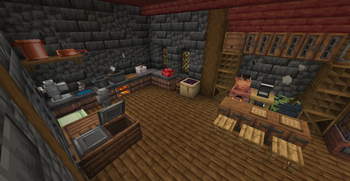
About this Modpack
This modpack was crafted to provide a fun and immersive experience for me and my friends, moving beyond the vanilla gameplay of Minecraft. It combines exploration, creativity, and a touch of chaos to create a well-rounded adventure.
At its core, the Create mod takes center stage, offering endless opportunities for innovation and automation. Build intricate contraptions, automate resource gathering, and bring your wildest mechanical ideas to life! To complement this, Biomes O' Plenty introduces a stunning variety of biomes, making exploration more exciting with breathtaking landscapes and unique resources.
For those who enjoy a cozy and agricultural experience, Farmer's Delight enhances farming with new crops, recipes, and tools, giving players more ways to grow, cook, and thrive. Early-game mobility gets a boost with Gliders, providing elytra-like mechanics to soar across the world before obtaining endgame gear. And if you’re a fan of adorable creatures, a selection of mods adds cute mobs to make the world feel more alive and charming.
Whether you're adventuring through new biomes, crafting delightful meals, tinkering with ingenious machines, or simply enjoying the company of cute creatures, this modpack ensures there's something for everyone. Gather your friends and dive into a Minecraft experience like no other—filled with discovery, innovation, and, of course, plenty of shenanigans!
Available Versions
How to Set Up a Tymers Server
Order Server
Choose at least 6 GB RAM (8 GB recommended for Tymers). Based on player count: per 5 players.
Install Modpack in Dashboard
Open the modpack browser in the dashboard, search for "Tymers" and click "Install". The fabric loader and Minecraft 1.20.1 are configured automatically.
Start Server & Play
Start the server – all mods are loaded automatically. Share the server IP with friends and play together!
Frequently Asked Questions
Tymers server crashes or won't start – what to do?
Most common causes: insufficient RAM or wrong fabric loader. Check latest.log for "OutOfMemoryError" → increase RAM to at least 8 GB. For "Mixin" or "ClassNotFoundException" errors: modpack version and loader don't match. With Mado Hosting, loader and Minecraft version are auto-configured on modpack install – preventing most startup issues.
How much RAM does a Tymers server really need?
Minimum 6 GB, recommended 8 GB for stable performance. per 5 players. Important: Minecraft modpacks need more RAM than vanilla – plan extra per additional player. With Mado Hosting, you can scale RAM up live at any time without data loss (from €12/month).
Can I add custom mods to Tymers without conflicts?
Yes, but check compatibility: only use mods for the same loader (fabric) and same Minecraft version (1.20.1). Common issues: ID conflicts with recipe mods and incompatible coremod versions. The Mado dashboard mod browser only shows compatible mods and warns about known conflicts.
Tymers server lagging – performance tips
1) Increase RAM to 8 GB+. 2) Reduce server view-distance to 8 (server.properties). 3) Pre-generate chunks with the "Chunky" plugin. 4) Use /spark profiler to check which mods consume the most tick time. With Mado Hosting, all servers run on NVMe SSDs with dedicated CPU cores – eliminating hardware as a bottleneck.
Similar Modpacks
![Cobblemon Official Modpack [Fabric]](https://cdn.modrinth.com/data/5FFgwNNP/e7f9ee2e9d361623847853fe2ddce42f519ee64f.png)
![COBBLEVERSE - Pokemon Adventure [Cobblemon]](https://cdn.modrinth.com/data/Jkb29YJU/581ecf54530972afb18a04660afd820f2f24f6c7.png)
![Better MC [FABRIC] - BMC2](https://cdn.modrinth.com/data/shFhR8Vx/a19c2bcb51d38f32f138d3607e91cb2b7b8e387f_96.webp)


![Better MC [FORGE] - BMC4](https://cdn.modrinth.com/data/4BV47HRn/7f5ef7cc61b2593609aabef3ed07a866a4f11b73_96.webp)
Rent Tymers Server
Start your own server with automatic modpack installation.
Supported Versions
Start your Tymers Server now
From €12.00/month with 8 GB RAM for the best performance.
Configure Server →