
Ultimate PBR Essentials
Enhanced visuals with PBR, POM, colormap support, and legacy OptiFine features.
Screenshots
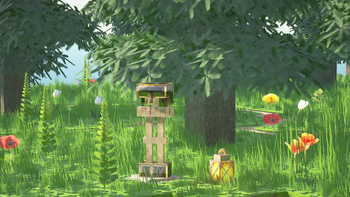
About this Modpack
Ultimate PBR Essentials
Ultimate PBR Essentials is the modpack for players who want to experience Minecraft with unparalleled visual enhancements while retaining the classic functionality they love. This modpack adds support for POM & PBR texturepack which previously used Optifine's features.
Who Is It For?
If you're looking to play with nearly any newer texture pack, whether it be realistic, vanilla, or one with minor tweaks, most require specific features and mods to provide these features. This modpack allows you to play with them effortlessly and also includes performance enhancements.
Isn't this just another Fabulously Optimized?
While the majority of mods are indeed common, however it does not mainly include visually game-altering mods, which are required/best suited for some PBR texture packs.
Classic OptiFine Features
Connected Textures:
Seamless glass, bookshelves, and other blocks using Continuity.
Dynamic Lighting:
Carry torches that illuminate surroundings using Sodium Dynamic Lights
Colormap Support
Using Polytone for legacy Optifine colormap, however compatibility with some older resource packs may not work.
Custom Splash Screen
Using Puzzle
Support for Entities
Using EMF and ETF
Performance Enhancements:
Optimize FPS without sacrificing quality, better fps in memory-hungry biomes
Mods used:
- Sodium
- BetterGrassify
- Cull Leaves
- ClLumps
- Dynamic FPS
- Entity Culling
- Enhanced Block Entities
- Ferrite Core
- ModernFix
- Lithium
- ImmediatelyFast
Controller Support
Using Controlify
Zoom Options
Using Zoomify
Gameplay & Graphical Improvements
Not Enough Animations
Model Gap Fix
3D Skin Layers
Better Third Person
Capes
Optimum Realism
Ambient Sounds
Remove Loading Screen
Shader Compatibility
Using Iris
Shaders themselves are not included, however pre-made configuration files for balanced performance and quality have been provided for some shaders.
Other Minor Enhancements
This modpack has libraries that are required by some of the mods mentioned above, and other mods. Some mods may have been added later and may not be mentioned in the list above however they will be suited for the modpack.
Please note that this Modpack is not perfect, and was originally created to make the installation of mods for Optimum Realism texturepack easier and more uniform, however it should cover the mods required for almost all other texture packs that previously used Optifine's feature and are currently in the loop with newer mods. If you have suggestions, please refer to the discord server. This modpack also includes additional files that are not on Modrinth, these files cannot be redistributed or modified.
Available Versions
How to Set Up a Ultimate PBR Essentials Server
Order Server
Choose at least 4 GB RAM (6 GB recommended for Ultimate PBR Essentials). Based on player count: per 8 players.
Install Modpack in Dashboard
Open the modpack browser in the dashboard, search for "Ultimate PBR Essentials" and click "Install". The fabric loader and Minecraft 1.21.6 are configured automatically.
Start Server & Play
Start the server – all mods are loaded automatically. Share the server IP with friends and play together!
Frequently Asked Questions
Ultimate PBR Essentials server crashes or won't start – what to do?
Most common causes: insufficient RAM or wrong fabric loader. Check latest.log for "OutOfMemoryError" → increase RAM to at least 6 GB. For "Mixin" or "ClassNotFoundException" errors: modpack version and loader don't match. With Mado Hosting, loader and Minecraft version are auto-configured on modpack install – preventing most startup issues.
How much RAM does a Ultimate PBR Essentials server really need?
Minimum 4 GB, recommended 6 GB for stable performance. per 8 players. Important: Minecraft modpacks need more RAM than vanilla – plan extra per additional player. With Mado Hosting, you can scale RAM up live at any time without data loss (from €8/month).
Can I add custom mods to Ultimate PBR Essentials without conflicts?
Yes, but check compatibility: only use mods for the same loader (fabric) and same Minecraft version (1.21.6). Common issues: ID conflicts with recipe mods and incompatible coremod versions. The Mado dashboard mod browser only shows compatible mods and warns about known conflicts.
Ultimate PBR Essentials server lagging – performance tips
1) Increase RAM to 6 GB+. 2) Reduce server view-distance to 8 (server.properties). 3) Pre-generate chunks with the "Chunky" plugin. 4) Use /spark profiler to check which mods consume the most tick time. With Mado Hosting, all servers run on NVMe SSDs with dedicated CPU cores – eliminating hardware as a bottleneck.
Similar Modpacks

![Better MC [FABRIC] - BMC2](https://cdn.modrinth.com/data/shFhR8Vx/a19c2bcb51d38f32f138d3607e91cb2b7b8e387f_96.webp)
![Better MC [FORGE] - BMC4](https://cdn.modrinth.com/data/4BV47HRn/7f5ef7cc61b2593609aabef3ed07a866a4f11b73_96.webp)


Rent Ultimate PBR Essentials Server
Start your own server with automatic modpack installation.
Details
- License
- LicenseRef-All-Rights-Reserved
- Server-side
- Unsupported
- Client-side
- Required
Supported Versions
Start your Ultimate PBR Essentials Server now
From €8.00/month with 6 GB RAM for the best performance.
Configure Server →