
Ultra Create
Performance+Create+Shaders+QOL
Screenshots


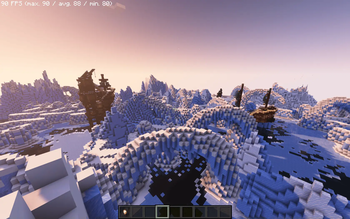


About this Modpack
Ever wanted to play all the different Create mods at once, with shaders and great performance on a low-end system?
Well your in luck.
I've spent a couple of years compiling every quality-of-life mod and nearly all Create-related mods, tweaking BSL shaders, and heavily optimizing performance. On top of that, I've added hundreds of smaller mods while keeping the experience very vanilla.
I run the game at 1680x1050 on my laptop with an i9-13900H, RTX 3050 (4GB), and 32GB RAM. With shaders and 8 render distance, that setup gets me 120 FPS when standing still, 100 FPS while running around villages, and as low as 50 FPS when flying at max speed in spectator mode while generating new chunks outside of Chunky. When it's (particle)raining, I get around 110 FPS. I've allocated 16GB of RAM to take full advantage of Chunky, but you can lower it without any issues.
I am still in school and don’t have all the time in the world, but I will try and fix any issues that arise. I know it’s a bit primitive, but you can email me at [email protected], about any issues, and I’m open to all suggestions.
There are some disabled mods. They are simply mods you can choose to turn on. There are also others I want to add, but they are no longer compatible. Dynamicfps and Guard Villagers were cuasing some serious fps loss.
(Update) Im going to completely rebuild on the latest version of create thats compatiably with distant horizons. Im also going to try a bunch of different shaders to see which one looks and preforms the best.
(Update 2) Ive reworked it but there are some weird exporting issues currently. Lots of new stuff and lots to go wrong and tune. Im going to try and get a new polished version out with full instructions on everything.
All credit goes to the original creators of the mods included in this pack. Their hard work and dedication have made this modpack possible, and I deeply appreciate the effort they’ve put into developing, maintaining, and improving these mods. I do not intend to profit from this modpack in any way. This is purely a passion project meant to enhance gameplay for myself and others who love the Create mod and its many expansions. Any profit generated from this modpack, whether through donations, advertisements, or other means, should be and will be directed to the original creators of the mods included.
Available Versions
How to Set Up a Ultra Create Server
Order Server
Choose at least 6 GB RAM (8 GB recommended for Ultra Create). Based on player count: per 5 players.
Install Modpack in Dashboard
Open the modpack browser in the dashboard, search for "Ultra Create" and click "Install". The fabric loader and Minecraft 1.20.1 are configured automatically.
Start Server & Play
Start the server – all mods are loaded automatically. Share the server IP with friends and play together!
Frequently Asked Questions
Ultra Create server crashes or won't start – what to do?
Most common causes: insufficient RAM or wrong fabric loader. Check latest.log for "OutOfMemoryError" → increase RAM to at least 8 GB. For "Mixin" or "ClassNotFoundException" errors: modpack version and loader don't match. With Mado Hosting, loader and Minecraft version are auto-configured on modpack install – preventing most startup issues.
How much RAM does a Ultra Create server really need?
Minimum 6 GB, recommended 8 GB for stable performance. per 5 players. Important: Minecraft modpacks need more RAM than vanilla – plan extra per additional player. With Mado Hosting, you can scale RAM up live at any time without data loss (from €12/month).
Can I add custom mods to Ultra Create without conflicts?
Yes, but check compatibility: only use mods for the same loader (fabric) and same Minecraft version (1.20.1). Common issues: ID conflicts with recipe mods and incompatible coremod versions. The Mado dashboard mod browser only shows compatible mods and warns about known conflicts.
Ultra Create server lagging – performance tips
1) Increase RAM to 8 GB+. 2) Reduce server view-distance to 8 (server.properties). 3) Pre-generate chunks with the "Chunky" plugin. 4) Use /spark profiler to check which mods consume the most tick time. With Mado Hosting, all servers run on NVMe SSDs with dedicated CPU cores – eliminating hardware as a bottleneck.
Similar Modpacks
![Cobblemon Official Modpack [Fabric]](https://cdn.modrinth.com/data/5FFgwNNP/e7f9ee2e9d361623847853fe2ddce42f519ee64f.png)
![COBBLEVERSE - Pokemon Adventure [Cobblemon]](https://cdn.modrinth.com/data/Jkb29YJU/581ecf54530972afb18a04660afd820f2f24f6c7.png)
![Better MC [FABRIC] - BMC2](https://cdn.modrinth.com/data/shFhR8Vx/a19c2bcb51d38f32f138d3607e91cb2b7b8e387f_96.webp)


![Better MC [FORGE] - BMC4](https://cdn.modrinth.com/data/4BV47HRn/7f5ef7cc61b2593609aabef3ed07a866a4f11b73_96.webp)
Rent Ultra Create Server
Start your own server with automatic modpack installation.
Details
- License
- GNU General Public License v2.0 or later
- Server-side
- Required
- Client-side
- Required
Supported Versions
Start your Ultra Create Server now
From €12.00/month with 8 GB RAM for the best performance.
Configure Server →