
UniversalX CB
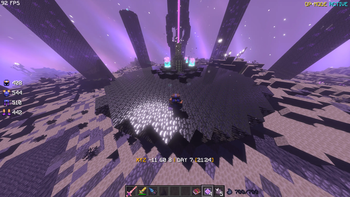
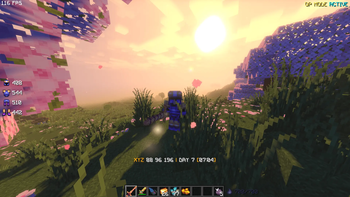
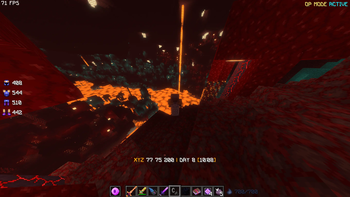
A power focused modpack packed with QOL features, bosses, and armor and weapons to battle them. While also maintaining 100+ FPS (new version coming soon)
Screenshots


About this Modpack
UniversalX CB – Enhanced Progression, Power, and Exploration
This custom Minecraft modpack is built to massively upgrade the vanilla experience through powerful QOL features, deep progression, and high intensity combat.
before you read: I recomend using Modrinth App since its way faster to instal stuff and play directly from there yk
(Install: ProjectJJK for the best experiance.) Specter BOTH if you want to use projectJJk
The pack includes core QOL improvements such as hammers(to help mine faster), tree VeinMine for faster resource gathering, advanced tools and armor sets, and modern traversal options including planes and rapid mobility mods to move across the world efficiently. More gringing, build, and explore faster.
(Install Big Globe | Biomes O' Plenty | Tectonic for overworld terrain gen. and Incendium for nether.) - NOTE: This will have affect on your pc, so I recomend following this tutorial -> Chunky Tutorial [credit to:
KasaiSora] (NOT SPONSORED)
Progression is expanded with Mythic Metals, introducing new ores, alloys, tools, and late-game gear, while (again, i highly recommend it)Project JJK adds anime inspired abilities, combat systems, and unique gameplay mechanics that dramatically change how you fight and progress.
(Use the mods listed above for world gen :D) World exploration is completely refreshed through custom terrain generation mods and datapacks, creating more immersive, varied, and visually striking landscapes. The world feels larger, more dangerous, and more rewarding to explore.
NOTE: IF YOU ARE A RICH KID WITH NASA PC INSTALL: JJThunderToTheMax for overworld & JJThunder Hell Is Fire
(Go to the bottom I have something insane for you to watch. Source: TRUST ME BRO) Combat is taken to the next level with custom bosses that can be configured and scaled, along with powerful custom weapons, tools, and armor sets designed for endgame dominance. Enchanting is fully uncapped no limits on enchantment levels(Protection XVIISKIBIDI), allowing for truly overpowered builds and experimentation & to help beat bosses. (some sick info for you: you can set boss's health to any amount.. and edit their damage/defence stats...)
This modpack is ideal for players who want freedom, power, and progression without artificial limits, whether you’re building massive projects, grinding endgame gear, or fighting god-tier bosses.
CHECK OUT MY YT FOR MODPACK TUTORIAL(Its gonna be good, trust me bro) Also Sub pls, im borke- help me..
Available Versions
How to Set Up a UniversalX CB Server
Order Server
Choose at least 4 GB RAM (6 GB recommended for UniversalX CB). Based on player count: per 8 players.
Install Modpack in Dashboard
Open the modpack browser in the dashboard, search for "UniversalX CB" and click "Install". The fabric loader and Minecraft 1.21.1 are configured automatically.
Start Server & Play
Start the server – all mods are loaded automatically. Share the server IP with friends and play together!
Frequently Asked Questions
UniversalX CB server crashes or won't start – what to do?
Most common causes: insufficient RAM or wrong fabric loader. Check latest.log for "OutOfMemoryError" → increase RAM to at least 6 GB. For "Mixin" or "ClassNotFoundException" errors: modpack version and loader don't match. With Mado Hosting, loader and Minecraft version are auto-configured on modpack install – preventing most startup issues.
How much RAM does a UniversalX CB server really need?
Minimum 4 GB, recommended 6 GB for stable performance. per 8 players. Important: Minecraft modpacks need more RAM than vanilla – plan extra per additional player. With Mado Hosting, you can scale RAM up live at any time without data loss (from €8/month).
Can I add custom mods to UniversalX CB without conflicts?
Yes, but check compatibility: only use mods for the same loader (fabric) and same Minecraft version (1.21.1). Common issues: ID conflicts with recipe mods and incompatible coremod versions. The Mado dashboard mod browser only shows compatible mods and warns about known conflicts.
UniversalX CB server lagging – performance tips
1) Increase RAM to 6 GB+. 2) Reduce server view-distance to 8 (server.properties). 3) Pre-generate chunks with the "Chunky" plugin. 4) Use /spark profiler to check which mods consume the most tick time. With Mado Hosting, all servers run on NVMe SSDs with dedicated CPU cores – eliminating hardware as a bottleneck.
Similar Modpacks

![COBBLEVERSE - Pokemon Adventure [Cobblemon]](https://cdn.modrinth.com/data/Jkb29YJU/581ecf54530972afb18a04660afd820f2f24f6c7.png)




Rent UniversalX CB Server
Start your own server with automatic modpack installation.
Supported Versions
Start your UniversalX CB Server now
From €8.00/month with 6 GB RAM for the best performance.
Configure Server →