
Universe1
One small step before something / Un pequeño paso antes de algo grande.
Screenshots
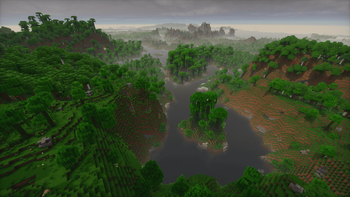
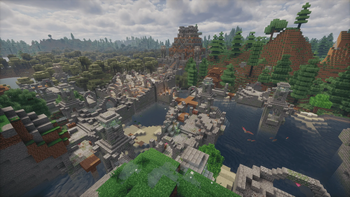
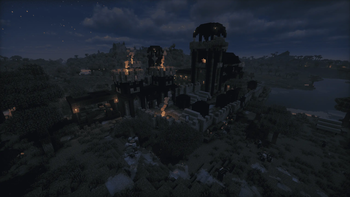
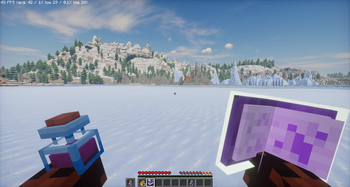
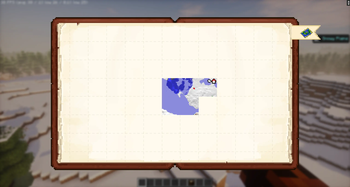
About this Modpack
🇬🇧 English version
✨ About the project
This modpack is designed to give Minecraft a second life without losing its core feel. It's not a random collection of mods, but a carefully chosen selection where everything fits together to create a smoother and more complete experience.
🚩 Purpose
With this small personal project, I want to create something meaningful — not just a modpack full of 'things', but a place with its own identity where people actually want to come back. A community where exploration feels personal, where we interact with each other, and where every step forward feels like it matters.
¿What does it mean? Well, I just enjoy creating modpacks as a hobby, but this time I want to try to make it official — for people, and for a real community."
🧩 The rest of the pack
The biggest highlights of this pack are probably Create, Farmer's Delight, voxy and a recent mod called Latitude. The rest of the mods are there to make the vanilla experience feel more alive — without breaking what makes it special.
💻 Hardware used
The modpack is primarily tested on:
- CPU: AMD Ryzen 5 3600
- GPU: AMD Radeon RX 590
- RAM: 6–8 GB allocated to Minecraft
- Storage: SSD
With no shaders enabled and using the default settings included with the modpack, performance is typically around 300 FPS, with 1% lows around 100 FPS (sometimes higher depending on the area and situation). These results were obtained with Voxy enabled, using a Voxy view distance of 130 chunks
👤 About me (if you want to know)
I'm just a simple guy who enjoys playing Minecraft and creating personal servers and modpacks for friends. Now, for the first time, I'm taking that further — turning my ideas into something for the wider community. This is that "step".
🇪🇸 Versión en Español
✨ Sobre el proyecto
Este modpack está diseñado para darle una segunda vida a Minecraft sin perder su esencia. No es una colección aleatoria de mods, sino una selección cuidadosa donde todo encaja para crear una experiencia más fluida y completa.
🚩 Propósito
Con este pequeño proyecto personal quiero crear algo con significado — no solo un modpack lleno de "cosas", sino un lugar con identidad propia al que la gente quiera volver. Una comunidad donde la exploración se sienta personal, donde interactuemos entre nosotros y donde cada paso hacia adelante sienta que importa.
¿Qué significa eso? Pues simplemente disfruto creando modpacks como hobby, pero esta vez quiero intentar hacerlo oficial — para la gente, y para una comunidad real.
🧩 El resto del modpack
Los grandes protagonistas de este pack son probablemente Create, Farmer's Delight, voxy y un mod reciente llamado Latitude. El resto de mods están ahí para hacer que la experiencia vanilla se sienta más viva — sin romper lo que la hace especial.
💻 Hardware utilizado para las pruebas
El modpack se prueba principalmente en:
- CPU: AMD Ryzen 5 3600
- GPU: AMD Radeon RX 590
- RAM: 6–8 GB asignados a Minecraft
- Almacenamiento: SSD
Sin shaders y utilizando la configuración predeterminada incluida en el modpack, el rendimiento suele rondar los 300 FPS, con un 1% low alrededor de los 100 FPS (a veces incluso más, dependiendo de la zona y la situación). Estos resultados se han obtenido con Voxy activado, utilizando una distancia de visualización de 130 chunks en Voxy
👤 Sobre mí (si te interesa saber)
Soy simplemente un chico al que le gusta jugar a Minecraft y crear servidores y modpacks para sus amigos. Ahora, por primera vez, voy un paso más allá — convirtiendo mis ideas en algo para la comunidad. Este es ese "paso".
Available Versions
How to Set Up a Universe1 Server
Order Server
Choose at least 6 GB RAM (8 GB recommended for Universe1). Based on player count: per 5 players.
Install Modpack in Dashboard
Open the modpack browser in the dashboard, search for "Universe1" and click "Install". The fabric loader and Minecraft 26.1.2 are configured automatically.
Start Server & Play
Start the server – all mods are loaded automatically. Share the server IP with friends and play together!
Frequently Asked Questions
Universe1 server crashes or won't start – what to do?
Most common causes: insufficient RAM or wrong fabric loader. Check latest.log for "OutOfMemoryError" → increase RAM to at least 8 GB. For "Mixin" or "ClassNotFoundException" errors: modpack version and loader don't match. With Mado Hosting, loader and Minecraft version are auto-configured on modpack install – preventing most startup issues.
How much RAM does a Universe1 server really need?
Minimum 6 GB, recommended 8 GB for stable performance. per 5 players. Important: Minecraft modpacks need more RAM than vanilla – plan extra per additional player. With Mado Hosting, you can scale RAM up live at any time without data loss (from €12/month).
Can I add custom mods to Universe1 without conflicts?
Yes, but check compatibility: only use mods for the same loader (fabric) and same Minecraft version (26.1.2). Common issues: ID conflicts with recipe mods and incompatible coremod versions. The Mado dashboard mod browser only shows compatible mods and warns about known conflicts.
Universe1 server lagging – performance tips
1) Increase RAM to 8 GB+. 2) Reduce server view-distance to 8 (server.properties). 3) Pre-generate chunks with the "Chunky" plugin. 4) Use /spark profiler to check which mods consume the most tick time. With Mado Hosting, all servers run on NVMe SSDs with dedicated CPU cores – eliminating hardware as a bottleneck.
Rent Universe1 Server
Start your own server with automatic modpack installation.
Supported Versions
Start your Universe1 Server now
From €12.00/month with 8 GB RAM for the best performance.
Configure Server →