
Vanilla Fabric
Optimized for lower end computers & server performance for sessions with friends, offers a lightly modded vanilla experience
Screenshots





About this Modpack
VANILLA FABRIC
SUPPORT FOR 1.21.1 / 1.21.4 / 1.21.8 / 26.1
Nothing overbearing, really a relaxing time. Vanilla composed with fabric performance & optimization mods optimized for lower end computers and overall pc/server performance, along with quality of life mods to offer a lightly modded experience
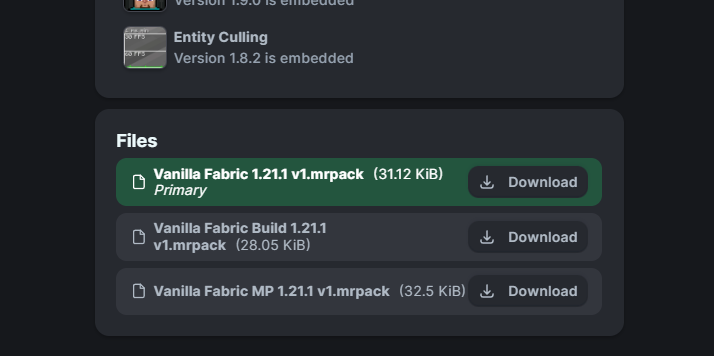
PLEASE PAY ATTENTION
to which version of the modpack that you choose to download
VANILA FABRIC MODLIST
v1
- Sodium c: caffeinemc, jellysquid3, ims
- Sodium Extra c: flashyreese
- Lithium c: caffeinemc, jellysquid3, 2no2name
- EntityCulling c: tr7zw
- ImmediatelyFast c: ralphimc
- Ferrite Core c: malte0811
- AppleSkin c: squeak502
- Better Third Person c: socolio
- NotEnoughAnimations c: tr7zw
- EasyAnvils & Shulker Boxes c: fuzs
- LambsDynamicLights c: lambdaurora
- FallingTree c: rakambda
- BetterClouds c: gendolin
- Geophilic c: bebebea_loste
- Diagonal Fences c: fuzs
- Big Sign Writer c: chililisoup
- Sit c: bl4ckscor3
Model Gap Fix c: mehvahdjukaar- ModernFix c: embeddedt (1.21.1)
- Amendments c: mehvahdjukaar (1.21.1)
- Supplementaries c: mehvahdjukaar (1.21.1)
- Map Atlases c: pepperoni jabroni (1.21.1)
v2
- Just Hammers c: error mikey
- Armor Statues c: fucz
- Toggle Item Frames c: iamaprogramer
- Mine Spawners c: katanya04
- Explosive Enhancement c: superkat32
- Particle Effects c: kteam, klashraick, lopymine
- Particular Rain c: pigcart
- Wakes c: goby56
- Falling Leaves c: fourmisain
- Carry On c: tschipp
- Let Sleeping Dogs Lie c: ichun
- Cat Jam c: shmove
- Cat Loaf c: khajitos (1.21.1)
- Eating Animation c: theoness1 (1.21.1)
- Scholar c: mortuusars (1.21.1)
v3 (1.21.1)
- JEI c: mezz
- Another Furniture c: starfish, synthestra
- Sooty Chimneys c: mortuusars
- Storage Drawers c: texelsaur
- Backpacked c: mrcrayfish
- Farmers Delight & Refabricated c: vectorwing & torty
- Immersive Armors c: luke100000
BUILD (bv; available below on every version page)
- Axiom c: axiom, moulberry
- Replay Mod c: johni0702
- Freecam c: hashalite
- Zoomify c: isxander
MULTIPLAYER (mp: available below on every version page)
- Krypton c: astei
- Clumps c: jaredlll08
- Emoji Type c: norbiros
- Simple Voice Chat c: henkelmax
- Sound Physics Remastered c: henkelmax
- Name Pain c: naqaden
- Held Item Info c: a5b84
CHECK OUT ADJACENT DATAPACKS & RESOURCEPACKS
- Vanilla Tweaks
- Bee's Fancy Crops c: bebebea_loste
- Bee's Fluffy Carpets c: bebebea_loste
- Flower Clusters c: azeolii_
NOTE recommend allocating 2-6GB of VRAM
Available Versions
How to Set Up a Vanilla Fabric Server
Order Server
Choose at least 4 GB RAM (6 GB recommended for Vanilla Fabric). Based on player count: per 8 players.
Install Modpack in Dashboard
Open the modpack browser in the dashboard, search for "Vanilla Fabric" and click "Install". The fabric loader and Minecraft 26.1 are configured automatically.
Start Server & Play
Start the server – all mods are loaded automatically. Share the server IP with friends and play together!
Frequently Asked Questions
Vanilla Fabric server crashes or won't start – what to do?
Most common causes: insufficient RAM or wrong fabric loader. Check latest.log for "OutOfMemoryError" → increase RAM to at least 6 GB. For "Mixin" or "ClassNotFoundException" errors: modpack version and loader don't match. With Mado Hosting, loader and Minecraft version are auto-configured on modpack install – preventing most startup issues.
How much RAM does a Vanilla Fabric server really need?
Minimum 4 GB, recommended 6 GB for stable performance. per 8 players. Important: Minecraft modpacks need more RAM than vanilla – plan extra per additional player. With Mado Hosting, you can scale RAM up live at any time without data loss (from €8/month).
Can I add custom mods to Vanilla Fabric without conflicts?
Yes, but check compatibility: only use mods for the same loader (fabric) and same Minecraft version (26.1). Common issues: ID conflicts with recipe mods and incompatible coremod versions. The Mado dashboard mod browser only shows compatible mods and warns about known conflicts.
Vanilla Fabric server lagging – performance tips
1) Increase RAM to 6 GB+. 2) Reduce server view-distance to 8 (server.properties). 3) Pre-generate chunks with the "Chunky" plugin. 4) Use /spark profiler to check which mods consume the most tick time. With Mado Hosting, all servers run on NVMe SSDs with dedicated CPU cores – eliminating hardware as a bottleneck.
Similar Modpacks

![Cobblemon Official Modpack [Fabric]](https://cdn.modrinth.com/data/5FFgwNNP/e7f9ee2e9d361623847853fe2ddce42f519ee64f.png)
![COBBLEVERSE - Pokemon Adventure [Cobblemon]](https://cdn.modrinth.com/data/Jkb29YJU/581ecf54530972afb18a04660afd820f2f24f6c7.png)
![Better MC [FABRIC] - BMC2](https://cdn.modrinth.com/data/shFhR8Vx/a19c2bcb51d38f32f138d3607e91cb2b7b8e387f_96.webp)


Rent Vanilla Fabric Server
Start your own server with automatic modpack installation.
Supported Versions
Start your Vanilla Fabric Server now
From €8.00/month with 6 GB RAM for the best performance.
Configure Server →