
Vanilla Optimized Plus
This modpack will allow you to immerse yourself in Minecraft in new colors.
Screenshots



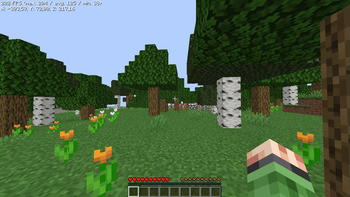

About this Modpack
✨ Vanilla Optimized Plus - What is it?
RU: Vanilla Optimized Plus – это модпак созданный обычным игроком на слабом устройстве. Он поставил задачу создать модпак, который улучшает игру и её оптимизирует, а главное, чтобы она была доступна для всех игроков без исключений. Большинство модов улучшают игру и делают её комфортной, отлично подходит для игры на ванильных проектах
EN: Vanilla Optimized Plus is a modpack created by an ordinary player on a weak device. He set the task of creating a modpack that improves and optimizes the game, and most importantly, that it is accessible to all players without exception. Most mods improve the game and make it comfortable, great for playing on vanilla projects.
⚡ Advantages of the mod pack:
RU: Модпак был нацелен на максимальное повышение производительности, улучшения геймплея для игры на ванильных проектов. Большое количество модов на оптимизацию помогут насладиться игрой, а приятные дополнения помогут вам в игре.
EN: The modpack was aimed at maximizing performance, improving gameplay for playing on vanilla projects. A large number of optimization mods will help you enjoy the game, and nice additions will help you in the game.
⚙️ How to install?
RU: Вы можете установить сборку через любой из 4 лаунчеров: ATLauncher, MultiMC, Prism Launcher и Modrinth App. Существует 2 способа установки сборок. Сначала вам нужно открыть загруженный файл в вашем лаунчере или добавить его через панель добавления сборок. Во-вторых, вам нужно открыть панель добавления сборок, выбрать метод Modrinth, затем найти сборку в строке поиска и нажать OK, после чего сборка сама установится в вашем лаунчере.
EN: You can install the build through any of the 4 launchers: ATLauncher, MultiMC, Prism Launcher and Modrinth App. There are 2 ways to install assemblies. First, you need to open the downloaded file in your launcher or add it via the Add assemblies panel. Secondly, you need to open the panel for adding assemblies, select the Modrinth method, then find the assembly in the search bar and click OK, after which the assembly will install itself in your launcher.
🍙Frame Rate Per second
- FPS: Max | Avg | Min
- FPS: 253 | 146 | 40
🛠️Test Configuration:
- Version: 1.21.1
- CPU: AMD Ryzen 3 3200U
- GPU: AMD Radeon(TM) Vega 3 Graphics
- RAM: 16 GB DDR4 (6 GB for Minecraft)
- Convenient settings for my game
Available Versions
How to Set Up a Vanilla Optimized Plus Server
Order Server
Choose at least 4 GB RAM (6 GB recommended for Vanilla Optimized Plus). Based on player count: per 5 players.
Install Modpack in Dashboard
Open the modpack browser in the dashboard, search for "Vanilla Optimized Plus" and click "Install". The fabric loader and Minecraft 26.1.2 are configured automatically.
Start Server & Play
Start the server – all mods are loaded automatically. Share the server IP with friends and play together!
Frequently Asked Questions
Vanilla Optimized Plus server crashes or won't start – what to do?
Most common causes: insufficient RAM or wrong fabric loader. Check latest.log for "OutOfMemoryError" → increase RAM to at least 6 GB. For "Mixin" or "ClassNotFoundException" errors: modpack version and loader don't match. With Mado Hosting, loader and Minecraft version are auto-configured on modpack install – preventing most startup issues.
How much RAM does a Vanilla Optimized Plus server really need?
Minimum 4 GB, recommended 6 GB for stable performance. per 5 players. Important: Minecraft modpacks need more RAM than vanilla – plan extra per additional player. With Mado Hosting, you can scale RAM up live at any time without data loss (from €8/month).
Can I add custom mods to Vanilla Optimized Plus without conflicts?
Yes, but check compatibility: only use mods for the same loader (fabric) and same Minecraft version (26.1.2). Common issues: ID conflicts with recipe mods and incompatible coremod versions. The Mado dashboard mod browser only shows compatible mods and warns about known conflicts.
Vanilla Optimized Plus server lagging – performance tips
1) Increase RAM to 6 GB+. 2) Reduce server view-distance to 8 (server.properties). 3) Pre-generate chunks with the "Chunky" plugin. 4) Use /spark profiler to check which mods consume the most tick time. With Mado Hosting, all servers run on NVMe SSDs with dedicated CPU cores – eliminating hardware as a bottleneck.
Similar Modpacks

![Cobblemon Official Modpack [Fabric]](https://cdn.modrinth.com/data/5FFgwNNP/e7f9ee2e9d361623847853fe2ddce42f519ee64f.png)
![COBBLEVERSE - Pokemon Adventure [Cobblemon]](https://cdn.modrinth.com/data/Jkb29YJU/581ecf54530972afb18a04660afd820f2f24f6c7.png)
![Better MC [FABRIC] - BMC2](https://cdn.modrinth.com/data/shFhR8Vx/a19c2bcb51d38f32f138d3607e91cb2b7b8e387f_96.webp)


Rent Vanilla Optimized Plus Server
Start your own server with automatic modpack installation.
Details
- License
- LicenseRef-All-Rights-Reserved
- Server-side
- Unsupported
- Client-side
- Required
Supported Versions
Start your Vanilla Optimized Plus Server now
From €8.00/month with 6 GB RAM for the best performance.
Configure Server →