
Vanilla Scoop
A modpack, with an extra scoop of visual and quality of life goodness.
Screenshots
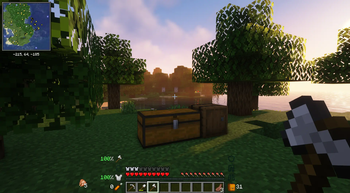
About this Modpack
This mod pack combines the highly-rated fabric visual and performance mods such as Sodium, Iris, Lithium, and Indium with many quality-of-life tweaks!
⚠ While all the installed mods support 1.19, some are experimental and may cause crashes. These will be replaced with stable versions when they become available.
Installation
Simply the modrinth documentation, this modpack has been tested on ATLauncher and MultiMC/PolyMC
External Downloads & Licenses
External Downloads
The following mods have been downloaded externally from CurseForge
- Illuminations - Adds fireflies and various glow-in-the-dark ambient particles
- Xaeros Mini Map - Adds a mini map
- Xaeros World Map - Adds a world map
- Effective - Adds visual and auditory effects lacking in Vanilla Minecraft
- Cycle Paintings - Lets you cycle placed paintings
Licencing
The mod pack works without these mods, but they improve the quality of life. If you wish to include them you'll have to download them externally from CurseForge
Mod List
| Mod List |
|---|
| 3D Skin Layers |
| Advancement Info |
| Amecs |
| Anti ghost |
| Appleskin Forge |
| Architectury |
| Auto harvest |
| Balm Fabric |
| Better Enchanted Books |
| Better biome blend |
| Better F3 |
| Better mount hud |
| Better Thirdperson |
| Block Meter |
| Blur |
| Bookshelf |
| Borderless Mining |
| Brb |
| Capes |
| Cem |
| Chest tracker |
| Citresewn |
| Clean Logs |
| Clear Despawn |
| Clickthrough |
| Cloth Config |
| Clumps |
| Cmd keybind |
| Collective |
| Colormatic |
| Continuity |
| Crafting Tweaks |
| Critical Orientation |
| Culllessleaves |
| Dashloader |
| Dcch |
| Debugify |
| Draggable Resource Packs |
| Dynamic Fps |
| Dynamic sound filters |
| Easier crafting |
| Easier villager trading |
| Effective |
| Emi |
| Enchanting commands |
| Enchantment descriptions |
| Enhanced Searchability |
| Enhanced block entities |
| Entity Texture Features |
| Entityculling |
| Extrasounds |
| Fabric API |
| Fabric Language Kotlin |
| Fabric Searchable Containers |
| Fabrishot |
| Falling leaves |
| Farsight |
| Ferritecore |
| Forgeconfigapiport |
| Grid |
| Gui followers |
| Hotbar cycle |
| Iceberg |
| Illuminations |
| Immersive Portals |
| Indium |
| Inspecio |
| Interactic |
| Inventoryhud |
| Inventory profiles next |
| Inventory sorter |
| Inventory tabs (unstable) |
| Iris |
| Jsmacros |
| Krypton |
| Lambdabettergrass |
| Lambdynamiclights |
| Language Reload |
| Lazydfu |
| Lithium |
| Loading Screen Tips |
| Main Menu Credits |
| Memoryleakfix |
| Mod menu |
| More chat history |
| Mouse tweaks |
| Nmuk |
| No fade |
| Not enough animations |
| Not enough crashes |
| Offers Hud |
| Optigui |
| Pet Owner |
| Presence Footsteps |
| Puzzle |
| Qfapi |
| Quick connect button |
| Reeses Sodium Options |
| Smoothboot Fabric |
| Smoothscrollingeverywhere |
| Sodium Extra |
| Sodium Fabric |
| Starlight |
| Statssearch |
| Suggestion Tweaker |
| Terra Fabric |
| Toolstats Forge |
| Tooltipfix |
| Visuality |
| Waveycapes Fabric |
| Worldedit Mod |
| Wthit (disabled) |
| Xaeros World Map |
| Xaeros Minimap |
| Yosbr |
| Zoomify |
Available Versions
How to Set Up a Vanilla Scoop Server
Order Server
Choose at least 4 GB RAM (6 GB recommended for Vanilla Scoop). Based on player count: per 8 players.
Install Modpack in Dashboard
Open the modpack browser in the dashboard, search for "Vanilla Scoop" and click "Install". The fabric loader and Minecraft 1.19 are configured automatically.
Start Server & Play
Start the server – all mods are loaded automatically. Share the server IP with friends and play together!
Frequently Asked Questions
Vanilla Scoop server crashes or won't start – what to do?
Most common causes: insufficient RAM or wrong fabric loader. Check latest.log for "OutOfMemoryError" → increase RAM to at least 6 GB. For "Mixin" or "ClassNotFoundException" errors: modpack version and loader don't match. With Mado Hosting, loader and Minecraft version are auto-configured on modpack install – preventing most startup issues.
How much RAM does a Vanilla Scoop server really need?
Minimum 4 GB, recommended 6 GB for stable performance. per 8 players. Important: Minecraft modpacks need more RAM than vanilla – plan extra per additional player. With Mado Hosting, you can scale RAM up live at any time without data loss (from €8/month).
Can I add custom mods to Vanilla Scoop without conflicts?
Yes, but check compatibility: only use mods for the same loader (fabric) and same Minecraft version (1.19). Common issues: ID conflicts with recipe mods and incompatible coremod versions. The Mado dashboard mod browser only shows compatible mods and warns about known conflicts.
Vanilla Scoop server lagging – performance tips
1) Increase RAM to 6 GB+. 2) Reduce server view-distance to 8 (server.properties). 3) Pre-generate chunks with the "Chunky" plugin. 4) Use /spark profiler to check which mods consume the most tick time. With Mado Hosting, all servers run on NVMe SSDs with dedicated CPU cores – eliminating hardware as a bottleneck.
Similar Modpacks

![Cobblemon Official Modpack [Fabric]](https://cdn.modrinth.com/data/5FFgwNNP/e7f9ee2e9d361623847853fe2ddce42f519ee64f.png)
![COBBLEVERSE - Pokemon Adventure [Cobblemon]](https://cdn.modrinth.com/data/Jkb29YJU/581ecf54530972afb18a04660afd820f2f24f6c7.png)
![Better MC [FABRIC] - BMC2](https://cdn.modrinth.com/data/shFhR8Vx/a19c2bcb51d38f32f138d3607e91cb2b7b8e387f_96.webp)


Rent Vanilla Scoop Server
Start your own server with automatic modpack installation.
Details
- License
- GNU Lesser General Public License v3.0 only
- Server-side
- Unsupported
- Client-side
- Required
Supported Versions
Start your Vanilla Scoop Server now
From €8.00/month with 6 GB RAM for the best performance.
Configure Server →