
Vanilla Ultra Deluxe
You're getting vanilla, the finest vanilla.
Screenshots


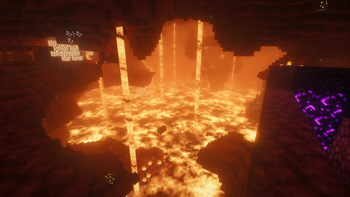


About this Modpack
Vanilla Ultra Deluxe
This modpack aims to include the best mods and resource packs I could find while still remaining compatible with vanilla servers. It includes all your favorite client-side mods, and if it doesn't, add it yourself!
Notable features
- Enchanted books and potions all have their own texture to distinguish them easily.

Credit to Even Better Enchants by mythitorium and Xali's Potions by xalixilax
- Stacking to nearby chests (Like a built in, quicker, copper golem)
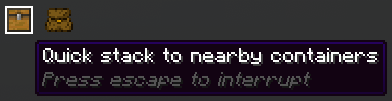
Credit to Stack to Nearby Chests by Xiaocihua
- Hold R to swap between tools by scrolling (Like an inventory managing update!)
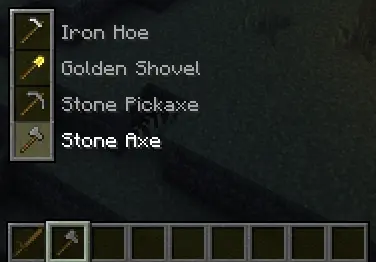
Credit to ItemSwapper by tr7zw
Sorting inventories (Your own and your storage)
Automatic elytra swapping (Just press space while falling and your elytra will equip itself)
Some more useful keybinds are:
- C to Zoom (Like a spyglass without a spyglass)
- F4 to Freecam (No noclipping, solely for looking at your builds!)
- F9 for Light Overlay (See where mobs can spawn)
- B to mute specific sounds
- X to inspect your tools in first person (it makes them do a little spin!)
Shaders
This modpack uses Iris with the beautiful Complementary Shaders. To make this even better we have added the Euphoria Patches addon, creating an absolutely beautiful world to explore and live in. To make the world feel bigger the mod Distant Horizons is also installed, which allows you to see much farther without being limited by the normal render distance.
Optimization
From Sodium to Entity Culling to dynamic FPS, this modpack utilizes all the best optimization mods I could find to make your experience as smooth as possible.
Cosmetic additions
This modpack features tons of cosmetic mods. These mods include sounds, animations, particles and HUD elements. A little bit of everything! Some included are:
- AmbientSounds; Birds chirping, waves crashing
- Better GUI; Every crafting station gets its own UI
- Chat Animation [Smooth Chat]; Make chat feel smoother
- Chat Heads; See who is chatting
- Continuity; Connect glass and more
- Effectual; Lots of particles where they should be
- Enchantment Outlines; Enchanted gear looks awesome (And the mace 3d!)
- Fresh Animations; A super well made overhaul of all mobs' animations
- Hold My Items; Make first person feel alive
- Icons; Make everything feel more lively
- Particle Effects; Every potion effect gets its own style
- Particular ✨ Reforged; Splashes, waterfalls and fireflies
- Smooth Swapping; A nicer item moving animation on the eyes
- Sound Physics Remastered; Adds more realism to the sounds around you
- Stylish Effects; See how long that levitation will last
- Tender Dragon; A visual revamp for the Ender Dragon
- Theone's Eating Animation Pack; Food gets actually eaten
- Visual: Armor Trims; See what trims are on your armor
- Wakes; Have the water move around you
- Windy; Some neat unobtrusive wind particles
Gameplay additions
As said in the "Notable features" section, this modpack uses Stack to Nearby Chests. Furthermore we use Nemo's Inventory Sorting for easy and quick sorting and ClickThrough Plus so that a sign on a chest won't be an annoyance for once.
Other notable gameplay additions are:
- AppleSkin; Shows food value of edible items
- Armor Hud; Shows you your armor durability in your hotbar
- Better Mount HUD; Shows more of your stats while riding a mount
- Controlling; Search your keybinds
- Cut Through; Swing weapons through grass
- Durability Tooltip; See your durability without advanced tooltips
- ItemSwapper; Swap items easily
- Jade 🔍; Know what you are looking at
- JJElytraSwap; Use your elytra whenever you please
- Light Overlay; Light up your base against mobs
- Locator Heads; See who actually are those colored dots
- Overflowing Bars; More armor info on hud
- Peek; Look into shulker boxes (and more)
- Pick Up Notifier; See what you are picking up, and how much
- Projectile Trajectory Preview; Never miss a pearl again
- Replanter Plus; Make farming less of a hassle
- Sounds Be Gone!; Mute those annoying cows or chickens
- VTDownloader; Allows you to download vanilla tweaks on the fly with whatever options you want
- Xaero's Minimap; See where you're going
- Xaero's World Map; See where you've been
Datapacks
There is one datapack included in this modpack and it, being a datapack, is completely optional for singleplayer survival, won't affect multiplayer experience and will not leave your world unable to update without it. The Datapack is called Remove Anvil Prior Work Penalty. This datapack makes it so that repairing items will always cost 1 experience level. This makes it so you can keep using tools without having to grind villagers for mending, which I personally hate more than anything in this game.
Fun additions
Lastly, I added a few personal additions that you are free to remove if you wish. I added Cute Animal Models Backport because I personally can't wait for the new baby mobs to be in the game and I added Do a Barrel Roll because I prefer it over the usual elytra flight and I think everyone should give it a try! (You can toggle Do a Barrel Roll off through the menu when you press V)
Available Versions
How to Set Up a Vanilla Ultra Deluxe Server
Order Server
Choose at least 4 GB RAM (6 GB recommended for Vanilla Ultra Deluxe). Based on player count: per 8 players.
Install Modpack in Dashboard
Open the modpack browser in the dashboard, search for "Vanilla Ultra Deluxe" and click "Install". The fabric loader and Minecraft 1.21.11 are configured automatically.
Start Server & Play
Start the server – all mods are loaded automatically. Share the server IP with friends and play together!
Frequently Asked Questions
Vanilla Ultra Deluxe server crashes or won't start – what to do?
Most common causes: insufficient RAM or wrong fabric loader. Check latest.log for "OutOfMemoryError" → increase RAM to at least 6 GB. For "Mixin" or "ClassNotFoundException" errors: modpack version and loader don't match. With Mado Hosting, loader and Minecraft version are auto-configured on modpack install – preventing most startup issues.
How much RAM does a Vanilla Ultra Deluxe server really need?
Minimum 4 GB, recommended 6 GB for stable performance. per 8 players. Important: Minecraft modpacks need more RAM than vanilla – plan extra per additional player. With Mado Hosting, you can scale RAM up live at any time without data loss (from €8/month).
Can I add custom mods to Vanilla Ultra Deluxe without conflicts?
Yes, but check compatibility: only use mods for the same loader (fabric) and same Minecraft version (1.21.11). Common issues: ID conflicts with recipe mods and incompatible coremod versions. The Mado dashboard mod browser only shows compatible mods and warns about known conflicts.
Vanilla Ultra Deluxe server lagging – performance tips
1) Increase RAM to 6 GB+. 2) Reduce server view-distance to 8 (server.properties). 3) Pre-generate chunks with the "Chunky" plugin. 4) Use /spark profiler to check which mods consume the most tick time. With Mado Hosting, all servers run on NVMe SSDs with dedicated CPU cores – eliminating hardware as a bottleneck.
Similar Modpacks


![Cobblemon Official Modpack [Fabric]](https://cdn.modrinth.com/data/5FFgwNNP/e7f9ee2e9d361623847853fe2ddce42f519ee64f.png)
![COBBLEVERSE - Pokemon Adventure [Cobblemon]](https://cdn.modrinth.com/data/Jkb29YJU/581ecf54530972afb18a04660afd820f2f24f6c7.png)
![Better MC [FABRIC] - BMC2](https://cdn.modrinth.com/data/shFhR8Vx/a19c2bcb51d38f32f138d3607e91cb2b7b8e387f_96.webp)

Rent Vanilla Ultra Deluxe Server
Start your own server with automatic modpack installation.
Details
- License
- Creative Commons Attribution Share Alike 4.0 International
- Server-side
- Unsupported
- Client-side
- Required
Supported Versions
Start your Vanilla Ultra Deluxe Server now
From €8.00/month with 6 GB RAM for the best performance.
Configure Server →