
Vanilla Boosted
Keeps the "Minecrafty" feel while adding much more optimisation and new content.
Screenshots

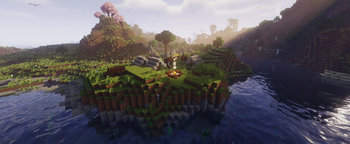


About this Modpack
Why Install This Modpack?
This modpack is able to make Minecraft look amazing while still running smoothly. Mobs look interesting with resource packs that retexture skeletons, zombies and creepers. It adds quality-of-life features like easier farming and faster navigation aswell as custom enchantments that fit in perfectly with vanilla minecraft. The HUD is easier to understand and there is new structures across the world to explore. It also supports playing with friends through the essential mod!
Features
Shaders
The modpack includes many shaders such as:
- BSL Shaders
- Complementary Reimagined
- Solas Shader
- AstraLex Shaders
- Bliss Shaders
- Miniature Shader
- MakeUp – Ultra Fast
- Complementary Unbound
Mob Overhauls
- Fresh Animations – Smooth animations for all vanilla mobs
- Not Enough Animations – Adds third-person animations like eating and map-holding
- New mob textures such as: Bray's Zombie Overhaul and AL's Creepers Revamped – Complete mob model redesigns, all with Fresh Animations support
- [EMF] Entity Model Features & [ETF] Entity Texture Features – Allows all custom mob models and textures
- Villager Pickup – (Disabled in 1.1.0) Allows you to pick up villagers to easily transport them anywhere
Exploration
- Dungeons and Taverns – New structures across the world
- Stellarity – Overhauls the End dimension with new biomes
- Voxy – Extends your view distance
- Xaero's Minimap & Xaero's World Map – A minimap and full-screen world map for navigation
- Chunky - Lets you pre-generate chunks in your world
Block Tweaks
- Better Ores 3D – Ore gems visually protrude from blocks
- Simple Grass Flowers – Small flowers scattered across grass
- Connectible Chains – (Disabled in 1.1.0 and above) Chains hang and sway between posts
- Bushier Bushes – Denser bush models
- Particle Rain – Visible rain particles
- Elytra Trims & Visual: Armor Trims – Apply and better display armor trims as well as on elytras
- Shelviety – Matches the bookshelf texture with the chiseled bookshelf texture
HUD & UI
- AppleSkin – Shows food saturation and hunger values
- Better Advancements & Advancements Reloaded – A cleaner advancements screen
- BetterF3 – Colour-coded and easy to read debug screen
- Detail Armor Bar Reconstructed – Shows individual armor piece durability in the HUD
- Status Effect Bars – Potion timers are shown as progress bars
- Chat Heads – Player head icons next to chat messages
- 3D Skin Layers – Your outer skin layer rendered in proper 3D
- Animated Loading Screen – Replaces the default Mojang loading screen
Quality of Life
- RightClickHarvest – Right-click to harvest and replant crops instantly
- Forgiving Void – Saves you from void death
- Easy Anvils – Removes "Too Expensive" and reduces anvil costs
- Easy Shulker Boxes – Open shulker boxes without placing them
- Pickup Notifications – Shows a small popup when items are picked up
- Lighty – Highlights blocks where mobs can spawn
- Naturally Trimmed – Mobs spawn wearing trimmed armor
- Zoomify – Adds a zoom key
- Litematica – Schematic tool for planning builds
- Sound Physics Remastered – Realistic reverb and sound occlusion
- Do a Barrel Roll – Changes the movement system with elytra
- All Mob Heads – Every mob has a chance to drop its head
- Advancement Screenshot – Auto-screenshots when you earn an advancement
- Shine - Replaces shaders by adding coloured lighting and bloom to your world
- Punchy! – Adds new first person animations
Performance
- Sodium + Sodium Extra – Core rendering overhaul for more FPS
- Lithium – Optimises game logic
- FerriteCore – Significantly reduces RAM usage
- Entity Culling & More Culling – Skips rendering entities and blocks you can't see
- ImmediatelyFast – Speeds up GUI and rendering
More Information
If you don't want to have custom structures you would have to turn off Dungeons and Taverns aswell as Stellerity in Modrinth before you create a world. If you create a world using Terralith, Tectonic and Continents removing those mods may cause issues for that world. Additionally to play with friends you need to sign in with an essential account. This modpack include mods such as Xaero's World Map, Xaero's Minimap and Freecam which may not be allowed on some servers. If you want to use shine you will have to disable shaders in video settings.
Available Versions
How to Set Up a Vanilla Boosted Server
Order Server
Choose at least 6 GB RAM (8 GB recommended for Vanilla Boosted). Based on player count: per 5 players.
Install Modpack in Dashboard
Open the modpack browser in the dashboard, search for "Vanilla Boosted" and click "Install". The fabric loader and Minecraft 26.1.2 are configured automatically.
Start Server & Play
Start the server – all mods are loaded automatically. Share the server IP with friends and play together!
Frequently Asked Questions
Vanilla Boosted server crashes or won't start – what to do?
Most common causes: insufficient RAM or wrong fabric loader. Check latest.log for "OutOfMemoryError" → increase RAM to at least 8 GB. For "Mixin" or "ClassNotFoundException" errors: modpack version and loader don't match. With Mado Hosting, loader and Minecraft version are auto-configured on modpack install – preventing most startup issues.
How much RAM does a Vanilla Boosted server really need?
Minimum 6 GB, recommended 8 GB for stable performance. per 5 players. Important: Minecraft modpacks need more RAM than vanilla – plan extra per additional player. With Mado Hosting, you can scale RAM up live at any time without data loss (from €12/month).
Can I add custom mods to Vanilla Boosted without conflicts?
Yes, but check compatibility: only use mods for the same loader (fabric) and same Minecraft version (26.1.2). Common issues: ID conflicts with recipe mods and incompatible coremod versions. The Mado dashboard mod browser only shows compatible mods and warns about known conflicts.
Vanilla Boosted server lagging – performance tips
1) Increase RAM to 8 GB+. 2) Reduce server view-distance to 8 (server.properties). 3) Pre-generate chunks with the "Chunky" plugin. 4) Use /spark profiler to check which mods consume the most tick time. With Mado Hosting, all servers run on NVMe SSDs with dedicated CPU cores – eliminating hardware as a bottleneck.
Similar Modpacks
![Cobblemon Official Modpack [Fabric]](https://cdn.modrinth.com/data/5FFgwNNP/e7f9ee2e9d361623847853fe2ddce42f519ee64f.png)
![COBBLEVERSE - Pokemon Adventure [Cobblemon]](https://cdn.modrinth.com/data/Jkb29YJU/581ecf54530972afb18a04660afd820f2f24f6c7.png)
![Better MC [FABRIC] - BMC2](https://cdn.modrinth.com/data/shFhR8Vx/a19c2bcb51d38f32f138d3607e91cb2b7b8e387f_96.webp)


![Better MC [FORGE] - BMC4](https://cdn.modrinth.com/data/4BV47HRn/7f5ef7cc61b2593609aabef3ed07a866a4f11b73_96.webp)
Rent Vanilla Boosted Server
Start your own server with automatic modpack installation.
Supported Versions
Start your Vanilla Boosted Server now
From €12.00/month with 8 GB RAM for the best performance.
Configure Server →