
VanillaFlux
Performance and worldgen focused modpack.
Screenshots
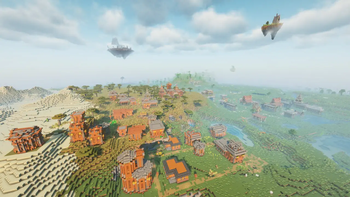





About this Modpack

Fed up with bland scenery or clunky menus? VanillaFlux breathes new life into every corner of Minecraft—without ever adding a single extra block or item. Imagine…
Worlds that feel handcrafted. Ancient towers and hidden ruins rise naturally in your biomes, daring you to explore deeper.
Atmospheres that whisper stories. Flickering torchlight, drifting fog, and dynamic shadows make nighttime feel alive.
Controls that simply work. Drag, drop, sort, tweak—your inventory and HUD stay out of your way, so you stay in the flow.
Stability that never quits. Rainstorms, nether highways, end cities—VanillaFlux keeps everything running smooth, whether you’re on a beastly rig or a modest laptop.
This is Minecraft, as it was meant to be: raw, beautiful, and utterly immersive.
🙏 Credits & Links
Every mod that powers VanillaFlux—huge thanks to the creators!
Click to view Mod Credits
Performance & Optimization:
- BadOptimizations
- C2ME
- Cloth Config API
- Continuity
- Dynamic FPS
- EntityCulling
- Fabric API
- Fabric Language Kotlin
- FerriteCore
- ImmediatelyFast
- Iris
- Lithium
- Mod Menu
- More Culling
- Noisium
- Reese's Sodium Options
- Sodium
- Sodium Extra
- Yet Another Config lib
- Zoomify
World Generation & Structures:
- Tectonic
- CliffTree
- Repurposed Structures
- Nullscape
- MES
- MVS
- MNS
- MSS
- Structory
- Structory:Towers
- Amplified Nether
- Medieval Buildings
- Hopo Better Ruined Portals
- Hopo Better Mineshaft
- Immersive Structures
- Medieval Buildings [End]
- Medieval Buildings [Nether]
- Lios Overhauled Villages
- DNT Pillager Outpost
- DNT Swamp Hut
- DNT Ancient City
- DNT Jungle Temple
- DNT Desert Temple
- DNT Nether Fortress
- DNT Stronghold
Visuals & UI/UX:
- EMF
- ETF
- AppleSkin
- LambDynamicLights
- Mouse Tweaks
- Inventory sorting
- OptiGUI
- Better Advancements
- JourneyMap
- Leaves Be Gone
- Clean F3
- Disable custom word advice
Libraries & APIs:
🔮 “Where flux ignites the silent night,
Vanilla’s soul takes fearless flight.”
Available Versions
How to Set Up a VanillaFlux Server
Order Server
Choose at least 6 GB RAM (8 GB recommended for VanillaFlux). Based on player count: per 5 players.
Install Modpack in Dashboard
Open the modpack browser in the dashboard, search for "VanillaFlux" and click "Install". The fabric loader and Minecraft 1.21.6 are configured automatically.
Start Server & Play
Start the server – all mods are loaded automatically. Share the server IP with friends and play together!
Frequently Asked Questions
VanillaFlux server crashes or won't start – what to do?
Most common causes: insufficient RAM or wrong fabric loader. Check latest.log for "OutOfMemoryError" → increase RAM to at least 8 GB. For "Mixin" or "ClassNotFoundException" errors: modpack version and loader don't match. With Mado Hosting, loader and Minecraft version are auto-configured on modpack install – preventing most startup issues.
How much RAM does a VanillaFlux server really need?
Minimum 6 GB, recommended 8 GB for stable performance. per 5 players. Important: Minecraft modpacks need more RAM than vanilla – plan extra per additional player. With Mado Hosting, you can scale RAM up live at any time without data loss (from €12/month).
Can I add custom mods to VanillaFlux without conflicts?
Yes, but check compatibility: only use mods for the same loader (fabric) and same Minecraft version (1.21.6). Common issues: ID conflicts with recipe mods and incompatible coremod versions. The Mado dashboard mod browser only shows compatible mods and warns about known conflicts.
VanillaFlux server lagging – performance tips
1) Increase RAM to 8 GB+. 2) Reduce server view-distance to 8 (server.properties). 3) Pre-generate chunks with the "Chunky" plugin. 4) Use /spark profiler to check which mods consume the most tick time. With Mado Hosting, all servers run on NVMe SSDs with dedicated CPU cores – eliminating hardware as a bottleneck.
Similar Modpacks
![Cobblemon Official Modpack [Fabric]](https://cdn.modrinth.com/data/5FFgwNNP/e7f9ee2e9d361623847853fe2ddce42f519ee64f.png)
![COBBLEVERSE - Pokemon Adventure [Cobblemon]](https://cdn.modrinth.com/data/Jkb29YJU/581ecf54530972afb18a04660afd820f2f24f6c7.png)
![Better MC [FABRIC] - BMC2](https://cdn.modrinth.com/data/shFhR8Vx/a19c2bcb51d38f32f138d3607e91cb2b7b8e387f_96.webp)


![Better MC [FORGE] - BMC4](https://cdn.modrinth.com/data/4BV47HRn/7f5ef7cc61b2593609aabef3ed07a866a4f11b73_96.webp)
Rent VanillaFlux Server
Start your own server with automatic modpack installation.
Supported Versions
Start your VanillaFlux Server now
From €12.00/month with 8 GB RAM for the best performance.
Configure Server →