
Vanillash
A lightweight and beautiful vanilla-like experience
Screenshots
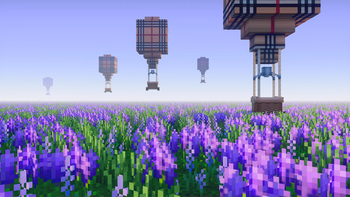
About this Modpack
🌱 Vanillash
A lightweight and beautiful almost vanilla experience.
Vanillash is a modpack created to be lightweight and optimized for a vanilla-like experience, based on adrenaline with the addition of some quality of life (QoL) mods among other mods that improve Minecraft but without sacrificing performance.
⚙️ Performance Tips
Still having performance issues? Here are some tips to help:
Spoiler
Improve performance
There are some ways to improve your performance past installation. Some of them are experimental and should only be used if you really want to.
Setting your allocated memory
Allocating more memory to Minecraft may increase performance greatly, but setting it too high can cause issues as well. If you have a low amount of memory installed, please make sure to keep enough memory for your system. As a general recommendation, 2-4 GB (2048-4096 MB) is usually all you should use for unchanged Adrenaline, Additive, or Vanilla. Playing with many mods? I'd suggest 3-6 GB (3074-6144 MB), however you may set this lower if needed. Do what works for you. Never set your allocated memory to the same amount as your installed memory.
If you are severely limited on memory, Adrenaline can run surprisingly well even with a minimum of 768 MB because of ModernFix and FerriteCore. Probably can be playable at even lower allocations, however I do not test with very low RAM so your mileage may vary.
In Prism Launcher, you can set your memory by going to Settings > Java > Maximum memory allocation. You may set the minimum memory too, however I haven't noticed any improvement over using the default.
Change your Minecraft settings
General
Start by changing your render distance. The higher this number, the further you can see. If you are playing on multiplayer, servers usually have a cap for render distance. On low-end systems, this should be set to 4-8 chunks. Mid-range systems will usually work well with 8-16 chunks, and high-end systems should be fine with 12-24 chunks.
After this, you can change your simulation distance. This is the distance in chunks that entities, blocks, fluids, etc are ticked, meaning that things like farms outside of this distance may not work properly. Unless you have areas with big farms and such, the default 5 should work well. If not, use 8-12. This only affects singleplayer - you won't notice anything while playing on servers as they have their own setting for simulation distance.
I recommend keeping V-Sync turned off unless you notice screen tearing, which in that case, turn it on or use Adaptive V-Sync. To use Adaptive V-Sync, you will need to install the Sodium Extra. If you are using Additive, this mod is already included. Adaptive V-Sync typically has less input latency than normal V-Sync.
Quality
Set graphics quality to "fast" on low-end systems and "fancy" on mid-range to high-end systems. This will affect if leaves are transparent or not, weather particles, and other things. **Do not use Fabulous unless you absolutely need it's benefits, as it can have a noticeably negative impact on performance.
**
Set particles to "minimal"/"decreased" on low-end systems, and "all" on other systems. For greater control over particles, install Sodium Extra.
Optimized Java runtime and JVM flags (advanced)
Warning This part is generally meant for advanced users! If you don't understand how to do this, then you should ignore this and stick with what you have now. I will not offer support for setting this up.
Tuning the JVM can be a good way to improve performance for some people, especially server-side. Follow along with this page for some more information about this
Available Versions
How to Set Up a Vanillash Server
Order Server
Choose at least 4 GB RAM (6 GB recommended for Vanillash). Based on player count: per 8 players.
Install Modpack in Dashboard
Open the modpack browser in the dashboard, search for "Vanillash" and click "Install". The fabric loader and Minecraft 1.21.1 are configured automatically.
Start Server & Play
Start the server – all mods are loaded automatically. Share the server IP with friends and play together!
Frequently Asked Questions
Vanillash server crashes or won't start – what to do?
Most common causes: insufficient RAM or wrong fabric loader. Check latest.log for "OutOfMemoryError" → increase RAM to at least 6 GB. For "Mixin" or "ClassNotFoundException" errors: modpack version and loader don't match. With Mado Hosting, loader and Minecraft version are auto-configured on modpack install – preventing most startup issues.
How much RAM does a Vanillash server really need?
Minimum 4 GB, recommended 6 GB for stable performance. per 8 players. Important: Minecraft modpacks need more RAM than vanilla – plan extra per additional player. With Mado Hosting, you can scale RAM up live at any time without data loss (from €8/month).
Can I add custom mods to Vanillash without conflicts?
Yes, but check compatibility: only use mods for the same loader (fabric) and same Minecraft version (1.21.1). Common issues: ID conflicts with recipe mods and incompatible coremod versions. The Mado dashboard mod browser only shows compatible mods and warns about known conflicts.
Vanillash server lagging – performance tips
1) Increase RAM to 6 GB+. 2) Reduce server view-distance to 8 (server.properties). 3) Pre-generate chunks with the "Chunky" plugin. 4) Use /spark profiler to check which mods consume the most tick time. With Mado Hosting, all servers run on NVMe SSDs with dedicated CPU cores – eliminating hardware as a bottleneck.
Rent Vanillash Server
Start your own server with automatic modpack installation.
Supported Versions
Start your Vanillash Server now
From €8.00/month with 6 GB RAM for the best performance.
Configure Server →