
Verdantia
Modern OG-style expansion with classic vibes, smarter worldgen, light RPG gear and strong performance tuning.
Screenshots
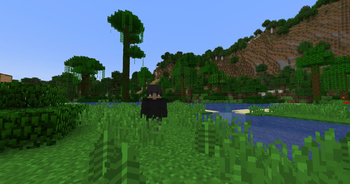
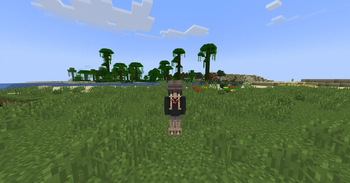
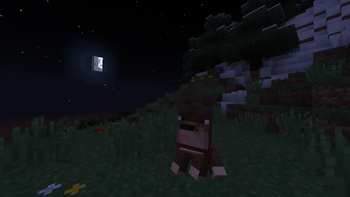
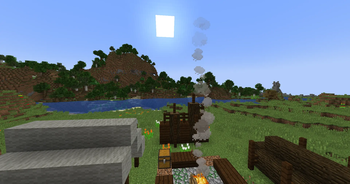
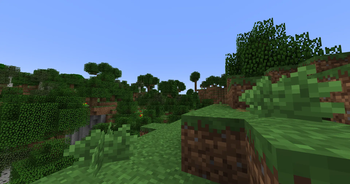
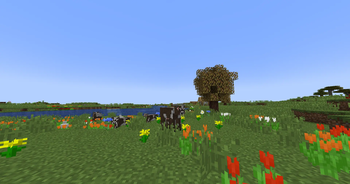
About this Modpack
🌲 Verdantia 🌲
(My Discord name for issues and bug reports also suggestions here : vagen1806)
(Also not sure if this going to work with multiplayer but you can test it and give me a DM)
Verdantia is my personal take on a “modern OG” Minecraft experience.
It keeps the vanilla heart and atmosphere while expanding the game in smart, tasteful ways: more structures, classic-style dimensions, light progression, classic style world generation, cozy building tools, and a lot of quality-of-life improvements.
If you want Minecraft to still feel like Minecraft, but you’re bored of pure vanilla, this pack is for you.
Note: This description was assisted by AI because English is not my first language.
All mod choices, configs, and design decisions are mine.
Do not forget to change keybinds and settings to your preference!
🌙 Recommended Resource Packs (Optional)
For a cleaner and darker UI experience, i recommend the following:
🖤 VanillaTweaks – Dark UI → get it here: https://vanillatweaks.net/picker/resource-packs/
🗑️ TrashSlot – Dark UI → get it here: https://www.curseforge.com/minecraft/texture-packs/trashslot-darkmode
( Ignore the outdated error , it works perfectly )
🌑 REI – Dark Theme → recommended as well
🌹 Poppy to Rose - get it here → https://www.planetminecraft.com/texture-pack/poppy-to-rose/
All of these are optional and fully compatible with the modpack.
✨ Core Idea ✨
Not a “kitchen sink” modpack, not a brutal overhaul – just a big, comfy expansion of vanilla.
Keeps the classic vibe of plains, oak forests and old-school gameplay flow.
Adds more to explore, build and collect without drowning you in pointless items or grindy systems.
Focus on performance, stability and comfort – designed for long-term survival worlds.
🌍 World & Exploration 🌍
Evergrove upgrades the Overworld, dungeons and extra dimensions, while still looking and feeling like Minecraft.
Worldgen & Structures
Key structure and worldgen mods include:
Backported Mods - It speaks for itself. (Wolves, Spring to Life)
YUNG’s Better End Island / Jungle Temples / Witch Huts / Extras – smarter, more interesting vanilla structures.
Additional Structures, and other small additions that make the world feel more alive.
Ecologics, Verdant Vibes, Serene Shrubbery, Little Joys – subtle biome and foliage expansions that blend into vanilla style.
Dimensions & Caves
The Aether – a classic-style sky dimension that fits perfectly with the OG adventure feeling.
Other dungeon / exploration content keep traveling and exploring exciting, not repetitive.
⚔️ Gameplay, Combat & Light Progression ⚔️
The pack keeps combat and progression recognizable, but gives you more tools and toys to play with.
Combat, Gear & Trinkets
Some of the main gameplay-related mods:
Simply Swords, Better Combat, More Bows, Immersive Armors – more weapons and armor without turning the game into an MMO.
Added Identity for extra fun.
Added Hold My Items ReFoxed. ( Configured too )
Relics, Bountiful Baubles, Artifacts, More Totems of Undying, Shield Expansion, Cloud Boots – powerful but balanced trinkets and gear.
ArmorPoints++ – a cleaner, more informative armor HUD.
You get more builds and playstyles, but your character still feels like a Minecraft player, not a superhero.
🤜 Utility & Survival 🤜
Farmer’s Delight, Supplementaries, Simple Farming, Golden Foods – expanded farming and food that stay grounded in vanilla style.
Gravestone, Backpacked, Carry On, Horse Buff, Horse Expert, Villager Names,Fish Shop, etc. – QoL improvements that respect the original game.
Helpful tweaks like Vein mining, Tree harvesting, Crop replanting, Super Flat No Slimes, Better Horse Handling, and more.
Everything is tuned to feel like a natural extension of vanilla, not a different game.
🧱 Building, Decoration & Cozy Vibes 🧱
Building and atmosphere are a huge part of Evergrove Lite.
Decoration & Furniture
Some of the main decor mods:
Refurbished Furniture, Beautify , MrCrayfish’s Furniture , Plenty Plates etc.
Extra blocks and decorations for interiors, cozy houses, villages, taverns and detailed builds.
Building Tools
Effortless Building, Moving Elevators, WorldEdit + WorldEditCUI
MCW-bridges, and similar building helpers.
These are meant to support big projects without removing the fun of building block by block.
⛰️Atmosphere & Immersion⛰️
Visuality, Falling Leaves, Snow Under Trees, Snowy Spirit, Subtle Effects, Pretty Rain, Glowing Torchflower, More frogs, Cosy Critters, Backported Wolves, Spring to Life Backport etc.
Together they create a richer, softer atmosphere while still keeping the classic Minecraft look.
🚀 Performance & Stability 🚀
The pack is heavily optimized so it runs smoothly, even with many mods.
Performance Mods
Included performance and tech mods:
Embeddium, ModernFix, FerriteCore, Starlight, C2MEF, Async Particles, Flevorium etc.
No Telemetry, No Chat Reports and other small backend QoL.
The goal: high FPS, low stutter, stable long-term worlds on a mid-range PC.
-Quality of Life
Jade, Xaero’s Minimap & World Map, Mouse Tweaks, Quickstack, Save & Load Inventories, Trade Cycling, Delete Worlds to Trash, Paper Doll, Status Effect Bars, Shoulder Surfing, etc.
These make the game feel more modern and responsive without changing its core identity.
🎨 Resource Packs & Config 🎨
Verdantia is tuned to preserve that OG feeling.
A small set of curated resource packs (classic-style visuals).
A pre-configured config folder, where all included mods are already adjusted to fit the “modern OG” vision.
They already enabled by default.
Keep the included config files for the intended balance and feel. Or you can modify it.
💾 Installation 💾 - Modrinth App
Install the Modrinth App.
Search for “Verdantia: OG Expansion”.
Click Install with Minecraft 1.20.1 + Forge.
Launch and play.
Recommended settings:
(Low)-Mid Range PC ( Tested on I5-11400F with GTX 1070 )
Allocate 8GB RAM to the instance.
Java Arguments:
-XX:+UseG1GC -XX:MaxGCPauseMillis=140 -XX:+ParallelRefProcEnabled -XX:+DisableExplicitGC -Dfile.encoding=UTF-8
Also use Java 17 64Bit. ( This should be the default with this pack )
The game contains a bundled options.txt and config folder, since this is mandatory for resourcepacks and for mod settings.
Feel free to change any mod or settings .
Use no shaders , since the pack already has enhanced visuals.
🧩 Full Version vs "Lite" 🧩
This page is for Verdantia "Lite":
Focused on compatibility, stability and Modrinth-friendly mods.
Keeps all the important OG-feeling content: worldgen, exploration, dimensions, combat and QoL.
There is also a Full version of Verdantia:
Includes extra FUN / over-the-top mods (crazy TNT, more weapons, wild stuff, etc.).
Shared separately (for example via Google Drive), outside of Modrinth.
Verdantia "Lite" = the clean, balanced, long-term survival version.
Verdantia Full = the chaotic playground. Here
This page text was AI-assisted because my English is not perfect,
but the vision, mood, modlist, configs and overall feel of Verdantia are 100% mine.
🙏 Credits & Final Note 🙏
Huge respect to all mod creators and resourcepacks creators – Verdantia wouldn’t exist without their work.
If you are a mod author and there is any problem with inclusion, please contact me and I will adjust the pack.
Other Mods from Curseforge and more
Here:
Extra Golems: https://www.curseforge.com/minecraft/mc-mods/extra-golems
Quark Programmer Art : Included with Quark Mod.
GoProne: https://www.curseforge.com/minecraft/mc-mods/goprone
Cosmetic Armor Reworked : https://www.curseforge.com/minecraft/mc-mods/cosmetic-armor-reworked
Hold My Items Refoxed : https://www.curseforge.com/minecraft/mc-mods/hold-my-items-refoxed
Resource Packs source here :
Enchant Icons : https://modrinth.com/resourcepack/enchant-icons-countxd
Disable Main Menu Music: https://modrinth.com/resourcepack/disable-menu-music
C418 Songs Only : https://modrinth.com/resourcepack/c418-songs-only
Programmer Art Fix : https://modrinth.com/resourcepack/programmer-art-fix
Available Versions
How to Set Up a Verdantia Server
Order Server
Choose at least 6 GB RAM (8 GB recommended for Verdantia). Based on player count: per 5 players.
Install Modpack in Dashboard
Open the modpack browser in the dashboard, search for "Verdantia" and click "Install". The forge loader and Minecraft 1.20.1 are configured automatically.
Start Server & Play
Start the server – all mods are loaded automatically. Share the server IP with friends and play together!
Frequently Asked Questions
Verdantia server crashes or won't start – what to do?
Most common causes: insufficient RAM or wrong forge loader. Check latest.log for "OutOfMemoryError" → increase RAM to at least 8 GB. For "Mixin" or "ClassNotFoundException" errors: modpack version and loader don't match. With Mado Hosting, loader and Minecraft version are auto-configured on modpack install – preventing most startup issues.
How much RAM does a Verdantia server really need?
Minimum 6 GB, recommended 8 GB for stable performance. per 5 players. Important: Minecraft modpacks need more RAM than vanilla – plan extra per additional player. With Mado Hosting, you can scale RAM up live at any time without data loss (from €12/month).
Can I add custom mods to Verdantia without conflicts?
Yes, but check compatibility: only use mods for the same loader (forge) and same Minecraft version (1.20.1). Common issues: ID conflicts with recipe mods and incompatible coremod versions. The Mado dashboard mod browser only shows compatible mods and warns about known conflicts.
Verdantia server lagging – performance tips
1) Increase RAM to 8 GB+. 2) Reduce server view-distance to 8 (server.properties). 3) Pre-generate chunks with the "Chunky" plugin. 4) Use /spark profiler to check which mods consume the most tick time. With Mado Hosting, all servers run on NVMe SSDs with dedicated CPU cores – eliminating hardware as a bottleneck.
Similar Modpacks
![Cobblemon Official Modpack [Fabric]](https://cdn.modrinth.com/data/5FFgwNNP/e7f9ee2e9d361623847853fe2ddce42f519ee64f.png)
![COBBLEVERSE - Pokemon Adventure [Cobblemon]](https://cdn.modrinth.com/data/Jkb29YJU/581ecf54530972afb18a04660afd820f2f24f6c7.png)
![Better MC [FABRIC] - BMC2](https://cdn.modrinth.com/data/shFhR8Vx/a19c2bcb51d38f32f138d3607e91cb2b7b8e387f_96.webp)


![Better MC [FORGE] - BMC4](https://cdn.modrinth.com/data/4BV47HRn/7f5ef7cc61b2593609aabef3ed07a866a4f11b73_96.webp)
Rent Verdantia Server
Start your own server with automatic modpack installation.
Supported Versions
Start your Verdantia Server now
From €12.00/month with 8 GB RAM for the best performance.
Configure Server →