
Visual Purity
Modpack for aesthetes: improved graphics without changing gameplay
Screenshots




About this Modpack
Visual Purity

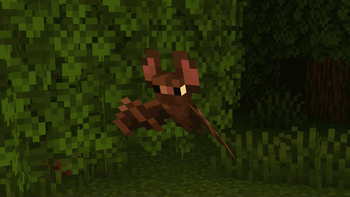
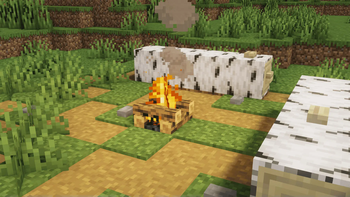
Visual Purity improves the visuals of the game while leaving the vanilla style
Visual Purity is a modpack aimed at improving the visual experience of Minecraft while maintaining the original vanilla style of the game. It includes high quality resourcepacks and shaders that improve lighting, shadows and textures, providing a more realistic and immersive atmosphere without altering gameplay. The modpack is fully compatible with all servers and does not require server-side installation. Works on versions of Minecraft 1.20.1, 1.21.1 and 1.21.4 on the Fabric platform

Optimization
With optimizing and lightweight mods, Visual Purity delivers improved graphics without significant performance degradation, ensuring stable FPS even on mid-range systems
Optimization mods
Content
Mods
Most mods have customization, so you can customize them to your liking in the “mods” tab

- EMF
- ETF
- AmbientSounds
- AppleSkin
- Better Command Block UI
- Better Third Person
- BetterF3
- Blur+
- Bobby
- Chat Animation [Smooth Chat]
- Chat Heads
- Cloud Layers(Minecraft-1.21.1/1.20.1)
- Continuity
- Dark Loading Screen
- Dynamic Brightness(Minecraft-1.21.1/1.20.1)
- Dynamic Crosshair
- Eating Animation(Minecraft-1.21.1/1.20.1)
- Enhanced Attack Indicator(Minecraft-1.21.1/1.20.1)
- Entity Culling
- Falling Leaves
- FootprintParticle(Minecraft-1.21.1/1.20.1)
- GUI Clock
- Iris Shaders
- Item Scroller
- LambDynamicLights
- Language Reload
- Lithium
- Mod Menu
- More Chat History
- Not Enough Animations
- Ok Boomer(Minecraft-1.21.1/1.20.1)
- Ok Zoomer(Minecraft-1.21.4)
- Particle Rain
- Particular✨
- Presence Footsteps
- Reese's Sodium Options
- Remove Reloading Screen
- Resourcify
- Screenshot to Clipboard
- Seamless(Minecraft-1.20.1/1.21.1)
- Smooth Scrolling
- Sodium
- Sodium Extra
- Sound Physics Remastered
- Status Effect Bars
- Stendhal
- Subtle Effects
- Texturized Particles
- Wakes(Minecraft-1.20.1/1.21.1)
- and various libraries and API
Resource packs
- Cubic Sun & Moon
- Drodi's Illagers Fresh Animation
- Drodi's Villagers : Fresh Animations
- Enchant Icons
- Fancy Crops
- Fresh Animations
- Fresh Moves
- Freshly Creepers
- Low Fire
- Low Shield
- Motschen's Better Leaves
- No Z-Fighting
- Torches Reimagined
- Translations for Sodium
- Visual Armor Trims
- Vocal Villagers
Important!
FreshAnimation, and other related resourcepacks (Drodi's Illagers Fresh Animation, Drodi's Villagers : Fresh Animations, Creeper FA, FA Quivers, Fresh Moves) must be placed at the top to display them correctly

Shaders
Compatibility with other mods
Is the modpack compatible with other popular mods?
Yes, my modpack is compatible with other mods. I tested its compatibility with some popular mods and everything was fine. Of course with some mods my modpack may give an error, but I think it is compatible with many mods, so if you want, you can use my modpack as a basis for your own.
Update
The Visual Purity modpack is planned to be updated regularly to ensure compatibility with the latest versions of Minecraft and popular mods.
Available Versions
How to Set Up a Visual Purity Server
Order Server
Choose at least 6 GB RAM (8 GB recommended for Visual Purity). Based on player count: per 5 players.
Install Modpack in Dashboard
Open the modpack browser in the dashboard, search for "Visual Purity" and click "Install". The fabric loader and Minecraft 1.21.4 are configured automatically.
Start Server & Play
Start the server – all mods are loaded automatically. Share the server IP with friends and play together!
Frequently Asked Questions
Visual Purity server crashes or won't start – what to do?
Most common causes: insufficient RAM or wrong fabric loader. Check latest.log for "OutOfMemoryError" → increase RAM to at least 8 GB. For "Mixin" or "ClassNotFoundException" errors: modpack version and loader don't match. With Mado Hosting, loader and Minecraft version are auto-configured on modpack install – preventing most startup issues.
How much RAM does a Visual Purity server really need?
Minimum 6 GB, recommended 8 GB for stable performance. per 5 players. Important: Minecraft modpacks need more RAM than vanilla – plan extra per additional player. With Mado Hosting, you can scale RAM up live at any time without data loss (from €12/month).
Can I add custom mods to Visual Purity without conflicts?
Yes, but check compatibility: only use mods for the same loader (fabric) and same Minecraft version (1.21.4). Common issues: ID conflicts with recipe mods and incompatible coremod versions. The Mado dashboard mod browser only shows compatible mods and warns about known conflicts.
Visual Purity server lagging – performance tips
1) Increase RAM to 8 GB+. 2) Reduce server view-distance to 8 (server.properties). 3) Pre-generate chunks with the "Chunky" plugin. 4) Use /spark profiler to check which mods consume the most tick time. With Mado Hosting, all servers run on NVMe SSDs with dedicated CPU cores – eliminating hardware as a bottleneck.
Similar Modpacks
![Cobblemon Official Modpack [Fabric]](https://cdn.modrinth.com/data/5FFgwNNP/e7f9ee2e9d361623847853fe2ddce42f519ee64f.png)
![COBBLEVERSE - Pokemon Adventure [Cobblemon]](https://cdn.modrinth.com/data/Jkb29YJU/581ecf54530972afb18a04660afd820f2f24f6c7.png)
![Better MC [FABRIC] - BMC2](https://cdn.modrinth.com/data/shFhR8Vx/a19c2bcb51d38f32f138d3607e91cb2b7b8e387f_96.webp)


![Better MC [FORGE] - BMC4](https://cdn.modrinth.com/data/4BV47HRn/7f5ef7cc61b2593609aabef3ed07a866a4f11b73_96.webp)
Rent Visual Purity Server
Start your own server with automatic modpack installation.
Supported Versions
Start your Visual Purity Server now
From €12.00/month with 8 GB RAM for the best performance.
Configure Server →