
Voltic
Voltic is a next-gen and thoroughly researched Minecraft Optimization mod pack
Screenshots
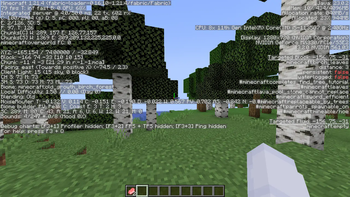
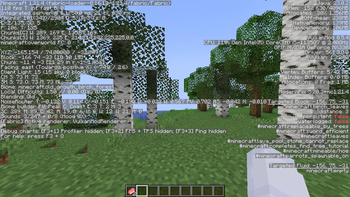
About this Modpack

Voltic is a next-generation and throughly researched performance optimization mod-pack.
Voltic combines mods from all over the community by esteemed mod-developers to give you just the perfect Minecraft performance.
The mod-pack is powered by VulkanMod which changes Minecraft's rendering engine from OpenGL to Vulkan. VulkanMod is a relatively newer mod, which is still in its experimental phase, but has produced some magical results.
A very glaring drawback of the VulkanMod ecosystem is that it has an extensive list of mod incompatibilities. Voltic aims to carefully research mods which help you the most, while keeping them compatible with VulkanMod.
Using Voltic does not guarantee a definite performance boost over Sodium-based optimization modpacks, as some devices run Vulkan better, and some OpenGL. It is upto you to choose the optimum solution for yourself.
Included Mods
VulkanMod – Replaces OpenGL with Vulkan for improved rendering performance and efficiency.
BadOptimizations – Removes inefficient and redundant game code to enhance FPS and stability.
ClothConfigAPI – Provides an easy-to-use configuration system for other mods.
C2ME (Concurrent Chunk Management Engine) – Optimizes chunk loading and multithreading to speed up world generation and improve server performance.
EntityCulling – Prevents the rendering of entities that are not visible to the player, boosting FPS.
FabricAPI – A core library that provides essential tools and compatibility support for Fabric mods.
FerriteCore – Reduces memory usage by optimizing how game objects are stored and accessed.
Krypton – Improves network performance by optimizing packet handling and server connections.
Lithium – Enhances physics calculations, entity AI, and game logic to reduce CPU load and improve performance.
ModernFix – Fixes inefficiencies in Java’s garbage collection and memory handling, reducing lag and improving overall stability.
MoreCulling – Expands on vanilla culling mechanics to remove unnecessary rendering and improve FPS.
Noisium – Optimizes terrain noise calculations, making world generation faster and smoother.
VMP (Very Many Players) – Enhances server performance, particularly in multiplayer settings with many players.
AlternateCurrent – Rewrites Redstone logic for better efficiency, reducing lag caused by complex Redstone circuits.
Cull Leaves – Reduces the rendering of unseen leaf blocks, improving performance in forested areas.
ParticleCore – Optimizes how Minecraft handles particles, reducing their impact on performance.
Since VulkanMod changes the Minecraft renderer to Vulkan, instead of OpenGL, mods which make direct calls to OpenGL are not supported. A major mod affected by the change is Sodium.
As of now, Voltic aims just at improving the overall performance of the game, without providing any QoL improvements in the game, which include the features added by OptiFine.
FAQs
Q: Is this going to work on my device?
A: Voltic should work fine on your device if your GPU supports the Vulkan Renderer. You can find an extensive list of supported GPUs here.
Q: This does not affect my performance!
A: The Vulkan Renderer may have different effects on different GPUs and devices. If Voltic doesn't seem to work for you, you may switch over to a Sodium ecosystem.
Q: What are the specifications of the device Voltic was tested on?
A: CPU: Intel Core i5-1135G7 11th Gen, GPU: Nvidia GeForce MX330, RAM: 8GB
Q: What does Voltic mean?
A: Voltic stands for "Vulkan-optimized lightweight tweaks for improved computing".
Available Versions
How to Set Up a Voltic Server
Order Server
Choose at least 4 GB RAM (6 GB recommended for Voltic). Based on player count: per 8 players.
Install Modpack in Dashboard
Open the modpack browser in the dashboard, search for "Voltic" and click "Install". The fabric loader and Minecraft 1.21.4 are configured automatically.
Start Server & Play
Start the server – all mods are loaded automatically. Share the server IP with friends and play together!
Frequently Asked Questions
Voltic server crashes or won't start – what to do?
Most common causes: insufficient RAM or wrong fabric loader. Check latest.log for "OutOfMemoryError" → increase RAM to at least 6 GB. For "Mixin" or "ClassNotFoundException" errors: modpack version and loader don't match. With Mado Hosting, loader and Minecraft version are auto-configured on modpack install – preventing most startup issues.
How much RAM does a Voltic server really need?
Minimum 4 GB, recommended 6 GB for stable performance. per 8 players. Important: Minecraft modpacks need more RAM than vanilla – plan extra per additional player. With Mado Hosting, you can scale RAM up live at any time without data loss (from €8/month).
Can I add custom mods to Voltic without conflicts?
Yes, but check compatibility: only use mods for the same loader (fabric) and same Minecraft version (1.21.4). Common issues: ID conflicts with recipe mods and incompatible coremod versions. The Mado dashboard mod browser only shows compatible mods and warns about known conflicts.
Voltic server lagging – performance tips
1) Increase RAM to 6 GB+. 2) Reduce server view-distance to 8 (server.properties). 3) Pre-generate chunks with the "Chunky" plugin. 4) Use /spark profiler to check which mods consume the most tick time. With Mado Hosting, all servers run on NVMe SSDs with dedicated CPU cores – eliminating hardware as a bottleneck.
Similar Modpacks

![Cobblemon Official Modpack [Fabric]](https://cdn.modrinth.com/data/5FFgwNNP/e7f9ee2e9d361623847853fe2ddce42f519ee64f.png)
![COBBLEVERSE - Pokemon Adventure [Cobblemon]](https://cdn.modrinth.com/data/Jkb29YJU/581ecf54530972afb18a04660afd820f2f24f6c7.png)
![Better MC [FABRIC] - BMC2](https://cdn.modrinth.com/data/shFhR8Vx/a19c2bcb51d38f32f138d3607e91cb2b7b8e387f_96.webp)


Rent Voltic Server
Start your own server with automatic modpack installation.
Supported Versions
Start your Voltic Server now
From €8.00/month with 6 GB RAM for the best performance.
Configure Server →