
Vortex Client
A clientside modpack that focuses on a survival client with loads of tweaks and performance!
Screenshots
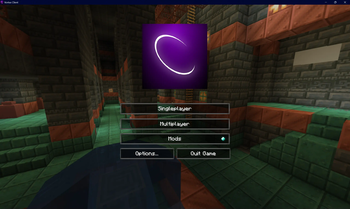

About this Modpack
Vortex Client Modpack
Welcome to the Vortex Client Modpack for Minecraft 1.21! This modpack is meticulously curated to enhance your gameplay with a blend of performance, aesthetics, and utility improvements. Dive into a seamless and immersive Minecraft experience with the following standout features:
Performance Boosters
- Sodium-Fabric: Drastically improves frame rates and overall performance.
- FerriteCore: Reduces memory usage, helping to maintain a smooth gaming experience.
- EntityCulling: Improves rendering by culling entities not visible to the player.
Visual Enhancements
- Iris: Adds shader support, allowing for stunning visual effects.
- Blur: Adds a stylish blur effect to background GUIs.
- WaveyCapes: Bring your capes to life with dynamic, wave-like movements.
Quality of Life Improvements
- BetterPingDisplay: Displays your ping in the player list for better server performance awareness.
- MiniHUD: Provides a customizable HUD to display useful information.
- BetterThirdPerson: Enhances the third-person perspective with more flexibility and control.
User Interface Tweaks
- ModMenu: Easily manage your mods with an intuitive in-game menu.
- Cloth Config: A robust configuration library for mod settings.
- Smooth Scrolling: Refurbished smooth scrolling for all lists and menus.
Enhanced Gameplay Mechanics
- Litematica: Advanced schematic mod for planning and building.
- Tweakeroo: Offers various tweak options to enhance the building experience.
- WorldEdit: Powerful in-game map editor for extensive world alterations.
Chat and Communication
- VoiceChat-Fabric: In-game voice chat for seamless communication.
- Compact Chat: Keeps your chat clean and organized.
- Twitch Chat Reader: Integrate Twitch chat directly into your game.
Miscellaneous Additions
- JourneyMap: Real-time mapping in-game or in a web browser as you explore.
- ShulkerBoxTooltip: Displays the contents of Shulker Boxes without opening them.
- Peek: Allows peeking into containers and inventories without opening them.
Config and Customization
- Custom Client Brand: Personalize your client branding.
- Gamma Utils: Adjust gamma settings for better visibility.
- Searchables: Enhances search functionality for blocks and items.
Elevate your Minecraft experience with Vortex Client Modpack—tailored for the discerning player seeking both performance and flair. Download now and immerse yourself in a world of optimized and visually captivating adventures!
For the latest updates, support, and more information, visit our Modrinth page. Happy crafting!
Included Mods [78]
- ALL MODS- AlinLib-fabric-2.0.0-alpha.3+mc1.21.jar
- athena-fabric-1.21-4.0.0.jar
- BetterPingDisplay-Fabric-1.21-1.1.1.jar
- betterstats-3.12.4+fabric-1.21.jar
- BetterThirdPerson-Fabric-1.21-1.9.0.jar
- blur-4.1.0.jar
- bobby-5.2.3+mc1.21.jar
- c2me-fabric-mc1.21-0.2.0+alpha.11.107.jar
- capes-1.5.4+1.21-fabric.jar
- chat_heads-0.12.7-fabric-1.21.jar
- ChatShot (1.21.x-fabric)-1.0.3.jar
- chunksfadein-1.0.1-1.21.jar
- cicada-lib-0.8.3+1.21-and-above.jar
- ClientSort-Fabric-1.21-0.7.0.jar
- cloth-config-15.0.127-fabric.jar
- cloth-config-15.0.128-fabric.jar
- compact-chat-2.1.1.jar
- custom-client-brand-1.0.1+1.20.5.jar
- DistantHorizons-2.1.2-a-1.21-neo-fabric.jar
- drippyloadingscreen_fabric_3.0.7_MC_1.21.jar
- dynamic-fps-3.6.0+minecraft-1.21.0-fabric.jar
- enhancedblockentities-0.10.1+1.21.jar
- entity_model_features_fabric_1.21-2.1.3.jar
- entity_texture_features_fabric_1.21-6.1.3.jar
- entityculling-fabric-1.6.6-mc1.21.jar
- EuphoriaPatcher-0.3.4-fabric.jar
- fabric-api-0.100.7+1.21.jar
- fabric-language-kotlin-1.11.0+kotlin.2.0.0.jar
- fancymenu_fabric_3.2.5_MC_1.21.jar
- fastitems-1.0.0-1.21.jar
- ferritecore-7.0.0-fabric.jar
- ForgeConfigAPIPort-v21.0.1-1.21-Fabric.jar
- Gamma-Utils-1.9.20-mc1.21.jar
- ImmediatelyFast-Fabric-1.2.18+1.21.jar
- indium-1.0.34+mc1.21.jar
- iris-1.7.3+mc1.21.jar
- journeymap-fabric-1.21-6.0.0-beta.18.jar
- konkrete_fabric_1.9.9_MC_1.21.jar
- litematica-fabric-1.21-0.18.999-sakura.25.jar
- malilib-fabric-1.21-0.19.999-sakura.8.jar
- melody_fabric_1.0.10_MC_1.21.jar
- mica-1.0.1-fabric.jar
- minihud-fabric-1.21-0.31.999-sakura.10.jar
- modelfix-1.21-1.6-fabric.jar
- modernfix-fabric-5.18.8+mc1.21.jar
- modmenu-11.0.1.jar
- mru-0.4.4+1.21.jar
- NoRefreshScroll-1.21-1.0.9.jar
- no-resource-pack-warnings-1.3.0.jar
- nvidium-0.2.9-beta.jar
- optigui-2.3.0-beta.2+1.21.jar
- peek-fabric-1.21-1.3.4.jar
- placeholder-api-2.4.1+1.21.jar
- Resourcify (1.21+-fabric)-1.4.0.jar
- screenfx-1.4.2+1.21.jar
- Searchables-fabric-1.21-1.0.1.jar
- serverpingerfixer-1.0.5.jar
- show-me-your-skin-1.11.2+1.21.jar
- shulkerboxtooltip-fabric-5.0.4+1.21.jar
- SimplyStatus-fabric-2.2.0-alpha.5.jar
- skinlayers3d-fabric-1.6.6-mc1.21.jar
- smoothgui-0.1.1.jar
- SmoothScrollingRefurbished+1.21-1.1.4.jar
- sodiumcoreshadersupport-1.0.3.jar
- sodium-fabric-0.5.11+mc1.21.jar
- tcdcommons-3.12.2+fabric-1.21.jar
- TerraBlender-fabric-1.21-4.0.0.1.jar
- tweakeroo-fabric-1.21-0.20.999-sakura.18.jar
- twitch-chat-reader-b4591a0-0.1.0.jar
- ViaFabricPlus-3.4.3.jar
- viewboboptions-0.2.1+1.21.jar
- voicechat-fabric-1.21-2.5.16.jar
- waveycapes-fabric-1.4.8-mc1.21.jar
- worldedit-mod-7.3.5.jar
- YetAnotherConfigLib-3.5.0+1.21-fabric.jar
- Zoomify-2.14.0+1.21.jar
Available Versions
How to Set Up a Vortex Client Server
Order Server
Choose at least 4 GB RAM (6 GB recommended for Vortex Client). Based on player count: per 8 players.
Install Modpack in Dashboard
Open the modpack browser in the dashboard, search for "Vortex Client" and click "Install". The fabric loader and Minecraft 1.21 are configured automatically.
Start Server & Play
Start the server – all mods are loaded automatically. Share the server IP with friends and play together!
Frequently Asked Questions
Vortex Client server crashes or won't start – what to do?
Most common causes: insufficient RAM or wrong fabric loader. Check latest.log for "OutOfMemoryError" → increase RAM to at least 6 GB. For "Mixin" or "ClassNotFoundException" errors: modpack version and loader don't match. With Mado Hosting, loader and Minecraft version are auto-configured on modpack install – preventing most startup issues.
How much RAM does a Vortex Client server really need?
Minimum 4 GB, recommended 6 GB for stable performance. per 8 players. Important: Minecraft modpacks need more RAM than vanilla – plan extra per additional player. With Mado Hosting, you can scale RAM up live at any time without data loss (from €8/month).
Can I add custom mods to Vortex Client without conflicts?
Yes, but check compatibility: only use mods for the same loader (fabric) and same Minecraft version (1.21). Common issues: ID conflicts with recipe mods and incompatible coremod versions. The Mado dashboard mod browser only shows compatible mods and warns about known conflicts.
Vortex Client server lagging – performance tips
1) Increase RAM to 6 GB+. 2) Reduce server view-distance to 8 (server.properties). 3) Pre-generate chunks with the "Chunky" plugin. 4) Use /spark profiler to check which mods consume the most tick time. With Mado Hosting, all servers run on NVMe SSDs with dedicated CPU cores – eliminating hardware as a bottleneck.
Similar Modpacks

![Better MC [FABRIC] - BMC2](https://cdn.modrinth.com/data/shFhR8Vx/a19c2bcb51d38f32f138d3607e91cb2b7b8e387f_96.webp)
![Better MC [FORGE] - BMC4](https://cdn.modrinth.com/data/4BV47HRn/7f5ef7cc61b2593609aabef3ed07a866a4f11b73_96.webp)


Rent Vortex Client Server
Start your own server with automatic modpack installation.
Supported Versions
Start your Vortex Client Server now
From €8.00/month with 6 GB RAM for the best performance.
Configure Server →