
VulkanOvertake
This modpack uses vulkan giving insane fps + has mods for pvp and other stuff.
Screenshots

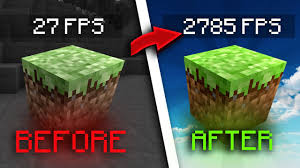
About this Modpack
VulkanOvertakeA performance-focused utility and PvP modpack designed to deliver high framerates while giving you complete control over your gameplay interface. Built on Fabric, this pack combines rendering optimizations with tools for competitive play, technical building, and general multiplayer convenience.
⚡ Key FeaturesVulkan Optimization: Uses VulkanMod to overhaul the Minecraft rendering engine, unlocking maximum FPS and smooth performance.PvP & Combat Enhancements: Features custom hitboxes, crystal placement tracking, armor HUD overlays, and motion blur for a responsive combat feel.Technical Utilities: Full support for Litematica, client-side freecam, and advanced gamma adjustments.Social & Networking: Integrated high-quality proximity voice chat and optimized network performance packets.
🛠️ Included ModsPerformance & EngineVulkanMod – Shifts game rendering to the Vulkan API for maximum frame rates.Dynamic FPS – Reduces resource usage when the game window is unfocused.EntityCulling – Skips rendering hidden entities to eliminate lag in crowded areas.Krypton – Optimizes the network stack for smoother multiplayer connection.
Combat & PvP UtilitiesCombat Hitboxes – Provides precise visual aids during intense engagements.Marlow's Crystal Optimizer – Smooths and tracks fast crystal placements.uku's Armor HUD – Keeps your equipment durability clearly visible on screen.Motion Blur – Adds cinematic camera smoothing to fast turns.NoWheel – Prevents accidental hotbar scrolling errors.
Visuals & NavigationZume – Clean, lightweight client zoom functionality.Xaero's Waypoints – Easily bookmark and navigate back to important map locations.3D Skin Layers – Adds extra physical depth to player skins.Gamma Utils – Instantly toggles fullbright illumination for dark caves or night fighting.Freecam – Client-side camera detachment to inspect builds safely.
Technical & Quality of LifeLitematica & MaLiLib – Schematic placement tools for planning intricate builds.Carpet Mod – Powerful technical tools for debugging and game state checking.Simple Voice Chat – Complete proximity audio setup for multiplayer worlds.Shulker Box Tooltip – View storage contents without placing the box down.Fast IP Ping – Instantly reveals connection speeds to multiplayer servers.
⚙️ Configuration NotesGraphics Drivers: Ensure your GPU drivers are fully up to date to prevent Vulkan rendering crashes.Controls: Double-check your keybind menu upon first launch, as several visual utilities share default activation keys.
Available Versions
How to Set Up a VulkanOvertake Server
Order Server
Choose at least 4 GB RAM (6 GB recommended for VulkanOvertake). Based on player count: per 8 players.
Install Modpack in Dashboard
Open the modpack browser in the dashboard, search for "VulkanOvertake" and click "Install". The fabric loader and Minecraft 1.21.11 are configured automatically.
Start Server & Play
Start the server – all mods are loaded automatically. Share the server IP with friends and play together!
Frequently Asked Questions
VulkanOvertake server crashes or won't start – what to do?
Most common causes: insufficient RAM or wrong fabric loader. Check latest.log for "OutOfMemoryError" → increase RAM to at least 6 GB. For "Mixin" or "ClassNotFoundException" errors: modpack version and loader don't match. With Mado Hosting, loader and Minecraft version are auto-configured on modpack install – preventing most startup issues.
How much RAM does a VulkanOvertake server really need?
Minimum 4 GB, recommended 6 GB for stable performance. per 8 players. Important: Minecraft modpacks need more RAM than vanilla – plan extra per additional player. With Mado Hosting, you can scale RAM up live at any time without data loss (from €8/month).
Can I add custom mods to VulkanOvertake without conflicts?
Yes, but check compatibility: only use mods for the same loader (fabric) and same Minecraft version (1.21.11). Common issues: ID conflicts with recipe mods and incompatible coremod versions. The Mado dashboard mod browser only shows compatible mods and warns about known conflicts.
VulkanOvertake server lagging – performance tips
1) Increase RAM to 6 GB+. 2) Reduce server view-distance to 8 (server.properties). 3) Pre-generate chunks with the "Chunky" plugin. 4) Use /spark profiler to check which mods consume the most tick time. With Mado Hosting, all servers run on NVMe SSDs with dedicated CPU cores – eliminating hardware as a bottleneck.
Similar Modpacks

![Better MC [FABRIC] - BMC2](https://cdn.modrinth.com/data/shFhR8Vx/a19c2bcb51d38f32f138d3607e91cb2b7b8e387f_96.webp)
![Better MC [FORGE] - BMC4](https://cdn.modrinth.com/data/4BV47HRn/7f5ef7cc61b2593609aabef3ed07a866a4f11b73_96.webp)


Rent VulkanOvertake Server
Start your own server with automatic modpack installation.
Supported Versions
Start your VulkanOvertake Server now
From €8.00/month with 6 GB RAM for the best performance.
Configure Server →