
Whimsy Brews
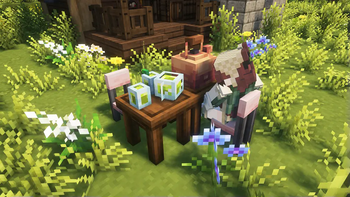
Run your own Tea shop or a Brewery, discover new Origin Races and explore redesigned Biomes, Worlds and Mobs in this cozy lightweight MC Modpack!
Screenshots
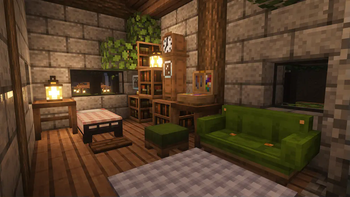
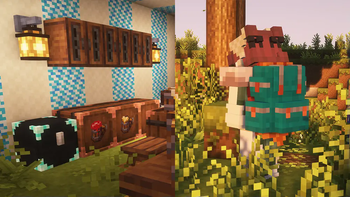
About this Modpack

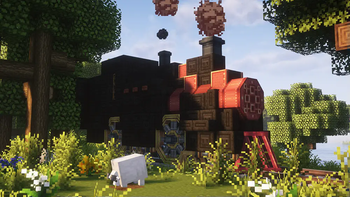
Enter the land of whimsy, where adventure and coziness go hand in hand! Prepare to embark on a peaceful journey in a world powered by YUNG's Better exploration mods, Let's Do series and the unparalleled creativity of the Create mod.
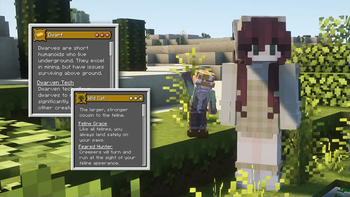
Pick and choose from a variety of Race Origins that completely alter the gameplay you will experience. From the tinniest Dwarf race to an enormous Troll with ravenous appetite.
Overworld now has some soothing ambient sounds and particles, vanilla friendly biome redesigns and variety of new mobs and structures. If you're looking for a more deadly experience, you can hop through the portals and even visit a unique Sleepy Hollows biome with mysterious bosses.
Perfect for playing with friends!

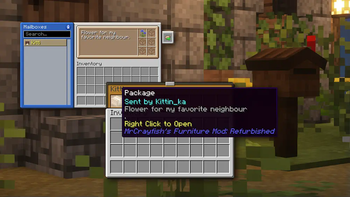
Other Mods: Amendments, MrCrayfish's Furniture, Ribbits, Lootr, HT's Tree Chop, Carry On, Corpse, 3D Skin Layers, Visual Workbench, Jade, JEI, Traveler's Titles, etc..
Resource packs: 3D Crops Revamped, Fresh Animations, Colourful Containers GUI, Enchant Icons, Mizuno 16 Craft
Shaders: Complementary Shaders - Unbound

This Modpack was made for my Community Minecraft server that makes the most out of the Discord Integration mod and includes special Journals to enhance its RPG feel. You will also encounter monthly challenges, community boss fights and other fun events.
You will have to add Twilight Forest and Sit & Chill mods manually to play on the server.
Join the Herbal Brews Discord for more information.
Available Versions
How to Set Up a Whimsy Brews Server
Order Server
Choose at least 6 GB RAM (8 GB recommended for Whimsy Brews). Based on player count: per 5 players.
Install Modpack in Dashboard
Open the modpack browser in the dashboard, search for "Whimsy Brews" and click "Install". The forge loader and Minecraft 1.20.1 are configured automatically.
Start Server & Play
Start the server – all mods are loaded automatically. Share the server IP with friends and play together!
Frequently Asked Questions
Whimsy Brews server crashes or won't start – what to do?
Most common causes: insufficient RAM or wrong forge loader. Check latest.log for "OutOfMemoryError" → increase RAM to at least 8 GB. For "Mixin" or "ClassNotFoundException" errors: modpack version and loader don't match. With Mado Hosting, loader and Minecraft version are auto-configured on modpack install – preventing most startup issues.
How much RAM does a Whimsy Brews server really need?
Minimum 6 GB, recommended 8 GB for stable performance. per 5 players. Important: Minecraft modpacks need more RAM than vanilla – plan extra per additional player. With Mado Hosting, you can scale RAM up live at any time without data loss (from €12/month).
Can I add custom mods to Whimsy Brews without conflicts?
Yes, but check compatibility: only use mods for the same loader (forge) and same Minecraft version (1.20.1). Common issues: ID conflicts with recipe mods and incompatible coremod versions. The Mado dashboard mod browser only shows compatible mods and warns about known conflicts.
Whimsy Brews server lagging – performance tips
1) Increase RAM to 8 GB+. 2) Reduce server view-distance to 8 (server.properties). 3) Pre-generate chunks with the "Chunky" plugin. 4) Use /spark profiler to check which mods consume the most tick time. With Mado Hosting, all servers run on NVMe SSDs with dedicated CPU cores – eliminating hardware as a bottleneck.
Similar Modpacks
![Cobblemon Official Modpack [Fabric]](https://cdn.modrinth.com/data/5FFgwNNP/e7f9ee2e9d361623847853fe2ddce42f519ee64f.png)
![COBBLEVERSE - Pokemon Adventure [Cobblemon]](https://cdn.modrinth.com/data/Jkb29YJU/581ecf54530972afb18a04660afd820f2f24f6c7.png)
![Better MC [FABRIC] - BMC2](https://cdn.modrinth.com/data/shFhR8Vx/a19c2bcb51d38f32f138d3607e91cb2b7b8e387f_96.webp)


![Better MC [FORGE] - BMC4](https://cdn.modrinth.com/data/4BV47HRn/7f5ef7cc61b2593609aabef3ed07a866a4f11b73_96.webp)
Rent Whimsy Brews Server
Start your own server with automatic modpack installation.
Details
- License
- LicenseRef-All-Rights-Reserved
- Server-side
- Unsupported
- Client-side
- Required
Supported Versions
Start your Whimsy Brews Server now
From €12.00/month with 8 GB RAM for the best performance.
Configure Server →