箱中世界World in a Box
这款整合包让你在长途探索时无需折返基地,借助随身携带的手提箱,随时就能进入箱中世界。This modpack allows you to explore on long - distance journeys without having to return to the base. With the portable suitcase at hand, you can enter the World in a Box at any time.
Screenshots





About this Modpack
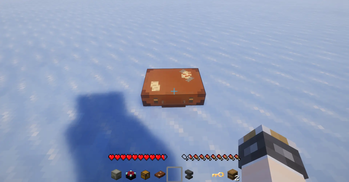
这个整合包可以让你像游牧民族一样,到世界各地去旅行,过上旅居的生活,长途旅行途中无需折返基地,借助随身携带的手提箱,随时就能进入箱中世界。我会让这个世界充满各种冒险和探索元素,还有美丽的风景,动人的音乐,目前处于早起开发制作阶段,欢迎大家来提出意见。
This modpack allows you to travel around the world like a nomad and lead a life of living away from home. During long - distance travels, you don't have to return to the base. With the portable suitcase at hand, you can enter the World in a Box at any time. I will fill this world with various adventure and exploration elements, as well as beautiful scenery and charming music. Currently, it is in the early stage of development and production. Everyone is welcome to offer their suggestions.
Available Versions
How to Set Up a 箱中世界World in a Box Server
Order Server
Choose at least 6 GB RAM (8 GB recommended for 箱中世界World in a Box). Based on player count: per 5 players.
Install Modpack in Dashboard
Open the modpack browser in the dashboard, search for "箱中世界World in a Box" and click "Install". The fabric loader and Minecraft 1.20.1 are configured automatically.
Start Server & Play
Start the server – all mods are loaded automatically. Share the server IP with friends and play together!
Frequently Asked Questions
箱中世界World in a Box server crashes or won't start – what to do?
Most common causes: insufficient RAM or wrong fabric loader. Check latest.log for "OutOfMemoryError" → increase RAM to at least 8 GB. For "Mixin" or "ClassNotFoundException" errors: modpack version and loader don't match. With Mado Hosting, loader and Minecraft version are auto-configured on modpack install – preventing most startup issues.
How much RAM does a 箱中世界World in a Box server really need?
Minimum 6 GB, recommended 8 GB for stable performance. per 5 players. Important: Minecraft modpacks need more RAM than vanilla – plan extra per additional player. With Mado Hosting, you can scale RAM up live at any time without data loss (from €12/month).
Can I add custom mods to 箱中世界World in a Box without conflicts?
Yes, but check compatibility: only use mods for the same loader (fabric) and same Minecraft version (1.20.1). Common issues: ID conflicts with recipe mods and incompatible coremod versions. The Mado dashboard mod browser only shows compatible mods and warns about known conflicts.
箱中世界World in a Box server lagging – performance tips
1) Increase RAM to 8 GB+. 2) Reduce server view-distance to 8 (server.properties). 3) Pre-generate chunks with the "Chunky" plugin. 4) Use /spark profiler to check which mods consume the most tick time. With Mado Hosting, all servers run on NVMe SSDs with dedicated CPU cores – eliminating hardware as a bottleneck.
Rent 箱中世界World in a Box Server
Start your own server with automatic modpack installation.
Supported Versions
Start your 箱中世界World in a Box Server now
From €12.00/month with 8 GB RAM for the best performance.
Configure Server →