
WildLight
This modpack transforms Minecraft into an immersive world full of exploration and realism.
Screenshots
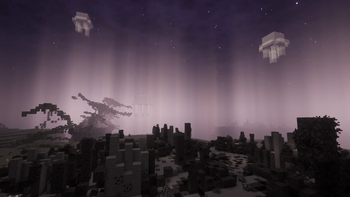
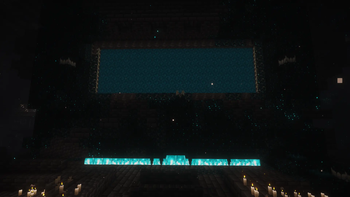
About this Modpack
🌲 WildLight
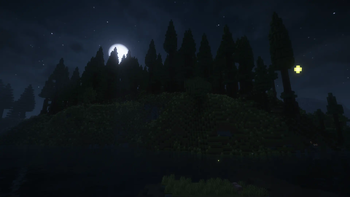
Step into a world where survival meets subtle beauty. In WildLight, every sound, texture, and detail is crafted to pull you deeper into a refined Minecraft experience. Explore vast landscapes, survive harsh conditions, and uncover the forgotten logic of a world shaped by realism. This is not just Vanilla — it’s nature, reborn through immersion.
✨ Features
🎧 Enhanced soundscapes and ambient effects ✨
Put on your headphones and listen to the beautiful, magical sounds of nature. With mods like AmbientSounds for natural ambience, Presence Footsteps that add unique walking sounds, and Sound Physics Remastered which makes audio more realistic, you'll feel more immersed in the game more than ever before.
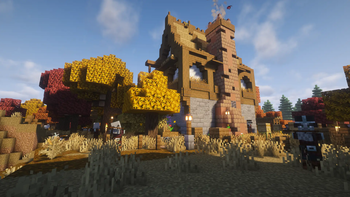
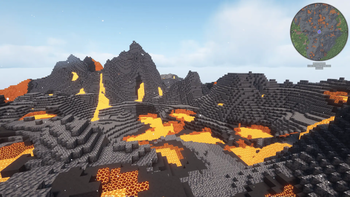
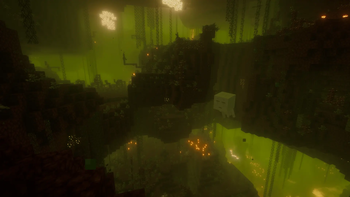
For visuals, countless new particles and stunning shaders make the world more breathtaking than ever. Particular add beautiful little animations that make the game feel alive, with waterfalls, falling leaves, and so much more. I also love Subtle Effect, it makes fire look truly magical. And of course, with Iris for shaders and Complementary Unbound enhanced by Euphoria Patches, every visual detail looks absolutely incredible.
🌄 Diverse new landscapes and discoveries 🔍
Create a new world and discover the richness of the new biomes added by Biomes O' Plenty, which introduces a ton of diverse biomes. The Nether also features new biomes thanks to Pyrellium. There's also Wilder Wild, which adds new biomes and structures to make the world feel even more realistic.
Throughout your world, you'll also encounter many new or revamped structures. Towns and Towers adds new villages and pillages outposts, while the End hasn't been forgotten, Moog's End Structures brings fresh exploration opportunities there as well. Several Vanilla structures have also been revamped with the YUNG's mods.
✨ Intuitive quality-of-life improvements 🧬
Countless QoL mods have been added, each playing an important role in the modpack. The essential AppleSkin shows you the potential hunger restored while holding food. Auto HUD lets you admire the beautiful world by automatically hiding and showing the hotbar, and as a complement, Dynamic Crosshair displays useful information right on your crosshair.
There are also many "Better" mods, but Better Third Person is especially great if you enjoy playing in third person. If you prefer the first-person view, First-person Model allows you to see your own body just like in real life. Another excellent QoL mod is InvMove, which lets you move while using your inventory.
In game, you'll never see annoying pop-ups, but if you prefer having them, you can easily configure toasts in the No More Pop-ups config via Mod Menu.
📈 An optimized experience 🔧
You don't have 32Gb RAM, a powerful graphic card, or a high-end chip? No problem! Many mods are included to optimize Minecraft's performance, Sodium is one of the most well-known. But there is also Dynamic FPS, which reduces memory usage when the game window is unfocused. ImmediatelyFast optimizes all immediate mode rendering, while Concurrent Chunk Management Engine improves chunk performance. Entity Culling is also used to hide blocks and entities that aren't visible.
You can check Opions Profiles menu to instantly load custom settings based on your PC's performance. There are 4 presets available:
- Default: The default setup (tested on a Mac Mini M2)
- Performance: No shaders, fast rendering, maximum possible FPS
- Balanced: Uses shaders, offers a middle ground between Performance and Quality
- Quality: Uses shaders, provides maximum visual fidelity, best for powerful PCs
🎨 A fresh look at a beautiful UI ✨
The new UI starts at the launch of the game, a little but appreciated mod Dark Loading Screen, after, you'll remark a revisited menu thanks to FancyMenu. All the GUI has also changed by the Recolourfull Containers GUI + HUD (DARK) resource pack. You'll also notice that there are a lot of icons into the buttons, they are created by Icons. All this new UI is now smooth when they appeared (Smooth Gui), when you scroll (Smooth Scrolling) and more. Some resource packs and mods has little UI bugs, so I created WildLight Compat mod to patch them manually for a better experience.
🛜 Multiplayer 🌍
This modpack is great to play solo, but it's even better to enjoy with friends using Wabbanode. Several mods are included to enhance the multiplayer experience.
For chat, Better Selection makes text easier and more pleasant to select, while Chat Heads displays player avatar in the chat, just like profile pictures next to message. And finally, I know how annoying it is when you accidentally hit a friend and all the dogs start attacking each other. Now you can calm them down with Calm down, dog.
🔧 Recommendation
It is recommended to allocate at least 4GB of RAM to Minecraft. This helps ensure smoother performance and reduces lag.
🙏 Credits
- Thanks to nNoidea for Eating Animation support for Wilder Wild compatibility! (via Eating Animation PR #62) (not anymore in this mod, but in this resource pack).
- Thanks to the FrozenBlock team for WilderWild, and to voxelotl for allowing me to add some of their textures to the resource pack!
- Thanks to Annie for making the beautiful WildLight logo
🚀 Planned Features
- A quest book to discover the mods in the modpack or custom advancements
- A refreshed interface
- Better performance
🌐 Looking for a server? Support me at the same time!
Want to play with friends? Get your own server with Wabbanode.
Use the code WILDLIGHT to support me and get 25% off.

🎮 Videos
Available Versions
How to Set Up a WildLight Server
Order Server
Choose at least 6 GB RAM (8 GB recommended for WildLight). Based on player count: per 5 players.
Install Modpack in Dashboard
Open the modpack browser in the dashboard, search for "WildLight" and click "Install". The fabric loader and Minecraft 1.21.1 are configured automatically.
Start Server & Play
Start the server – all mods are loaded automatically. Share the server IP with friends and play together!
Frequently Asked Questions
WildLight server crashes or won't start – what to do?
Most common causes: insufficient RAM or wrong fabric loader. Check latest.log for "OutOfMemoryError" → increase RAM to at least 8 GB. For "Mixin" or "ClassNotFoundException" errors: modpack version and loader don't match. With Mado Hosting, loader and Minecraft version are auto-configured on modpack install – preventing most startup issues.
How much RAM does a WildLight server really need?
Minimum 6 GB, recommended 8 GB for stable performance. per 5 players. Important: Minecraft modpacks need more RAM than vanilla – plan extra per additional player. With Mado Hosting, you can scale RAM up live at any time without data loss (from €12/month).
Can I add custom mods to WildLight without conflicts?
Yes, but check compatibility: only use mods for the same loader (fabric) and same Minecraft version (1.21.1). Common issues: ID conflicts with recipe mods and incompatible coremod versions. The Mado dashboard mod browser only shows compatible mods and warns about known conflicts.
WildLight server lagging – performance tips
1) Increase RAM to 8 GB+. 2) Reduce server view-distance to 8 (server.properties). 3) Pre-generate chunks with the "Chunky" plugin. 4) Use /spark profiler to check which mods consume the most tick time. With Mado Hosting, all servers run on NVMe SSDs with dedicated CPU cores – eliminating hardware as a bottleneck.
Similar Modpacks
![Cobblemon Official Modpack [Fabric]](https://cdn.modrinth.com/data/5FFgwNNP/e7f9ee2e9d361623847853fe2ddce42f519ee64f.png)
![COBBLEVERSE - Pokemon Adventure [Cobblemon]](https://cdn.modrinth.com/data/Jkb29YJU/581ecf54530972afb18a04660afd820f2f24f6c7.png)
![Better MC [FABRIC] - BMC2](https://cdn.modrinth.com/data/shFhR8Vx/a19c2bcb51d38f32f138d3607e91cb2b7b8e387f_96.webp)


![Better MC [FORGE] - BMC4](https://cdn.modrinth.com/data/4BV47HRn/7f5ef7cc61b2593609aabef3ed07a866a4f11b73_96.webp)
Rent WildLight Server
Start your own server with automatic modpack installation.
Supported Versions
Start your WildLight Server now
From €12.00/month with 8 GB RAM for the best performance.
Configure Server →