
What Is My FPS??
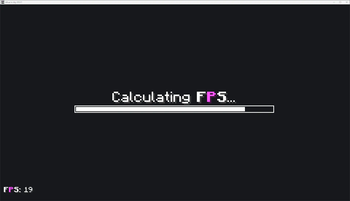
WIMP is the next generation of Minecraft Client Modpacks and human evolution. For the curious, the adventurous, and those ready to know more: Finally see your FPS.
Screenshots
About this Modpack
A Brief Introduction
"The unexamined life is not worth living." - Socrates
These words ring true most of all when it comes to Minecraft, after all, one must "Know thyself" before it can be said you know anything at all. This is what Aristotle would call the beginning of all wisdom.
What does it mean to know oneself? You must understand your actions, the world around you, how that world affects you, and how you impact it in kind.
Your Minecraft world is no different, well, except for one thing.
Between us and our beloved land of voxels is an inpreceptable barrier, one not only restricting your physical access but your mental and spiritual access as well. Of course, I'm talking about the barrier to the entire digital second space that makes up our modern world, what I call "the barrier of the screen."
Our devices have gotten better over the ages, and we've rapidly worked to cross this barrier to observe our digital world in its raw form. Alas, we are not there yet, even information itself has a speed limit set not by man, king, institution, government, nor god, but by the laws of physics. The universe itself is the sole governing body in total control of how we perceive the world, how light is emitted from the screens, and hits our retinas. We crave more.
As humans often do, we long for more information, more understanding, more connection to what's going on in our humble computers... more power. So thirsty for this connection, so lost in our quest, some dedicate their careers to this innately human quest, the quest for a higher FPS.
I come to you today, humbled by such an important drive. My offering to this higher calling is a meager one, but I believe in its importance nonetheless. I am no genius, I am no pioneer, and I will not be on the front lines in our battle as a species against the barrier of the screen.
Through this project, I, no WIMP, offers support.
Never again will you be without understanding of your true power, never again will you be encumbered by the burden of uncertainty, and never again will you have to ask...
What How
How
WIMP achieves greatness by leveraging the best the Minecraft community has to offer. Ensuring you're always informed of your FPS, no matter where you're looking.
Through rigourous testing, WIMP ensures at least 420% uptime of detailed performance information during regular gameplay regardless of playstyle or other conditions.
Built for anyone from brand new players looking for a deeper understanding of the game to battletested PVPers who rely on in-the-moment critical information, to professionals and creators hoping to optimize their workflow by cutting out the time it takes to find FPS information.
With 25+ mods dedicated to this one singular goal, WIMP offers more options than any other modpack on the market garunteed.
Carefully and painstakingly preconfigured to ensure your game still looks clean WIMP promises:
- ❌ No unnecessary information!
No screen clutter, only see what really matters to you when you want it. - ✅ Easy customization!
Through preconfigured keybinds, ready made Better F3 profiles,
and a custom resource pack for Mod Menu that clarifies some of its more confusing elements, WIMP is highly tuned but ready for you to take control.
 - ❌ No hard to see or overlapping elements!
Be confident in your FPS without straining your eyes or worrying about setting things up first, WIMP has you covered. - ✅ There is no fourth thing!
WIMP is effiecient and lightweight without any bloat, while still providing everything you've been looking for and everything you need in a client-side Modpack.
This wouldn't be possible without the hard work, dedication, and unparalleled creativity of the Minecraft modding community.
This pack is, after all, the sum of its parts, and wouldn't exist without forward-thinking one-of-a-kind developers who dared to be different and create something unlike anything that had come before.
Each mod a masterpiece in its own right; these are just a few key components of WIMP.
Ensure you're never without critical knowledge thanks to these critical mods...
 DisplayFPS
 FPShud
 FPS - Display
Use powerful tools to take full control of your experience...
 CustomHUD
 Hudman
 Hudder
For those that want something a little more user-friendly, dare I say simpler, WIMP offers...
 simplehud
 SimpleHUD
 Simple Hud
⚠️ What Is The Catch
No catch! WIMP is offered as a community service for the public good. WIMP will never ask for your money, information, time, and will never attempt to C̵̩̦̲̒̐͠l̴̛̝̯̟̣̉a̷͈͕͉̤̓͆̈́͊i̸̼͆̈̓͘m̶̜̈́̅́͒ ̷̭̱̺̈́͠y̷̡̦͐̊ͅò̷̡̤̂̐u̴̺͛̒̽̂.
That being said, there are a few things you should know!
- This pack is designed with
16:9screens in mind, specifically1080x1920resolutions playing in windowed or full-screen mode. However, testing on other screens and resolutions indicates there should be little to no adverse effects even if you're playing on phones or ultra-wide screens. - Some mods included are disabled by default, either due to incompatibility or redundancy with included mods, or because they lack the customization necessary to fit into WIMP. Re-enable at your own risk!
- Some mods like
 Immediately Fast
and
Immediately Fast
and
 Exordium
are included to enhance performance, particularly when rendering HUD elements. If this is undesired, you may want to disable them.
Exordium
are included to enhance performance, particularly when rendering HUD elements. If this is undesired, you may want to disable them.
Testimonials
Below you'll find the powerful words of our brave users who were willing to share the story of their personal journies with WIMP. Please read with respect and understanding for these deeply honest accounts.

|
{fps} isn't good enough they say. It's too complicated they say. Well no more. This pack is now my goto recommendation for my users" |

|
But after I finally learned what my FPS was, I won the lottery, got my master's degree, and now I'm dating a supermodel. It's all thanks to WIMP. WIMP turned my life around." |

|
My world now operates on a higher frequency of inquiry. Only one purpose remains, and while I don't fully understand it yet, I have never felt more optimized." |

|
This pack works great on my Ninetendo 3DS! Having my FPS jump out at me in real live action 3D took my gaming experience to the next level! Sometimes I'll see a glimmer in the top left of my eyes and get saddened that I can't be playing WIMP at that very moment..." |


Available Versions
How to Set Up a What Is My FPS?? Server
Order Server
Choose at least 6 GB RAM (8 GB recommended for What Is My FPS??). Based on player count: per 5 players.
Install Modpack in Dashboard
Open the modpack browser in the dashboard, search for "What Is My FPS??" and click "Install". The fabric loader and Minecraft 1.21.1 are configured automatically.
Start Server & Play
Start the server – all mods are loaded automatically. Share the server IP with friends and play together!
Frequently Asked Questions
What Is My FPS?? server crashes or won't start – what to do?
Most common causes: insufficient RAM or wrong fabric loader. Check latest.log for "OutOfMemoryError" → increase RAM to at least 8 GB. For "Mixin" or "ClassNotFoundException" errors: modpack version and loader don't match. With Mado Hosting, loader and Minecraft version are auto-configured on modpack install – preventing most startup issues.
How much RAM does a What Is My FPS?? server really need?
Minimum 6 GB, recommended 8 GB for stable performance. per 5 players. Important: Minecraft modpacks need more RAM than vanilla – plan extra per additional player. With Mado Hosting, you can scale RAM up live at any time without data loss (from €12/month).
Can I add custom mods to What Is My FPS?? without conflicts?
Yes, but check compatibility: only use mods for the same loader (fabric) and same Minecraft version (1.21.1). Common issues: ID conflicts with recipe mods and incompatible coremod versions. The Mado dashboard mod browser only shows compatible mods and warns about known conflicts.
What Is My FPS?? server lagging – performance tips
1) Increase RAM to 8 GB+. 2) Reduce server view-distance to 8 (server.properties). 3) Pre-generate chunks with the "Chunky" plugin. 4) Use /spark profiler to check which mods consume the most tick time. With Mado Hosting, all servers run on NVMe SSDs with dedicated CPU cores – eliminating hardware as a bottleneck.
Similar Modpacks

![COBBLEVERSE - Pokemon Adventure [Cobblemon]](https://cdn.modrinth.com/data/Jkb29YJU/581ecf54530972afb18a04660afd820f2f24f6c7.png)




Rent What Is My FPS?? Server
Start your own server with automatic modpack installation.
Details
- License
- Do What The F*ck You Want To Public License
- Server-side
- Unsupported
- Client-side
- Required
Supported Versions
Start your What Is My FPS?? Server now
From €12.00/month with 8 GB RAM for the best performance.
Configure Server →