
WONDERVERSE PRIME
1.21.5 | 32x Textures | Better Performance | Controller & Steam Deck Support | Multiplayer Friendly | Vanilla Gameplay | Custom Shaders | 3D Elements
Screenshots
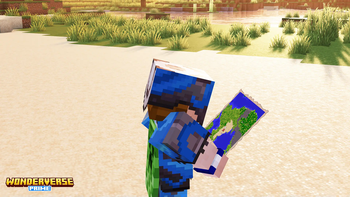
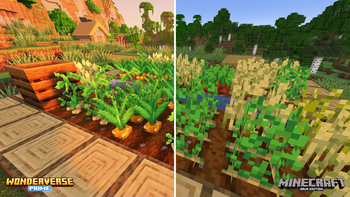
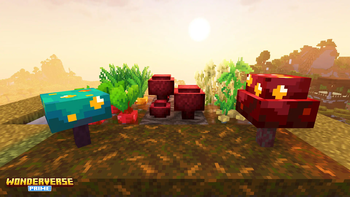
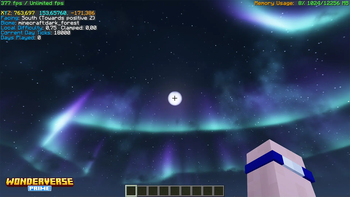
About this Modpack

Welcome to the official page of the WONDERVERSE PRIME modpack, always up-to-date with the latest version of Minecraft!
Enhance graphics without altering gameplay, ensuring compatibility with any world or server. This modpack introduces several Quality of Life improvements and optimizes performance, allowing Minecraft to run smoother even on low-end devices. It's designed to be more visually appealing with shaders, resource packs and mods that focus on improving the game's graphical aspects.

WONDERVERSE PRIME will always be on the latest Minecraft version and it will be released as soon as Fabric and a few other core mods get updated, so everyone can immediately enjoy the newest features of Minecraft and enhanced vanilla experience.
There will be more frequent releases, adding more contents and keeping everything updated, while doing our best to ensure quality and stability.

- Made for the latest version of Minecraft
- 99% Vanilla-like using only mods that don't alter the original gameplay
- Higher resolution graphics with 32x textures and enhanced GUIs
- Stunning visuals with customized shaders, animations and 3D elements (including player skins!)
- Steam Deck / gamepad support allowing you to play Minecraft with any controller
- Many vanilla-friendly Quality of Life improvements
- Human-readable Debug Screen (F3) with essential information only
- Planty of performance optimizations: no need Optifine anymore
- Multiplayer-friendly: join friends and play on any server without limitations
- Upcoming official features, when available, directly from weekly Snapshots;
- Works everywhere without limitations
- Built for Fabric

Feel free to suggest how we can improve this modpack on our Discord.
We carefully selected all the mods, shaders and resource packs included in WONDERVERSE PRIME. All credits go to the original creators. Minecraft is a trademark of Mojang Synergies AB. Made in Italy.
Available Versions
How to Set Up a WONDERVERSE PRIME Server
Order Server
Choose at least 4 GB RAM (6 GB recommended for WONDERVERSE PRIME). Based on player count: per 8 players.
Install Modpack in Dashboard
Open the modpack browser in the dashboard, search for "WONDERVERSE PRIME" and click "Install". The fabric loader and Minecraft 1.21.5 are configured automatically.
Start Server & Play
Start the server – all mods are loaded automatically. Share the server IP with friends and play together!
Frequently Asked Questions
WONDERVERSE PRIME server crashes or won't start – what to do?
Most common causes: insufficient RAM or wrong fabric loader. Check latest.log for "OutOfMemoryError" → increase RAM to at least 6 GB. For "Mixin" or "ClassNotFoundException" errors: modpack version and loader don't match. With Mado Hosting, loader and Minecraft version are auto-configured on modpack install – preventing most startup issues.
How much RAM does a WONDERVERSE PRIME server really need?
Minimum 4 GB, recommended 6 GB for stable performance. per 8 players. Important: Minecraft modpacks need more RAM than vanilla – plan extra per additional player. With Mado Hosting, you can scale RAM up live at any time without data loss (from €8/month).
Can I add custom mods to WONDERVERSE PRIME without conflicts?
Yes, but check compatibility: only use mods for the same loader (fabric) and same Minecraft version (1.21.5). Common issues: ID conflicts with recipe mods and incompatible coremod versions. The Mado dashboard mod browser only shows compatible mods and warns about known conflicts.
WONDERVERSE PRIME server lagging – performance tips
1) Increase RAM to 6 GB+. 2) Reduce server view-distance to 8 (server.properties). 3) Pre-generate chunks with the "Chunky" plugin. 4) Use /spark profiler to check which mods consume the most tick time. With Mado Hosting, all servers run on NVMe SSDs with dedicated CPU cores – eliminating hardware as a bottleneck.
Similar Modpacks

![Cobblemon Official Modpack [Fabric]](https://cdn.modrinth.com/data/5FFgwNNP/e7f9ee2e9d361623847853fe2ddce42f519ee64f.png)
![COBBLEVERSE - Pokemon Adventure [Cobblemon]](https://cdn.modrinth.com/data/Jkb29YJU/581ecf54530972afb18a04660afd820f2f24f6c7.png)
![Better MC [FABRIC] - BMC2](https://cdn.modrinth.com/data/shFhR8Vx/a19c2bcb51d38f32f138d3607e91cb2b7b8e387f_96.webp)


Rent WONDERVERSE PRIME Server
Start your own server with automatic modpack installation.
Details
- License
- LicenseRef-All-Rights-Reserved
- Server-side
- Unsupported
- Client-side
- Required
Supported Versions
Start your WONDERVERSE PRIME Server now
From €8.00/month with 6 GB RAM for the best performance.
Configure Server →