
Worlds O' Plenty
A curated modpack featuring all sorts of experiences!: - Adventure! - Decorations! - Bosses and Mobs a plenty! And of course... *drum rolls* Plenty of Worlds to explore!
Screenshots

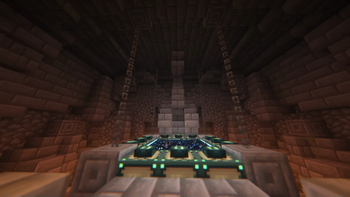
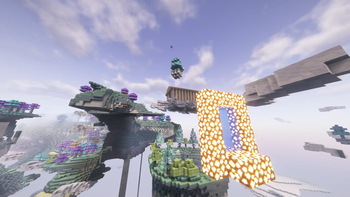

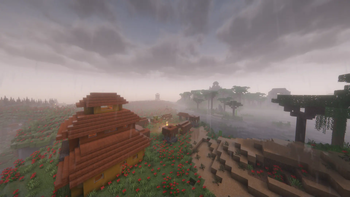
About this Modpack
Welcome to the Worlds O' Plenty Modpack!
Worlds O' Plenty is a curated Modpack by me, the name's LeeKan nice to meet you!!
This was originally created for personal uses, but I wanted to also share this enjoyment with you all as well!

This modpack contains plenty of popular mods that work together to create a thoroughly enjoyable experience!
From the big mods that introduce entirely different worlds and biomes to the more humble mods that add in decorations and simple technological funs, it aims to be something you can enjoy but not be overwhelmed by!
The Contents within!
With a collection that regularly gets updated, you can expect up to 400+ mods running! Of course there's also TONS of optimization mods to help cope with the amount of stuff going on here! Do still be careful with your RAM usage tho!
Some notable big mods include:
Biomes O' Plenty
Create
The Aether (+ Addons)
Ad Astra
Applied Energistics 2
The Cataclysm Mod
... And more!
Important notes regarding this modpack!:
- As this is a pretty big modpack, please remember to save up at least 4~6GB of RAM to use!
- This is my first ever modpack so updates will be slow at times! As I am only one person and checking compatibilities takes some time!
- If anything pops up, you can join my Discord Server! I'll try my best to work out any flaws, issues or anything else!
- I do hope you have fun!
And lastly some additional mods I'd like to recommend y'all have in here!:
- The Twilight Forest Mod.
- The Umbral Skies Mod.
- The Twilight's Flavor & Delight Mod.
- The Twilight Forest: The Lost Blocks Mod.
Available Versions
How to Set Up a Worlds O' Plenty Server
Order Server
Choose at least 6 GB RAM (10 GB recommended for Worlds O' Plenty). Based on player count: per 4 players.
Install Modpack in Dashboard
Open the modpack browser in the dashboard, search for "Worlds O' Plenty" and click "Install". The forge loader and Minecraft 1.20.1 are configured automatically.
Start Server & Play
Start the server – all mods are loaded automatically. Share the server IP with friends and play together!
Frequently Asked Questions
Worlds O' Plenty server crashes or won't start – what to do?
Most common causes: insufficient RAM or wrong forge loader. Check latest.log for "OutOfMemoryError" → increase RAM to at least 10 GB. For "Mixin" or "ClassNotFoundException" errors: modpack version and loader don't match. With Mado Hosting, loader and Minecraft version are auto-configured on modpack install – preventing most startup issues.
How much RAM does a Worlds O' Plenty server really need?
Minimum 6 GB, recommended 10 GB for stable performance. per 4 players. Important: Minecraft modpacks need more RAM than vanilla – plan extra per additional player. With Mado Hosting, you can scale RAM up live at any time without data loss (from €12/month).
Can I add custom mods to Worlds O' Plenty without conflicts?
Yes, but check compatibility: only use mods for the same loader (forge) and same Minecraft version (1.20.1). Common issues: ID conflicts with recipe mods and incompatible coremod versions. The Mado dashboard mod browser only shows compatible mods and warns about known conflicts.
Worlds O' Plenty server lagging – performance tips
1) Increase RAM to 10 GB+. 2) Reduce server view-distance to 8 (server.properties). 3) Pre-generate chunks with the "Chunky" plugin. 4) Use /spark profiler to check which mods consume the most tick time. With Mado Hosting, all servers run on NVMe SSDs with dedicated CPU cores – eliminating hardware as a bottleneck.
Similar Modpacks
![Cobblemon Official Modpack [Fabric]](https://cdn.modrinth.com/data/5FFgwNNP/e7f9ee2e9d361623847853fe2ddce42f519ee64f.png)
![COBBLEVERSE - Pokemon Adventure [Cobblemon]](https://cdn.modrinth.com/data/Jkb29YJU/581ecf54530972afb18a04660afd820f2f24f6c7.png)
![Better MC [FABRIC] - BMC2](https://cdn.modrinth.com/data/shFhR8Vx/a19c2bcb51d38f32f138d3607e91cb2b7b8e387f_96.webp)


![Better MC [FORGE] - BMC4](https://cdn.modrinth.com/data/4BV47HRn/7f5ef7cc61b2593609aabef3ed07a866a4f11b73_96.webp)
Rent Worlds O' Plenty Server
Start your own server with automatic modpack installation.
Supported Versions
Start your Worlds O' Plenty Server now
From €12.00/month with 10 GB RAM for the best performance.
Configure Server →