
WWW vibe
Modpack aimed at vanilla, without magic and mechanisms. So that traveling doesn't seem like an afterthought.
Screenshots
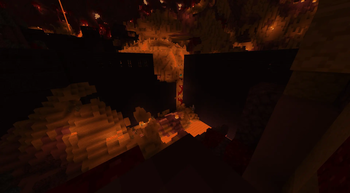
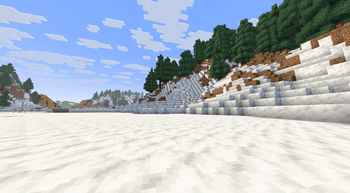
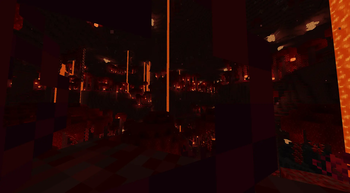
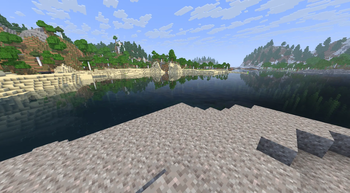
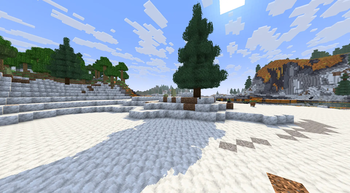
About this Modpack
Modpack is aimed at vanilla, no magic and mechanisms, only travel and beauty of the world. In the world will appear new structures.(overworld, nether, end) You can craft waystone to return from a trip was easier. And new ambient sounds and visual effects will make the world even more lively. Rechiseled will allow you to customize your cabin in a new way. Adds new weapons and armor, as well as another way of enchanting. And new attack animations will make battles more interesting.
Mods 2.1.0:
- 3d-Skin-Layers [1.9.2] by tr7zw
- AdvancementsFullscreen [1.3] by diskria
- AdvancementsSearch [1.3] by diskria
- Amber [6.0.12+1.21.8] by iamkaf
- AmbientSounds [6.2.1] by CreativeMD
- AppleSkin [3.0.6+mc1.21.6] by squeek502
- Architectury [17.0.8] by shedaniel
- Bag Of Holding [21.8.4] by Fuzs
- Balm [21.8.10] by BlayTheNinth
- Better Statistics Screen [4.0.0] by TheCSDev
- Better Third Person [1.9.0] by Socolio
- BetterF3 [15.0.0] by cominixo, TreyRuffy
- Blur+ [5.2.2] by Motschen, tterrag1098, Pyrofab
- Borderless Fullscreen [2.2.1] by Me!
- CICADA [0.14.3+1.21.6-1.21.8] by enjarai
- Chat Heads [0.14.2] by dzwdz, Fourmisain
- Chat Patches [8.0-alpha.5] by OBro1961
- ChatAnimation [1.0.7] by Ezzenix
- Cherished Worlds [13.0.1+1.21.8] by Illusive Soulworks
- ClickThrough Plus [3.5.1+1.21.4] by cassiancc
- ClientSort [2.1.3+1.21.8] by NotRyken
- Cloth Config v19 [19.0.147] by shedaniel
- Clumps [26.0.0.1] by Jared
- Cobweb [1.4.0] by Crystal Spider
- Collective [8.11] by Rick South
- Comforts [12.0.0+1.21.8] by Illusive Soulworks
- Concurrent Chunk Management Engine [0.3.5+alpha.0.8+1.21.8] by RelativityMC, ishland
- Controlling [26.0.3] by Jaredlll08
- CreativeCore [2.14.7] by CreativeMD, AriaFreeze
- Debugify [1.21.8+1.0] by isXander
- Default Options [21.8.5] by BlayTheNinth
- Deimos [2.5] by Mars
- Detail Armor Bar Reconstructed [4.3.5+1.21.6_8-fabric] by coredex-source
- Diagonal Fences [21.8.1] by Fuzs, XFactHD
- Diagonal Walls [21.8.1] by Fuzs, XFactHD
- Do a Barrel Roll [3.8.3] by enjarai
- Double Doors [7.1] by Rick South
- Draggable Lists [1.0.15] by MrMelon54
- Dynamic Crosshair [9.8] by Crendgrim
- Dynamic FPS [3.9.6] by juliand665, LostLuma
- Easy Anvils [21.8.0] by Fuzs
- Enchant Overhaul [2.0.1] by nty
- Enchanting Infuser [21.8.2] by Fuzs
- Enchantment Compatibility [1.5.0] by Roundaround
- EnchantmentDescriptions [21.8.1] by Darkhax
- Entity Model Features [3.0.6] by Traben
- Entity Texture Features [7.0.6] by Traben
- EntityCulling [1.9.3] by tr7zw
- Essentials [2.0.0] by F1nal04
- Explosive Enhancement [1.3.0-1.21.4] by Superkat32
- Fabric API [0.136.1+1.21.8] by FabricMC
- Fabric Language Kotlin [1.13.7+kotlin.2.2.21] by FabricMC
- Fabrishot [1.16.2] by ramidzkh
- Fadeless [2.0.5-1.21.6-1.21.8] by DerpDerpling, UltimateBoomer (Original Author)
- Falling Leaves [2.0.1] by Fourmisain, BrekiTomasson, RandomMcSomethin
- Farmer's Delight [1.21.8-3.3.3+refabricated] by MehVahdJukaar, MerchantCalico
- Female Gender Mod [4.3.4+1.21.7] by WildfireRomeo
- FerriteCore [8.0.0] by malte0811
- Fixed Levels [1.3.2+1.21] by neptunecentury
- Forge Config API Port [21.8.2] by Fuzs
- Fusion [1.2.11] by SuperMartijn642
- Gravestones [1.2.6] by Pneumono_
- Harvest with ease [9.4.0] by Crystal Spider
- Health Bars [21.8.0] by Fuzs
- Held Item Info [1.8.0] by A5b84
- Hide Experimental Warning [1.2] by Rick South
- Highlight [3.6.0] by ThatGravyBoat
- Hold My Items [5.0L4] by sapling.
- ImagineBook [1.2.9] by JavaJumper
- ImmediatelyFast [1.12.2+1.21.8] by RK_01
- Incendium [5.4.9] by Stardust Labs
- InvMove [0.9.1] by PieKing1215
- InvMoveCompats [0.5.0] by PieKing1215
- Inventory Particles [1.2.0+1.21.8] by LopyMine kovrik337
- Invisible Frames [1.5.0] by Roundaround
- Iris [1.9.6+mc1.21.8] by coderbot, IMS212, Justsnoopy30, FoundationGames
- Jade [19.3.2+fabric] by Snownee
- Leaves Be Gone [21.8.0] by Fuzs
- Liteminer [1.2.1+1.21.8] by iamkaf
- Lithium [0.18.1+mc1.21.8] by JellySquid, 2No2Name
- Lootr [fabric-1.21.8-1.16.39.95] by Noobanidus, ZestyBlaze, embeddedt
- M.R.U [1.0.22+edge+1.21.8+fabric] by IMB11 (mineblock11)
- MaLiLib [0.25.6] by masa
- Minecraft Cursor [3.11.2+1.21.6] by fishstiz
- Mod Menu [15.0.0] by Prospector, haykam821, TerraformersMC
- Model Gap Fix [1.21.5-1.12] by MehVahdJukaar
- More Chest Variants [1.5.14] by LieOnLion
- Mouse Tweaks [2.28] by Ivan Molodetskikh (YaLTeR)
- My Totem Doll [2.3.1+1.21.8] by LopyMine, KlashRaick
- No Chat Reports [1.21.8-v2.15.0] by Aizistral
- NotEnoughAnimations [1.10.6] by tr7zw
- Nullscape [1.2.14] by Stardust Labs
- Particle Effects [1.0.8+1.21.8] by LopyMine, KlashRaick
- Particle Rain [4.0.0-beta.3+1.21.6-fabric] by PigCart
- Particular Reforged [1.3.1] by Leclowndu93150
- Pick Up Notifier [21.8.1] by Fuzs
- Placeholder API [2.7.2+1.21.8] by Patbox
- PneumonoCore [1.21.8] by Pneumono_
- Presence Footsteps [1.11.2+1.21.7] by Hurricaaane (Ha3), Sollace
- PrickleMC [21.8.2] by Darkhax
- Puzzles Lib [21.8.9] by Fuzs
- Quad [1.2.14] by LieOnLion
- Rechiseled [1.1.6+b] by SuperMartijn642
- Reese's Sodium Options [1.8.4+mc1.21.6] by FlashyReese
- Remove Reloading Screen [5.1.10+mc1.21.8-fabric] by dima_dencep
- Resource Pack Overrides [21.8.0] by Fuzs
- Resourcify [1.7.5] by DeDiamondPro
- Roughly Enough Items [20.0.811] by shedaniel
- Roughly Enough Professions [6.0.0] by Mrbysco, ShyNieke
- Rp Vanilla CIT Fix [4.2] by Danrus110_
- Searchables [1.0.2] by Jaredlll08
- Show Me Your Skin! [1.11.3+1.21.6] by enjarai
- Shulker Box Tooltip [5.2.12+1.21.8] by MisterPeModder
- Simple Voice Chat [1.21.8-2.6.6] by Max Henkel
- Sleep [1-v4.2.6] by Jodek, Mqx
- Smelting Sand in a Blast Furnace [12.4] by Mars
- Smooth Scroll [2.3.1] by SlovakSmileSK
- Smooth Swapping [0.9.6.1] by Schauweg, Riflusso
- SmoothGui [0.1.3] by Ezzenix
- Sodium [0.7.3+mc1.21.8] by JellySquid (jellysquid3)
- Sodium Extra [0.7.0+mc1.21.8] by FlashyReese
- Sound Physics Remastered [1.21.8-1.5.1] by Sonic Ether, vlad2305m, Max Henkel, Saint
- Sounds [2.4.16+edge+1.21.8+fabric] by IMB11
- Spyglass Improvements [1.5.9] by juancarloscp52 (Im_JC)
- Status Effect Bars [1.0.9] by A5b84
- Structory [1.3.13] by Stardust Labs
- Structory: Towers [1.0.14] by Stardust Labs
- SuperMartijn642's Config Library [1.1.8] by SuperMartijn642
- SuperMartijn642's Core Lib [1.1.18+e] by SuperMartijn642
- TCDCommons API [4.0.1+fabric-1.21.8] by TheCSDev
- Terralith [2.5.13] by Stardust Labs
- Tetris MC [1.1.2] by Nukebob3
- Tiny Item Animations [1.2.3] by Trivaxy
- Too Many Paintings! [25.10.20-1.21.2-fabric] by Axperty
- Tweakeroo [0.25.5] by masa
- VTDownloader [2.3.9+1.21.8] by IotaBread
- Visual Workbench [21.8.1] by Fuzs
- VisualKeys [0.0.10-1.21.6] by DimasKama
- Visuality [0.7.10+1.21.5] by PinkGoosik
- Voice Chat Interaction [1.21.8-1.0.8] by Max Henkel
- Voice Messages [1.0.11-1.21.7] by DimasKama
- VolumeScroll [0.0.2+1.21.4] by DimasKama
- Wakes [0.4.3+1.21.8] by Goby56
- WaveyCapes [1.8.0] by tr7zw
- Waystones [21.8.5] by BlayTheNinth
- Xaero's Maps x Waystones [1.0.6] by alinco8
- Xaero's Minimap [25.2.16] by xaero96
- Xaero's World Map [1.39.13] by xaero96
- YetAnotherConfigLib [3.7.1+1.21.6-fabric] by isXander
- essential-container [1.0.0]
- lazy-language-loader [0.3.8] by ChachyDev
Available Versions
How to Set Up a WWW vibe Server
Order Server
Choose at least 6 GB RAM (8 GB recommended for WWW vibe). Based on player count: per 5 players.
Install Modpack in Dashboard
Open the modpack browser in the dashboard, search for "WWW vibe" and click "Install". The fabric loader and Minecraft 1.21.8 are configured automatically.
Start Server & Play
Start the server – all mods are loaded automatically. Share the server IP with friends and play together!
Frequently Asked Questions
WWW vibe server crashes or won't start – what to do?
Most common causes: insufficient RAM or wrong fabric loader. Check latest.log for "OutOfMemoryError" → increase RAM to at least 8 GB. For "Mixin" or "ClassNotFoundException" errors: modpack version and loader don't match. With Mado Hosting, loader and Minecraft version are auto-configured on modpack install – preventing most startup issues.
How much RAM does a WWW vibe server really need?
Minimum 6 GB, recommended 8 GB for stable performance. per 5 players. Important: Minecraft modpacks need more RAM than vanilla – plan extra per additional player. With Mado Hosting, you can scale RAM up live at any time without data loss (from €12/month).
Can I add custom mods to WWW vibe without conflicts?
Yes, but check compatibility: only use mods for the same loader (fabric) and same Minecraft version (1.21.8). Common issues: ID conflicts with recipe mods and incompatible coremod versions. The Mado dashboard mod browser only shows compatible mods and warns about known conflicts.
WWW vibe server lagging – performance tips
1) Increase RAM to 8 GB+. 2) Reduce server view-distance to 8 (server.properties). 3) Pre-generate chunks with the "Chunky" plugin. 4) Use /spark profiler to check which mods consume the most tick time. With Mado Hosting, all servers run on NVMe SSDs with dedicated CPU cores – eliminating hardware as a bottleneck.
Similar Modpacks
![Cobblemon Official Modpack [Fabric]](https://cdn.modrinth.com/data/5FFgwNNP/e7f9ee2e9d361623847853fe2ddce42f519ee64f.png)
![COBBLEVERSE - Pokemon Adventure [Cobblemon]](https://cdn.modrinth.com/data/Jkb29YJU/581ecf54530972afb18a04660afd820f2f24f6c7.png)
![Better MC [FABRIC] - BMC2](https://cdn.modrinth.com/data/shFhR8Vx/a19c2bcb51d38f32f138d3607e91cb2b7b8e387f_96.webp)


![Better MC [FORGE] - BMC4](https://cdn.modrinth.com/data/4BV47HRn/7f5ef7cc61b2593609aabef3ed07a866a4f11b73_96.webp)
Rent WWW vibe Server
Start your own server with automatic modpack installation.
Supported Versions
Start your WWW vibe Server now
From €12.00/month with 8 GB RAM for the best performance.
Configure Server →