
Wynn Volcanism
Custom Wynncraft modpack focused on a clean experience, minimal GUI, unobtrusive overlays, and only the mods that actually matter.
Screenshots
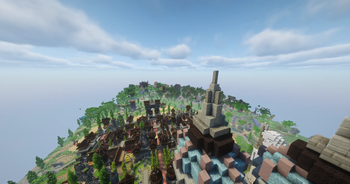
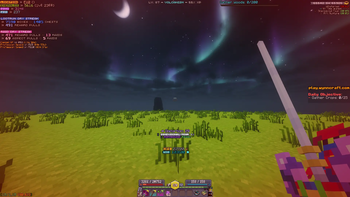
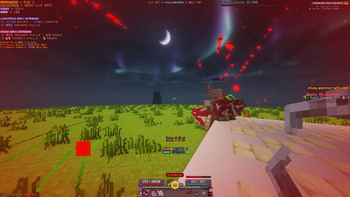
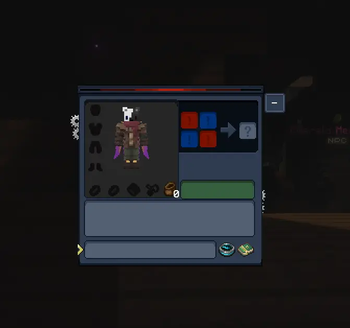
About this Modpack
A performance-focused client modpack built specifically for the Wynncraft server. Optimized for smooth gameplay, a clean unobtrusive UI, and quality-of-life features that let you focus on the game without unnecessary bloat.
Performance, Visuals & UI
- Sodium — massively improves rendering performance over vanilla
- Bobby — extends render distance beyond what the server sends, keeping the world feeling full
- Disable Fog — removes the fog effect for clearer long-distance visibility
- Iris — optional shader support with minimal performance cost
- WynnIris — Wynncraft-specific Iris integration for optimized shader compatibility
- 3D Skin Layers — renders all skin layers in full 3D for a polished player appearance
- Konkrete — clean UI rendering library used by several mods in this pack
- Mod Menu — in-game mod list and config access
Wynncraft-Specific
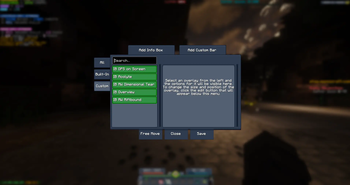
- Wynntils — the essential Wynncraft companion: custom HUD, map, item tooltips, and more
- wynnmod — core Wynncraft utility mod for additional QoL improvements
- wynnventory — enhanced inventory management for Wynncraft loot
- Wynncraft Spell Caster — improved spell casting to be more precise
- VisibleToggleSprint — visual sprint toggle indicator
How to install the wynntils configs
As wynntils configs are hardcoded per UUID you will need to manually copy the contents of the configs to your UUID config file.
Launch the game once to let everything load, then exit.
Open the instance folder and navigate to
(INSTANCE NAME)/minecraft/wynntils/configInside you'll find a
CopyConfigs.jsonfile and a UUID config (a long string of letters and numbers), that UUID file is yours.Copy the contents of
CopyConfigs.jsoninto your UUID file, then launch the game.
You should now have a fully configured Wynntils setup handcrafted by me.
Keep in mind every overlay is tailored for Minecraft GUI Scale 2
Available Versions
How to Set Up a Wynn Volcanism Server
Order Server
Choose at least 6 GB RAM (8 GB recommended for Wynn Volcanism). Based on player count: per 5 players.
Install Modpack in Dashboard
Open the modpack browser in the dashboard, search for "Wynn Volcanism" and click "Install". The fabric loader and Minecraft 1.21.11 are configured automatically.
Start Server & Play
Start the server – all mods are loaded automatically. Share the server IP with friends and play together!
Frequently Asked Questions
Wynn Volcanism server crashes or won't start – what to do?
Most common causes: insufficient RAM or wrong fabric loader. Check latest.log for "OutOfMemoryError" → increase RAM to at least 8 GB. For "Mixin" or "ClassNotFoundException" errors: modpack version and loader don't match. With Mado Hosting, loader and Minecraft version are auto-configured on modpack install – preventing most startup issues.
How much RAM does a Wynn Volcanism server really need?
Minimum 6 GB, recommended 8 GB for stable performance. per 5 players. Important: Minecraft modpacks need more RAM than vanilla – plan extra per additional player. With Mado Hosting, you can scale RAM up live at any time without data loss (from €12/month).
Can I add custom mods to Wynn Volcanism without conflicts?
Yes, but check compatibility: only use mods for the same loader (fabric) and same Minecraft version (1.21.11). Common issues: ID conflicts with recipe mods and incompatible coremod versions. The Mado dashboard mod browser only shows compatible mods and warns about known conflicts.
Wynn Volcanism server lagging – performance tips
1) Increase RAM to 8 GB+. 2) Reduce server view-distance to 8 (server.properties). 3) Pre-generate chunks with the "Chunky" plugin. 4) Use /spark profiler to check which mods consume the most tick time. With Mado Hosting, all servers run on NVMe SSDs with dedicated CPU cores – eliminating hardware as a bottleneck.
Similar Modpacks
![Cobblemon Official Modpack [Fabric]](https://cdn.modrinth.com/data/5FFgwNNP/e7f9ee2e9d361623847853fe2ddce42f519ee64f.png)
![COBBLEVERSE - Pokemon Adventure [Cobblemon]](https://cdn.modrinth.com/data/Jkb29YJU/581ecf54530972afb18a04660afd820f2f24f6c7.png)
![Better MC [FABRIC] - BMC2](https://cdn.modrinth.com/data/shFhR8Vx/a19c2bcb51d38f32f138d3607e91cb2b7b8e387f_96.webp)


![Better MC [FORGE] - BMC4](https://cdn.modrinth.com/data/4BV47HRn/7f5ef7cc61b2593609aabef3ed07a866a4f11b73_96.webp)
Rent Wynn Volcanism Server
Start your own server with automatic modpack installation.
Supported Versions
Start your Wynn Volcanism Server now
From €12.00/month with 8 GB RAM for the best performance.
Configure Server →